
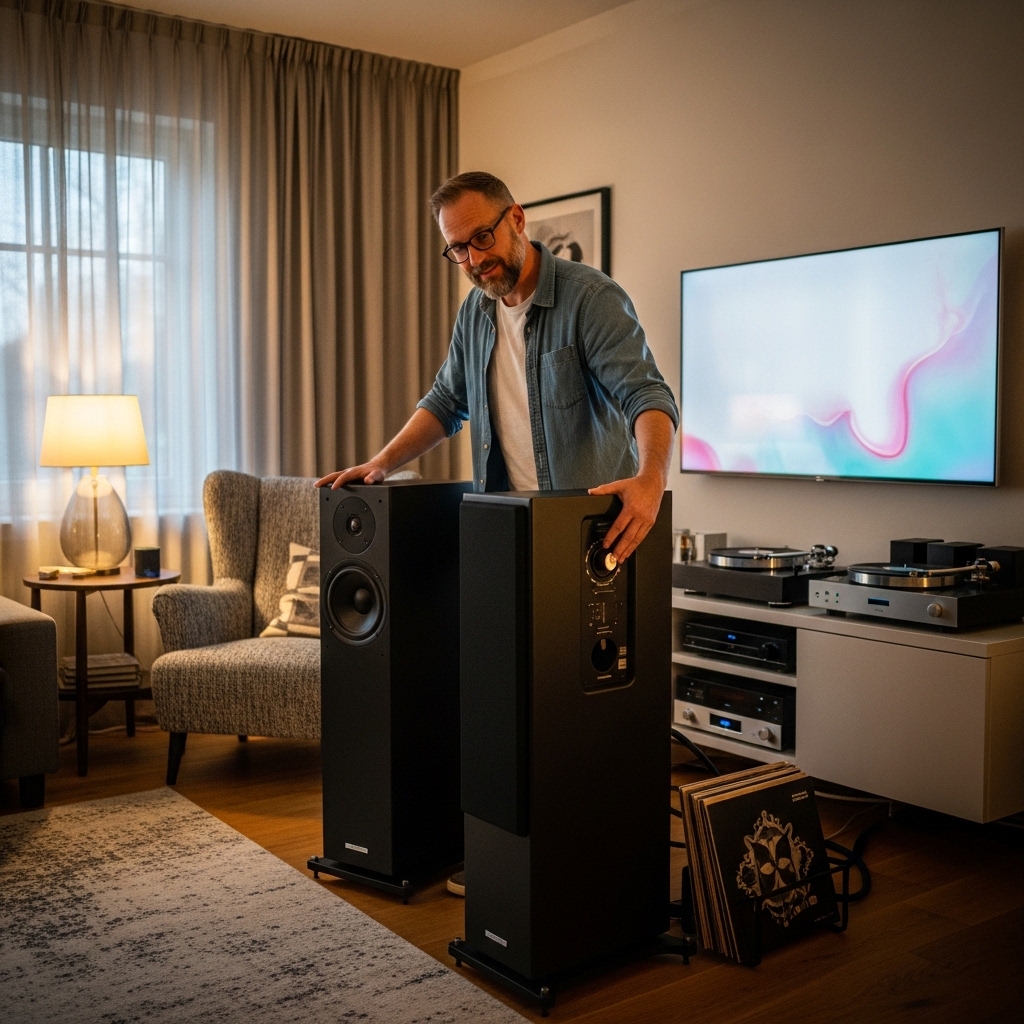

Setting up a desktop workstation or audio station often forces listeners to ask whether a single speaker is sufficient or if a matched pair is truly required. While casual voice calls or simple system notifications function over a single channel, answering do you need 2 monitor speakers requires understanding how human ears interpret spatial audio, instrument separation, and soundstage width. A single point source forces all acoustic frequencies into a collapsed mono stream, which muddles complex instrumentation and obscures stereo panning in modern media. Exploring dedicated active studio monitor speakers illustrates how dedicated left and right channels maintain acoustic definition across varied desktop activities.
Desktop audio setups frequently encounter spatial constraints, cable clutter, and acoustic boundary reflections near walls or computer monitors. Choosing between a compact single-box unit and a true stereo pair shapes dialogue clarity, gaming positional cues, and fatigue during prolonged listening sessions. The products listed below provide active stereo pairing, flexible wired inputs, and Bluetooth connectivity suited for compact desks or dedicated media stations. Evaluating your acoustic requirements, available desktop clearance, and listening distance ensures your audio setup delivers balanced frequency performance without unnecessary desk clutter.

Pros
- Powerful 30W x2 output with clear highs and rich mid-bass
- Multiple connectivity options including stable Bluetooth 5.3
- Durable MDF build reduces vibrations for cleaner sound
- Easy front-panel volume control enhances usability
- Compact size fits seamlessly on desktops or shelves
Cons
- No dedicated subwoofer limits ultra-deep bass for audiophiles
- Requires AC power outlet, not suitable for portable use
- Lacks app control or EQ customization options
The OHAYO 60W computer speakers bring HiFi audio to your desktop in a sleek black pair designed for modern setups. With a compact footprint, they fit perfectly on PC desks, laptops, or gaming stations without crowding your space. Featuring premium drivers and a sturdy MDF enclosure, these speakers target gamers, remote workers, and music lovers who want elevated sound from everyday computing.
In real-world use, they excel at delivering detailed playback for music streaming, video calls, and action-packed games. The independent sound card ensures smooth audio without glitches, while versatile inputs make switching devices a breeze. Whether enhancing Spotify sessions or booming in-game effects, they punch above their size for everyday desktop audio upgrades.
Overall, these speakers offer excellent value for anyone tired of tinny laptop sound. Their distortion-free performance and easy controls make them a smart pick for home offices or gaming rigs, earning a strong recommendation for reliable, powerful desktop audio.
At the heart of these speakers is a 0.75-inch carbon fiber silk dome tweeter paired with a 3-inch carbon fiber full-range driver, producing crystal-clear highs and rich mid-bass that fills small rooms effortlessly. The rear bass port enhances low-end depth without muddiness, ideal for gaming explosions or rhythmic tracks. 60W total power (30W x2) handles high volumes without distortion, maintaining detail even in busy audio scenes.
Bluetooth 5.3 provides stable wireless range up to 30 feet, perfect for streaming from laptops or phones. Wired options like AUX, RCA, and USB deliver lag-free sound for competitive gaming. Vocals stay sharp in podcasts or calls, with the integrated sound card ensuring precise, studio-like playback across sources.
Crafted from premium MDF wood, these speakers feature a resonance-free enclosure that boosts sound clarity and durability for long-term desk use. The modern black finish and space-saving bookshelf style complement home offices, gaming setups, or media corners without dominating your workspace. A front-mounted volume knob offers quick tweaks right at your fingertips.
As active powered speakers, they plug directly into AC power for unlimited continuous playback, eliminating battery life worries during all-day work or marathon gaming. Compact and lightweight at under 5 pounds per pair, they are easy to position or relocate. No IP rating means they shine indoors, away from dust or spills, focusing on reliable stationary performance.

Pros
- Versatile three-way connectivity for desktops, laptops, tablets, and phones
- User-friendly controls and no-software setup for quick daily use
- Vibrant RGB lighting adds fun customization to any workstation
- Strong, clear sound from drivers and passive radiators punches above its size
- Headphone output supports personal listening without disturbing others
Cons
- Requires USB power source, limiting true cordless portability
- Compact size may not deliver room-shaking bass for large spaces
- No companion app for EQ tweaks or advanced sound customization
The X9 Performance computer speakers are compact desk companions designed for desktops, laptops, and tablets, blending solid audio with eye-catching RGB lighting. Targeted at students powering through study sessions, professionals on conference calls, and gamers seeking immersive sound, they connect effortlessly via Bluetooth 5.4, USB, or AUX for versatile daily use.
In real-world testing, these speakers shine in home offices and gaming rigs, delivering clear vocals and punchy bass that fills a personal workspace without overwhelming. The plug-and-play USB setup gets you up and running in seconds, while front controls make adjustments intuitive during long workdays or late-night sessions.
Passive radiators enhance low-end response for music and effects, making them a step above basic desktop audio. Though not for audiophile-grade listening, their balance of sound, style, and simplicity earns high marks for everyday desk enhancement.
Verdict: A smart pick for anyone wanting affordable, feature-packed speakers that brighten both your desk and your audio experience. Grab these if you need reliable performance with a personal touch.
Dual 2.25-inch drivers paired with passive radiators produce clear highs and mids alongside surprisingly punchy bass for desk speakers, handling everything from podcasts to playlists with ease. Vocals stand out sharply during video calls or gaming dialogue, avoiding muddiness even at higher volumes.
Bluetooth 5.4 ensures stable wireless streaming up to 30 feet with minimal dropouts, while USB and AUX wired options deliver lag-free audio for critical tasks. Volume reaches desk-filling levels without distortion, ideal for focused work or casual gaming without needing max power.
Overall, the sound signature favors balanced clarity over booming lows, suiting personal setups where precision trumps party volume.
Sleek and compact, these speakers boast a modern look with customizable 10-color RGB lighting that syncs with your mood or workspace theme, easily tucking beside monitors or laptops without cluttering desks. Durable build quality suits daily office or dorm use, with dual AUX ports adding flexibility for headphones.
Power comes directly via USB for plug-and-play reliability, meaning no built-in battery to charge or worry about draining. They're always ready when plugged in, supporting endless sessions from morning meetings to evening gaming without interruptions.
At under a pound per speaker, portability shines for moving between rooms or travel setups, though they thrive most stationary on desks. No IP ratings noted, so keep them away from spills for longevity.
Pros
- Natural sound reproduction from premium tweeter and driver
- Multiple input options for versatile connectivity
- Full remote and side controls for easy adjustments
- High-quality wooden enclosure for premium look and resonance
Cons
- No Bluetooth or wireless connectivity
- Requires AC power outlet, not portable
- Limited to wired AUX inputs only
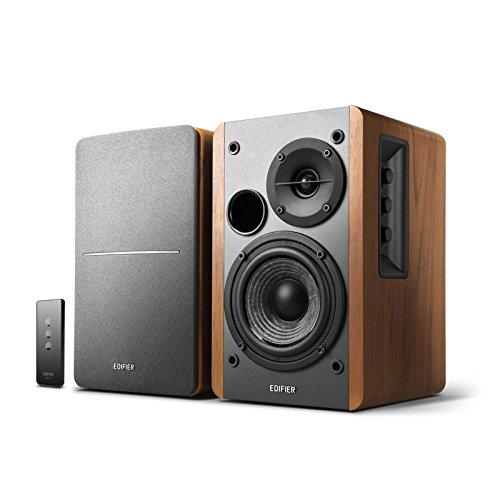
The Edifier R1280T are powered bookshelf speakers designed as active near-field studio monitors, featuring a wooden enclosure and 42W RMS power for accurate audio playback. Ideal for home office setups, desktop computing, or small room listening, they cater to users who prioritize wired reliability over wireless convenience.
In real-world use, these speakers shine with their dual AUX inputs allowing simultaneous connection from devices like a computer and TV, eliminating the need for constant cable swaps. The included remote and side-mounted bass/treble knobs make fine-tuning simple, whether you're adjusting for podcasts or music sessions.
Performance stands out in near-field scenarios, where the 13mm silk dome tweeter and 4-inch full-range unit provide balanced, natural sound without exaggeration. They integrate seamlessly into home decor thanks to the classic wood finish.
Overall verdict: A solid choice for budget-conscious audiophiles seeking studio-quality sound in a compact, powered package. Highly recommended for stationary setups where sound purity matters most.
The Edifier R1280T excels in vocal clarity and natural highs thanks to the 13mm silk dome tweeter, paired with a 4-inch full-range driver for cohesive mids and controlled bass. Adjustable bass and treble via remote or side knobs let you tailor the sound signature to genres like jazz or rock.
Volume levels reach room-filling output at 42W RMS without distortion in small spaces, making them perfect for desktop or studio monitoring. Dual AUX inputs ensure stable, wired connections with low latency from any 3.5mm or RCA source.
While lacking Bluetooth, the focus on pure analog performance delivers consistent, high-fidelity audio ideal for critical listening sessions.
Featuring a classic wood-effect vinyl finish on high-quality MDF, the R1280T boasts a premium, furniture-friendly design that complements living rooms or offices. Compact bookshelf size keeps them unobtrusive yet resonant.
Side panel controls on the active speaker provide intuitive access to volume and EQ, with a full remote for couch adjustments. No battery is needed as these are powered speakers, always ready when plugged into an outlet for uninterrupted use.
Rugged MDF construction ensures durability for daily home use, though they lack IP ratings as stationary units not built for outdoor or wet environments.
Pros
- Easy single-cable USB connection for audio and power
- Enhanced bass from passive radiators outperforms typical budget speakers
- Elevated drivers improve sound projection and personal immersion
- Stylish white finish complements modern setups
- Budget-friendly upgrade for clear, room-filling desktop audio
Cons
- USB-powered only, no built-in battery for portability
- Wired connection limits placement flexibility
- Small size may not fill large rooms at high volumes
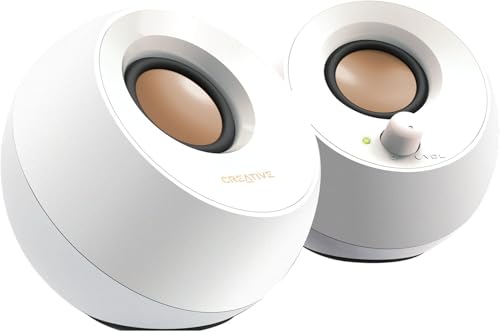
The Creative Pebble 2.0 are compact USB-powered desktop speakers designed for PCs and laptops, offering a simple audio upgrade without the clutter of extra cables or adapters. They feature far-field drivers and passive radiators that punch above their weight in bass and clarity, making them perfect for everyday use in home offices, dorms, or small workspaces.
Ideal for students, remote workers, or casual listeners who want better sound from their computer without complexity, these speakers shine in real-world scenarios like video calls, music streaming, and movie watching. The 45-degree elevated drivers direct sound straight at you, creating a more engaging personal audio bubble on your desk.
Performance is surprisingly strong for the size, with enhanced bass reproduction that adds depth to tracks and smooth vocals. While not party-level loud, they handle daily desktop tasks with ease and style.
Overall verdict: A top pick for budget desktop audio. If you need wired simplicity and solid sound, these deliver reliable value for PC and laptop users.
Far-field drivers paired with rear-facing passive radiators produce excellent audio balance, emphasizing punchy bass that surprises for such small speakers. Vocals come through clear and natural, making dialogue in videos and podcasts easy to follow without muddiness.
Volume levels reach room-filling heights for personal desks, with minimal distortion at moderate to high settings. The elevated driver angle enhances projection, immersing you in music or games right at your workstation.
USB audio connection ensures stable, low-latency performance directly from your computer, outperforming basic laptop speakers in depth and detail.
Sleek white finish and compact form factor blend seamlessly into modern homes, offices, and workspaces, with a minimalist look that saves desk space. The 45-degree elevated drivers not only boost sound but add a premium aesthetic touch.
No rugged IP ratings, as these are desktop-focused rather than portable, prioritizing style over outdoor durability. Lightweight build makes setup effortless on any surface.
USB-powered design eliminates battery concerns, drawing steady power from your PC or laptop for continuous play without recharging. Simply plug in the single cable for reliable, adapter-free operation all day.

Pros
- Distortion-free 30W x2 power handles high volumes effortlessly
- Premium carbon fiber drivers ensure detailed, precise audio
- Multiple connectivity options for seamless device switching
- Rear bass port enhances low-end depth for fuller sound
- Stable Bluetooth 5.3 with broad compatibility
Cons
- USB-powered only, requires constant connection to a power source
- No dedicated subwoofer for extreme bass enthusiasts
- Bookshelf size limits ultra-portability for on-the-go use
The OHAYO 60W computer speakers bring high-fidelity audio to your desktop setup with a compact, stylish white design that fits perfectly on PC monitors, laptops, or gaming stations. Featuring Bluetooth 5.3, AUX, RCA, and USB inputs, they connect effortlessly to a variety of devices, making them a versatile upgrade for anyone tired of tinny built-in sound.
In real-world use, these speakers excel during long gaming sessions or music streaming, delivering powerful stereo sound that fills small rooms without distortion. The MDF wooden enclosure minimizes resonance for cleaner playback, while the front volume knob allows instant adjustments mid-action. Gamers and home office pros appreciate the space-saving footprint and reliable performance.
Overall, the OHAYO speakers stand out for their punchy yet balanced sound in a budget-friendly package. They transform everyday computing into an enjoyable audio experience, earning a strong recommendation for desktop enthusiasts seeking quality without complexity.
With 30W per channel, these speakers pump out distortion-free audio that covers up to 50 square meters, ideal for immersive gaming or playlist marathons. The 0.75-inch carbon fiber silk dome tweeter handles crisp highs, while the 3-inch full-range driver and rear bass port deliver rich mid-bass punch for dynamic soundstages.
Vocal clarity shines in music and calls, thanks to the integrated sound card ensuring smooth, detailed playback. Volume levels stay clean even cranked up, and Bluetooth 5.3 offers stable wireless range for freedom from cables across your desk or room.
Connectivity versatility means no dropouts when switching between wired AUX/RCA or wireless sources, keeping your flow uninterrupted during extended sessions.
The sleek white MDF enclosure combines modern aesthetics with durability, resisting resonance for consistent performance in home offices or gaming rigs. Its compact bookshelf size maximizes desk space while blending into contemporary decor, weighing in light for easy placement.
USB-powered design means plug-and-play simplicity with no battery life concerns, drawing steady power from your PC or charger for endless playback during all-day use. No charging downtime keeps sessions going strong.
Built tough with premium materials, it handles daily intensity without wear, though it stays stationary as a powered desktop essential rather than portable gear.

Pros
- Maneuverable size adapts to any desk layout
- Quality bass enhances gaming immersion
- Plug-and-play USB power with no extra adapters needed
- Extra ports support headphones and mics
- Red LED lighting boosts aesthetic appeal
Cons
- Wired connection limits placement flexibility
- USB power caps maximum volume output
- No wireless Bluetooth option
The Redragon GS550 is a compact 2.0 channel stereo speaker system designed for PC gamers and desktop users seeking affordable audio enhancement. Its shapeshifting design allows it to stand on either side of your monitor or merge into a soundbar below, making it perfect for cramped desks in home offices or gaming rigs.
In real-world use, it punches above its weight with full-range drivers delivering decent bass and clear highs for gaming sessions, video calls, or casual media playback. The included volume knob simplifies adjustments, while the headphone jack and mic port make it a hub for peripherals.
Setup is effortless with USB power and 3.5mm cables up to 31 inches long, compatible with PCs, laptops, and TVs. Though basic, its red LED backlighting adds a stylish touch without overwhelming your space.
Verdict: A solid budget pick for gamers wanting better sound without complexity. Ideal if you prioritize compactness and wired reliability over wireless features.
The GS550's 2.0 stereo core uses advanced drive units for balanced sound with quality bass that rumbles during game explosions or movie soundtracks. Vocals come through clearly for calls or dialogue-heavy content, though it shines most in close-range desktop listening.
Volume reaches satisfying levels for personal use without distortion, controlled precisely by the onboard knob. The wired 3.5mm connection ensures stable audio delivery with no dropouts, outperforming wireless in reliability for stationary setups.
Overall, expect punchy lows and decent mids that elevate PC gaming without needing external amps.
Ultra-compact and maneuverable, the GS550 weighs little and shifts effortlessly between upright speakers or a merged soundbar, fitting tight desk spaces. Its sturdy build handles daily desk jostling, with red LED backlighting providing subtle gaming ambiance.
USB-powered design means no battery to charge; it draws power directly from your PC or laptop for continuous play as long as your device is on. The 31-inch cables offer flexible positioning without clutter.
Lacking rugged IP ratings, it's best for indoor desktop use rather than portable outings, prioritizing sleek integration over outdoor toughness.

Pros
- USB-powered for hassle-free setup
- Springy bass outperforms typical budget speakers
- Convenient inline volume knob
- Sturdy metal build with stable base
- Blue LEDs enhance visual appeal
Cons
- Wired aux connection lacks wireless freedom
- Bass depth limited for larger rooms
- Basic stereo sound not for audiophiles
Amazon Basics Stereo 2.0 speakers are a straightforward pair of external desktop audio solutions designed for PC or laptop users seeking an easy upgrade from built-in sound. Ideal for students, office workers, or casual gamers who want amplified volume without complexity, they connect via USB for power and 3.5mm aux for audio input.
Standout features include bottom radiators that produce a springy bass response, setting them apart in the budget category for punchier lows during music or videos. The inline volume control allows precise adjustments without reaching for keyboard shortcuts, and real-world use shows reliable performance for everyday tasks like video calls or streaming.
Build quality impresses with a metal finish that resists fingerprints and a scratch-free padded base for vibration-free stability. Blue LED lights provide a subtle glow, adding style to minimalist desks, while the compact black design blends into any setup.
Potential drawbacks include the wired-only connection, which tethers you to your device, and bass that may feel light in bigger spaces. Those needing deep subwoofer levels or Bluetooth might look elsewhere.
Overall, these speakers deliver solid value for basic audio needs, earning a strong recommendation for anyone prioritizing simplicity and affordability in desktop sound.
Connectivity: 3.5mm aux input, USB-powered
Design: Stereo 2.0, black metal finish, blue LED lights, scratch-free padded base
Controls: Inline volume knob
Audio Features: Bottom radiators for springy bass
Compatibility: PC, laptop
Understanding Stereo Imaging and Nearfield Monitor Configurations
Deciding whether do you need 2 monitor speakers starts with understanding how sound engineers record, mix, and pan modern audio content. While casual voice memos and basic system notifications play legibly in mono, almost all music, movie sound design, and video games rely on two distinct channels to create a convincing sense of space. Deploying two dedicated monitor speakers establishes a stereo soundstage where instruments, dialogue, and ambient effects occupy distinct horizontal positions between the left and right cabinets. A single speaker collapses this dimensional information into a flat audio signal, reducing clarity and masking nuanced audio cues.
The Core Difference Between Mono Playback and Stereo Pairs
Single-speaker setups produce monophonic sound where left and right audio channels combine into a single mixed output. This combined signal plays through one cabinet, forcing mid-bass frequencies, vocal tracks, and high-frequency details to compete across the same physical driver plane. While mono setups conserve desk space and simplify cabling, they prevent listeners from locating specific instruments or environmental sounds in a stereo mix. Critical listening, audio editing, and immersive gaming suffer when channel separation disappears from the listening environment.
Stereo monitor setups utilize two distinct acoustic enclosures to reproduce dedicated left and right channels independently. Splitting the audio signal allows left and right channels to interact naturally with human binaural hearing. The brain calculates arrival time differences and slight amplitude variations between both ears to pinpoint sound sources in three-dimensional space. Using two physical monitor speakers preserves these intended timing cues, creating an accurate acoustic presentation that mimics natural hearing conditions.
How Stereo Imaging and Soundstage Affect Critical Listening
Stereo imaging refers to the perceived spatial location of individual sound elements between two speakers. In a properly configured stereo monitor setup, a lead vocalist sounds as though they are singing directly from the center of your computer screen, even though no physical center-channel speaker exists. This phenomenon is known as a phantom center image, created when identical audio signals reach both ears simultaneously at equal amplitude. Secondary instruments, backing vocals, and panning percussion spread outward toward the far left and right edges of the desk.
A single monitor speaker cannot produce a phantom center or spread audio elements across an acoustic stage. Without channel separation, overlapping audio frequencies mask one another, forcing listeners to raise the volume in an attempt to discern buried details. In contrast, two monitor speakers provide spatial separation that lets each element breathe within its own acoustic space. This spatial clarity reduces ear strain during long mixing sessions, workday meetings, and extended gaming sessions.
Nearfield Geometry and the Equilateral Listening Triangle
Nearfield monitor speakers are engineered specifically for close-range listening environments where direct sound reaches your ears before room reflections interfere. To achieve accurate stereo reproduction, listeners must position the two speakers and their primary listening position in an equilateral triangle. In this arrangement, the distance between the left and right speakers matches the exact distance from each speaker to the listener’s head. Placing speakers roughly two to three feet apart on a computer desk typically places the listener at an ideal two-to-three-foot listening distance.
Proper toe-in angle completes this acoustic geometry. Angling the speaker baffles slightly inward directs the high-frequency dispersion from the tweeters directly toward the listener’s ears. Because high frequencies are directional, off-axis listening causes muffled treble response and weakens the phantom center image. Maintaining this geometric relationship between two monitors ensures that stereo balance remains coherent across the entire frequency range.
Acoustic Tradeoffs of Using a Single Speaker on a Desk
Listeners with restricted desk space often contemplate using a single active speaker or a single compact soundbar. A single-cabinet solution undeniably saves space, eliminates interconnecting speaker wires, and reduces power outlet consumption. For spoken-word podcasts, administrative notifications, and basic teleconference calls, a single monitor provides intelligible mid-range vocal projection without unnecessary complexity. If desktop footprint is the primary constraint, a single speaker remains a functional compromise for basic vocal communication.
However, the acoustic tradeoffs become immediately apparent when playing dynamic music or cinematic media. A single speaker forces stereo tracks into mono summing, which can cause phase cancellation if out-of-phase stereo elements cancel each other out. This cancellation frequently weakens bass impact, hollows out mid-range frequencies, and dulls instrument presence. Furthermore, users looking for broader spatial immersion often explore multichannel desktop sound systems when expanding beyond basic stereo into immersive surround sound configurations.
Active 2.0 Speaker Architecture and Desktop Signal Routing
Most desktop monitor systems in the budget and mid-tier categories use an active-passive paired architecture. In this design, one speaker cabinet houses the internal stereo amplifier, power supply, and input connections, while the second cabinet remains passive. A simple two-conductor speaker cable or proprietary multi-pin tether sends the amplified right-channel audio signal from the primary cabinet across to the companion speaker. This master-and-companion configuration keeps desktop wiring manageable while delivering dedicated two-channel amplification.
For example, the Edifier R1280T Powered Bookshelf Speakers feature a built-in 42-watt RMS power system with side-mounted volume, treble, and bass knobs on the primary active unit. Similarly, the OHAYO 60W Computer Speakers for Music and and the OHAYO 60W Computer Speakers for Gaming and Music utilize an active stereo design with 30 watts per channel output, driving dedicated 0.75-inch silk dome tweeters and 3-inch carbon fiber drivers. These systems demonstrate how a self-powered two-piece layout provides balanced amplification without requiring bulky external receivers.
Desk Reflections, Boundary Loading, and Speaker Elevation
Placing monitor speakers directly on a flat desktop surface introduces physical acoustic challenges that alter sound quality. High-frequency reflections bounce off the smooth desk surface, arriving at your ears milliseconds after the direct sound from the driver. This timing discrepancy causes comb filtering, a phenomenon where certain frequencies cancel out while others artificially peak. The result is hollow mid-range response, uneven vocal clarity, and smudged stereo imaging across the desk.
Elevating or angling monitor speakers resolves many of these desktop reflection problems. Compact designs like the Creative Pebble 2.0 USB-Powered Desktop Speakers incorporate custom-tuned far-field drivers angled upward at 45 degrees, projecting audio directly toward the listener’s ears rather than firing parallel to the desktop. Meanwhile, larger bookshelf designs benefit from foam isolation pads or dedicated desktop stands to decouple speaker enclosures from the desk surface. Decoupling stops mechanical vibrations from transferring into the desktop, preventing muddy low-end resonances and preserving clean bass definition.
Evaluating Input Connectivity Across Analog, USB, and Bluetooth
Desktop monitor speakers provide diverse input interfaces that dictate how they integrate with computers, audio interfaces, and mobile devices. Traditional analog 3.5mm auxiliary jacks and dual RCA inputs accept line-level signals directly from PC sound cards, DACs, and headphone outputs. Systems like the Edifier R1280T Powered Bookshelf Speakers provide dual AUX RCA inputs, allowing users to connect two analog sources simultaneously without swapping cables. When switching between multiple analog audio sources, some listeners also incorporate a dedicated speaker selector switch to route signals cleanly across varied components.
Digital and wireless connectivity expand desktop convenience for modern laptops and mobile workstations. Models such as the X9 Performance Computer Speakers for Desktop PC combine 3.5mm AUX, USB wired audio, and Bluetooth 5.4 wireless pairing, while offering front-panel volume controls and customizable RGB lighting. Similarly, the Amazon Basics Stereo 2.0 Speakers for PC or Laptop utilize convenient USB bus power paired with a standard 3.5mm audio jack for basic plug-and-play operation. When choosing an input method, wired connections remain preferable for latency-sensitive tasks like gaming or audio production, while Bluetooth offers convenient secondary streaming from smartphones.
Matching Monitor Speaker Pairs to Gaming, Media, and Production Tasks
The requirement for two monitor speakers intensifies depending on the specific tasks you perform at your desk. In competitive gaming, directional audio cues provide critical spatial awareness, allowing players to identify footsteps, gunfire, and vehicle movement relative to their screen position. Compact convertible options like the Redragon GS550 PC Gaming Speakers offer maneuverable enclosures that sit on either side of the monitor or lock together as a soundbar beneath the screen. However, separating them into two distinct left and right enclosures significantly broadens the stereo field, providing far superior positional accuracy compared to merged bar mode.
Content creators, video editors, and music producers demand two monitors to ensure their mixes translate accurately to consumer playback systems. Panning dialogue, balancing stereo tracks, and adjusting reverb decay require hearing distinct left and right channels in real time. Even casual media consumers benefit from two speakers because streaming video platforms and music services master their content specifically for two-channel stereo. Listening through a single speaker compresses these detailed dynamic mixes, robbing movies and music of their intended impact and emotional resonance.
Practical Verification and Setup Steps for Balanced Desktop Audio
Once you establish that two monitor speakers fit your workspace, proper setup and channel verification ensure they perform as intended. Begin by placing the active and passive cabinets on the correct physical sides of your workspace, referencing the left and right channel labels on the rear panel. Position both cabinets at equal distances from your main display, ensuring that the distance between the two speakers matches your listening distance. Angle the cabinets inward until the front grilles point toward your shoulders to stabilize the stereo field.
Next, verify channel assignment using an online stereo balance test or operating system sound settings. Playing a dedicated left-channel test tone should emit audio strictly from the left cabinet, while a right-channel tone should sound exclusively on the right. If the sound sources appear reversed, swap the RCA input cables or reposition the master active cabinet to the designated side. Adjust the treble and bass controls on models that provide physical equalization dials to compensate for nearby walls or reflective desk surfaces, ensuring clear and neutral audio reproduction.
While a single compact speaker might satisfy basic voice communication in tight spaces, deploying two monitor speakers remains essential for genuine stereo imaging, spatial immersion, and audio clarity. Two properly aligned speakers relieve auditory fatigue, reveal subtle details in music, and provide directional precision in games and movies. Matching your chosen two-channel system to your available desk footprint, input options, and listening geometry ensures an engaging, balanced audio experience across every daily listening task.





Write Your Review
No reviews yet. Be the first to share your experience!