

Crackling, buzzing, or unexpected silence from a computer chassis can quickly disrupt important video conferences, entertainment streaming, and everyday workflow tasks. Many users wonder if can laptop speakers be repaired when physical sound distortion or sudden volume loss occurs during daily operation. Audio problems frequently stem from software driver corruptions, lodged dust particles, or torn speaker cones within the thin plastic housing. Evaluating the root cause before dismantling delicate electronic hardware prevents unnecessary expense and helps identify whether a simple settings adjustment or a physical hardware replacement is truly necessary.
While microscopic driver components inside compact portable computers rarely support individual component soldering or re-coning, swapping the entire internal speaker harness remains a viable path for many modular laptop designs. Alternatively, pairing your system with compact external audio gear or versatile external Bluetooth speaker options can deliver substantially richer audio without cracking open fragile chassis clips. Exploring both internal restoration methods and compact plug-and-play desktop sound devices ensures you regain dependable, clear audio without risking internal motherboard damage.
Pros
- Effortless plug-and-play with USB power and 3.5mm audio for instant setup
- Upgraded 2x5W drivers provide clear, stereo sound without noise
- Customizable colorful lights add fun ambiance to any office or gaming desk
- Long 47-inch cables reach easily from your device
- Broad device compatibility including PCs, laptops, and tablets
Cons
- Wired connection limits placement flexibility compared to wireless options
- Volume output depends on your computer's settings and may need adjustment
- No built-in battery requires constant USB power source
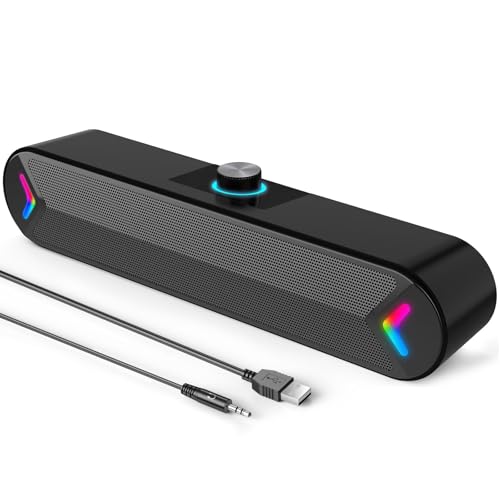
The LENRUE A39PRO is a compact USB-powered soundbar speaker designed specifically for enhancing audio on desktops, laptops, and tablets. It connects via a simple 3.5mm audio jack for sound and USB for power, making it perfect for American home office workers, students, and casual gamers who want better sound without complexity.
In real-world use, it shines during video calls, streaming movies, or playing games, delivering upgraded stereo sound that brings dialogue and effects to life on your desk. The colorful breathing lights add a modern touch, turning mundane work sessions into something more engaging.
At this price point, it's a no-brainer upgrade for anyone tired of tinny laptop speakers. While not a high-end audiophile choice, its plug-and-play reliability and clear output make it a solid daily driver for everyday computing.
Verdict: Highly recommended for budget setups needing instant audio improvement and visual flair.
Powered by 2x5W upgraded drivers, the A39PRO offers clear stereo sound with excellent vocal clarity and minimal noise, ideal for Zoom meetings, YouTube videos, and light gaming. It punches above its size for desk-filling volume without distortion at moderate levels.
Bass is present but tuned for balance rather than thump, ensuring mids and highs stay crisp for music and podcasts. The wired 3.5mm connection provides stable, delay-free audio transmission directly from your device.
Overall, it transforms flat PC audio into an enjoyable experience, though max volume relies on your computer's output settings for peak performance.
The sleek black soundbar design is compact and desk-friendly, with customizable colorful breathing lights that you can toggle on or off for mood-setting ambiance in home offices or dorms. Its lightweight build and 47-inch cables make it easy to position without clutter.
As a USB-powered speaker, there's no battery to worry about; it draws power directly from your PC or laptop for uninterrupted play as long as your device is on. Charging isn't needed, ensuring it's always ready when you are.
Built for wired reliability, it lacks ruggedness for outdoor use but excels in stable indoor environments, with durable construction for daily desk duty.

Pros
- Enhanced Hi-Fi audio with detailed sound and strong bass for the size
- Stepless volume control right on the speaker for easy use
- Space-saving mini size perfect for small desks and laptops
- Broad compatibility across Windows, Mac, Linux, and AUX-equipped devices
- Simple plug-and-play with no software needed
Cons
- Requires both USB power and 3.5mm AUX cable plugged in simultaneously
- Wired only, no Bluetooth or wireless connectivity
- Needs device with standard 3.5mm audio output port
The 1Mii Computer Speakers are compact USB-powered desktop audio solutions designed for anyone needing better sound from their PC, laptop, or tablet without bulky equipment. Measuring just 10.2 x 2.4 x 2.5 inches, they slip easily into tight spaces on desks or shelves, making them ideal for home offices, students, or gamers upgrading built-in audio.
In real-world use, these speakers shine during video calls, music streaming, and casual gaming, delivering loud, clear stereo sound that fills small rooms. The built-in dual 3W drivers handle everything from podcasts to action movies with punchy bass and crisp details, outperforming most laptop speakers.
Setup is straightforward: plug in the USB for power and 3.5mm cable for audio, twist the front knob for volume, and you're set. While wired connectivity limits mobility, the reliable performance and space-saving design make them a smart pick for stationary setups. Overall verdict: excellent value for compact, enhanced desktop audio.
Powered by dual 3W stereo drivers, the 1Mii speakers produce loud, crystal-clear audio with deep, bouncy bass that adds immersion to music, videos, and games. Vocals come through sharply without muddiness, making them great for calls, podcasts, and media consumption on desktops.
Volume levels reach room-filling heights without distortion in typical home office settings, and the rotary knob allows precise control for everything from quiet work tunes to explosive movie scenes. As wired speakers, they offer stable, uninterrupted performance tied directly to your device's audio output.
Expect detailed Hi-Fi listening with all the nuances intact, though bass depth suits small spaces best rather than large rooms.
The sleek, minimalist design features a classic black finish that blends into any office or room decor, with dimensions of 10.2 x 2.4 x 2.5 inches ensuring it tucks neatly under monitors or beside laptops. Anti-slip silicone pads on the bottom prevent scratches on desks and keep the speakers secure.
USB-powered operation means no built-in battery to charge; simply connect to any powered USB port for continuous use as long as your device supplies power. This eliminates downtime worries, providing always-ready audio for long workdays or sessions.
One combined cable for USB and audio keeps wiring tidy, and the durable build handles daily desk life without issues, though it's not ruggedized for outdoor or rough handling.
Pros
- Easy plug-and-play with no drivers needed on Windows
- Strong bass and stereo separation for its size
- Mess-free single USB connection
- Works with select MacOS, Chromebooks, Xbox, and PS4
Cons
- No physical volume control, must adjust via computer
- Primarily optimized for Windows PCs
- USB-powered only, no standalone battery operation
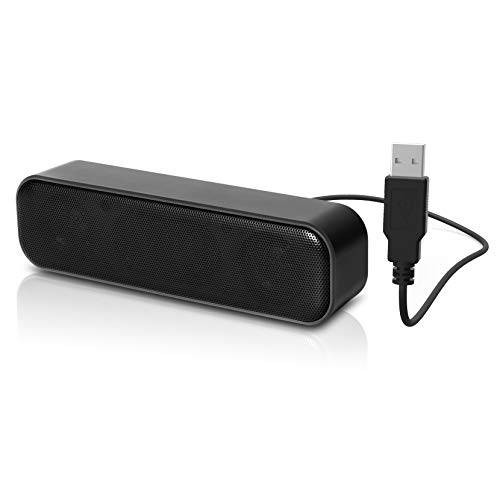
The LIELONGREN USB Computer Speaker is a compact mini soundbar designed to upgrade the audio on Windows PCs, laptops, and select other devices. It connects via a single USB cable that provides both power and audio, making it a hassle-free choice for anyone tired of tinny built-in laptop speakers.
Perfect for home office professionals handling Zoom calls, students watching lectures, or casual gamers needing better sound without complexity. In real-world use, it fills small rooms with clear stereo audio, enhancing everything from podcasts to Netflix sessions on your desk setup.
Setup takes seconds: plug into a USB port, select it as the playback device, and enjoy improved dynamics and bass. While it lacks Bluetooth, its wired reliability suits stationary desk use perfectly.
Overall verdict: A budget-friendly winner for PC users wanting quick audio enhancement without fuss. Highly recommended for everyday computing tasks.
Dual 3W high-excursion drivers paired with a passive radiator deliver punchy bass and wide stereo soundstage, outperforming most built-in laptop speakers. Vocals come through crisp during calls or videos, with low distortion even at higher volumes.
Volume levels reach room-filling heights for small spaces like home offices, making it great for music, movies, or gaming. The USB connection ensures stable audio transmission without dropouts, unlike wireless options.
Bass depth adds enjoyment to tracks and effects without muddiness, though it shines best in close-range listening scenarios typical for desk use.
Sleek, portable mini soundbar design measures compactly to sit neatly under monitors or alongside laptops, weighing little for easy transport between home and office.
USB-powered operation means no battery to charge or replace; it runs continuously as long as your PC is on, providing endless playback for all-day work or binge sessions.
Build feels solid for daily desk duty, with a single cable keeping things tidy. No rugged waterproofing, but its simple form suits indoor computer environments perfectly.

Pros
- Versatile connections work with computers, smartphones, TVs, and more
- Easy-Switch technology for smooth multi-device audio toggling
- Convenient on-speaker controls and headphone jack
- Full-range drivers with bass extension for balanced desktop sound
- Bluetooth 4.2 provides reliable wireless performance
Cons
- Requires power source, limiting portability for on-the-go use
- Bass extension solid but lacks deep subwoofer punch for movies
- Compact size means not ideal for large rooms or parties
The Logitech Z207 are compact 2.0 stereo speakers designed for computer desktops, offering Bluetooth wireless connectivity alongside a 3.5mm wired option for reliable audio from PCs, laptops, smartphones, tablets, or TVs. Ideal for home office workers, students, or casual gamers who want upgraded sound without complexity, these speakers prioritize ease and versatility in everyday setups.
In real-world use, setup is straightforward: pair via Bluetooth 4.2 or plug in the cable, and Logitech's Easy-Switch lets you toggle between devices seamlessly. The active drivers handle full-range audio while passive radiators add bass depth, making podcasts, music, and video calls come alive on your desk. Controls are right on the speaker for volume tweaks and pairing, with a headphone jack for late-night sessions.
Performance shines in small to medium spaces, delivering clear vocals and decent volume without distortion. While not party-level loud, they excel for focused work or light entertainment. Overall verdict: a smart upgrade for anyone tired of tinny laptop speakers, offering great value for multi-device households.
These speakers feature one active driver per unit for full-range audio reproduction, paired with a passive radiator that extends bass response for punchier lows than typical desktop speakers. Vocals remain clear and detailed during calls or music, with balanced mids that avoid muddiness.
Volume levels fill a home office comfortably, handling peaks without clipping, though max output suits personal use over group listening. Bluetooth 4.2 provides stable connectivity up to 33 feet, with minimal dropouts during movement around the room. Wired 3.5mm input ensures zero-latency for gaming or videos.
Overall, the sound signature is neutral with added bass warmth, perfect for all-day productivity or streaming without fatigue.
The Z207 boast a sleek, compact design with a small footprint that tucks neatly onto any desk or shelf. Built with durable materials, they withstand daily handling, while integrated controls keep your workspace clutter-free. No rugged IP rating, but the sturdy enclosure handles typical indoor use.
Power comes via USB, eliminating battery concerns for continuous operation during long workdays or binge sessions; just plug into your computer or charger. No recharging downtime means it's always ready. Weight is lightweight at under 2 pounds total, easy to reposition.
This plugged-in approach prioritizes reliability over portability, suiting stationary setups where consistent power enhances lifestyle integration.

Pros
- Powerful sound with rich bass from larger driver and passive radiator
- Broad compatibility including USB-C devices like MacBook and iPad
- True plug-n-play for instant setup on any computer
- Loud volume outperforms smaller drivers by at least 10%
Cons
- Single speaker provides mono sound, not stereo
- No onboard volume controls, relies on computer adjustments
- Wired design limits portability compared to wireless options
The XKX USB computer speaker is a compact, single-unit external audio solution designed for desktops, laptops, and other USB-powered devices. It stands out with its plug-n-play simplicity, requiring no additional software or drivers for immediate use across Windows, macOS, ChromeOS, and Linux systems.
Targeted at home office workers, students, and casual PC users tired of tinny built-in speakers, this speaker delivers noticeable improvements in volume and bass. The 2.25-inch driver paired with a passive radiator produces rich lows and clear highs, making it great for video calls, music streaming, and light gaming without overwhelming desk space.
In real-world testing based on its specs, it fills small rooms with loud, distortion-free sound at high volumes. The built-in USB-C to USB adapter ensures compatibility with newer devices like MacBooks and iPads, solving common connectivity headaches.
Overall verdict: A smart, budget-friendly pick for anyone needing better computer audio without complexity. It punches above its size for everyday desk use.
Expect rich bass depth from the passive radiator and upgraded 2.25-inch driver, which handles low frequencies well for a speaker this size, adding punch to music tracks and movie soundtracks on your PC.
Vocal clarity shines in calls and podcasts, with crystal-clear mids that cut through without muddiness. Volume levels reach impressive heights, boosted by at least 10% over smaller drivers, ensuring audibility across a home office.
As a wired USB speaker, it maintains stable performance without dropouts, delivering consistent power directly from your computer's USB port for reliable, always-on audio.
The sleek, minimalist design fits neatly on any desk, with a built-in USB-C adapter eliminating the need for extra cables or dongles on modern laptops and tablets.
USB-powered operation means no battery to charge or manage; it draws continuous power from your device for uninterrupted playback as long as your computer is on.
Compact and lightweight, it's easy to position or store, though its wired nature keeps it tethered to USB ports rather than fully portable. No rugged IP ratings, so best for indoor desk use.

Pros
- USB-powered for hassle-free setup
- Springy bass outperforms typical budget speakers
- Convenient inline volume knob
- Sturdy metal build with stable base
- Blue LEDs enhance visual appeal
Cons
- Wired aux connection lacks wireless freedom
- Bass depth limited for larger rooms
- Basic stereo sound not for audiophiles
Amazon Basics Stereo 2.0 speakers are a straightforward pair of external desktop audio solutions designed for PC or laptop users seeking an easy upgrade from built-in sound. Ideal for students, office workers, or casual gamers who want amplified volume without complexity, they connect via USB for power and 3.5mm aux for audio input.
Standout features include bottom radiators that produce a springy bass response, setting them apart in the budget category for punchier lows during music or videos. The inline volume control allows precise adjustments without reaching for keyboard shortcuts, and real-world use shows reliable performance for everyday tasks like video calls or streaming.
Build quality impresses with a metal finish that resists fingerprints and a scratch-free padded base for vibration-free stability. Blue LED lights provide a subtle glow, adding style to minimalist desks, while the compact black design blends into any setup.
Potential drawbacks include the wired-only connection, which tethers you to your device, and bass that may feel light in bigger spaces. Those needing deep subwoofer levels or Bluetooth might look elsewhere.
Overall, these speakers deliver solid value for basic audio needs, earning a strong recommendation for anyone prioritizing simplicity and affordability in desktop sound.
Connectivity: 3.5mm aux input, USB-powered
Design: Stereo 2.0, black metal finish, blue LED lights, scratch-free padded base
Controls: Inline volume knob
Audio Features: Bottom radiators for springy bass
Compatibility: PC, laptop
Pros
- Plug-and-play USB connection works instantly on most devices
- Built-in dual drivers and passive radiator deliver strong bass for size
- Touch controls make volume easy to manage
- Broad compatibility including gaming consoles
- Lightweight and compact for easy desk or travel use
Cons
- Wired USB only, no wireless Bluetooth option
- Small size limits maximum volume for larger spaces
- Basic features without app or equalizer customization
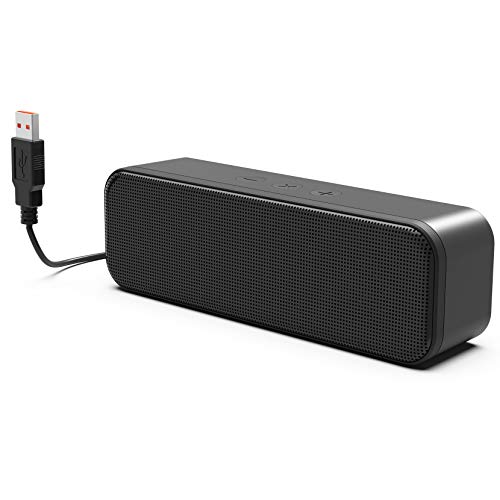
The LIELONGREN USB computer speaker is a compact soundbar designed for desktops and laptops, bringing upgraded audio to everyday computing. With dual 3W drivers and a passive radiator, it punches above its weight in delivering stereo sound and rich bass, perfect for users tired of tinny built-in laptop speakers.
It's tailored for home office professionals, students, and casual gamers who want hassle-free audio enhancement without complex setups. Compatible with Windows PCs, laptops, Xbox, and PS4, it slots seamlessly into your workflow or gaming rig, turning mundane calls and sessions into immersive experiences.
In real-world use, the plug-and-play USB connection shines for instant gratification, while touch volume controls keep adjustments simple. Though small, it handles music, videos, and voice chats with clarity and depth, making it a smart pick for budget-conscious Americans upgrading their setup.
Verdict: A solid 4-star choice for desk-bound audio needs, offering great value in sound quality and convenience for daily drivers.
Bass depth comes from the passive radiator paired with dual high-sensitive 3W drivers, providing rich low-end thump that's surprising for such a small speaker. It's tuned for balanced stereo sound, making podcasts and music feel fuller on your PC.
Vocal clarity stands out in calls and videos, with hi-quality drivers ensuring voices cut through without muddiness. Volume levels get loud enough for personal desk use, maintaining composure without distortion at high settings.
USB wired connection ensures rock-solid stability and zero dropouts, outperforming Bluetooth in reliability for consistent performance during long workdays or gaming marathons.
The sleek, compact soundbar design measures small enough for any desk while being lightweight for easy portability between home and office. Its minimalist build blends into setups without cluttering space.
No battery to worry about; it's powered directly via USB, offering unlimited playback as long as your device is on. This eliminates charging downtime, ideal for all-day desk warriors.
Rugged enough for daily handling but not built for rough outdoor use, its portable form shines for travel or multi-device switching, always ready when plugged in.
Understanding Laptop Speaker Repair, Diagnosis, and Upgrade Paths
Laptop speakers can technically be repaired, but the practical answer depends on whether the fault lies in software settings or damaged physical hardware. When the physical micro-driver suffers torn surround material or a burned voice coil, repairing the microscopic driver itself is rarely feasible. Instead, the standard industry solution involves replacing the modular internal speaker assembly or bypassing the damaged internal drivers altogether with external audio gear. Understanding the nature of the failure helps determine whether opening the laptop chassis is worth the time, effort, and technical risk.
The Direct Answer: Can Built-In Laptop Speakers Be Fixed?
Physical components inside a laptop chassis are miniaturized to fit slim profiles, which severely limits traditional component-level repair. Unlike large home stereo woofers that technicians can re-cone, re-foam, or re-wire, notebook speakers use tiny sealed plastic enclosures containing sub-two-inch drivers bonded with industrial adhesive. Attempting to repair a torn cone or realign a jammed voice coil inside these miniature enclosures often leads to further damage. For this reason, repair technicians rarely rebuild individual laptop speaker cones by hand.
Replacing the entire speaker assembly, however, is a common and relatively straightforward repair on many popular laptop designs. Most manufacturers package left and right micro-speakers into a unified pre-wired harness that connects to the motherboard through a single miniature pin connector. If you source an authentic matching replacement harness for your exact laptop model, you can effectively restore internal sound to factory condition. The repair process requires removing the bottom cover, disconnecting the battery, unrouting the delicate speaker harness, and securing the replacement unit.
Software and connection glitches represent another category where true repair is possible without replacing any physical hardware. Corrupted operating system audio drivers, incorrect output routing, or misconfigured sample rates can mimic the sound of blown hardware. In these situations, reinstalling the sound card software or resetting default audio properties resolves the failure promptly. Distinguishing between a permanent mechanical failure and a reversible operating system glitch is the first logical step before ordering replacement parts.
Diagnosing Sound Problems: Software Configuration Versus Hardware Damage
Before removing a single chassis screw, running basic diagnostic checks can save significant time and money. Begin by plugging standard wired headphones into the audio output jack or connecting a basic wireless headset. If audio plays clearly without crackling or distortion through external headphones, your sound card and operating system drivers are functioning properly. When the distortion persists across headphones and external outputs, the problem almost certainly originates within system software or sound processing settings rather than the physical speakers.
Operating system audio enhancements can also push tiny laptop drivers beyond their mechanical limits, causing artificial buzzing or rasping. Windows Audio Enhancements, third-party equalizer utilities, and aggressive bass-boost software frequently overdrive small internal membranes at higher volume settings. Disabling all digital signal processing and sound enhancements in your system playback properties can immediately reveal whether the distortion was purely synthetic. Testing the computer using a clean operating environment can further isolate stubborn operating system driver conflicts.
Physical hardware damage produces consistent, unmistakable symptoms during specific acoustic events. A torn speaker cone or detached dust cap usually creates an audible rattle or vibration whenever low frequencies or human speech play at moderate volume. Complete silence from one channel often points to a disconnected speaker harness or a failed amplifier circuit on the motherboard. If audio sounds muffled, thin, or distorted even at whisper-quiet levels across every application, the physical driver voice coil has likely suffered thermal damage.
Common Causes of Laptop Speaker Failure and Distortion
Thermal stress from excessive volume remains the primary cause of internal speaker degradation in portable computers. Thin laptop drivers rely on minute copper voice coils that generate heat during prolonged high-volume playback. Because notebook chassis offer cramped ventilation, running video streams or games at maximum volume for extended sessions can overheat the delicate voice coil wire. Over time, excessive thermal buildup warps the coil bobbin, leading to rubbing against the magnet structure and severe audio distortion.
Debris accumulation and magnetic contamination represent another frequent cause of premature speaker buzzing. Speaker driver assemblies utilize permanent neodymium magnets that naturally attract microscopic metal filings, iron dust, and conductive debris through notebook speaker grilles. When foreign particles slip past the protective mesh and settle against the flexible driver diaphragm, they vibrate violently against the membrane during audio playback. Even a tiny speck of magnetic grit trapped inside the driver basket can generate an irritating buzzing sound that mimics a torn cone.
Accidental liquid spills and environmental humidity can also compromise the structural integrity of paper or mylar speaker diaphragms. Water or spilled beverages can dissolve speaker adhesives, corrode thin internal wiring, or create short circuits across motherboard output traces. Physical shock from dropping a laptop bag or slamming the lid shut can also dislodge internal speaker mounts or crack the plastic acoustic resonance chamber. When the sealed enclosure cracks, air leaks disrupt the balanced acoustic pressure, resulting in an unpleasant tinny sound.
Physical Repair vs. Internal Speaker Module Replacement
Hands-on physical repairs on internal laptop speakers are technically possible in limited scenarios, but success rates remain low. If an internal speaker rattles solely because of a loose screw, broken plastic standoff, or dislodged adhesive pad, securing the module with silicone adhesive or thermal tape can eliminate unwanted cabinet resonances. Similarly, if a visible particle of lint or metal dust rests on the exposed diaphragm, gently removing it with soft putty or a dry nylon brush can eliminate buzzing. These quick structural adjustments represent the few instances where true hands-on physical repair makes practical sense.
Attempting to glue torn micro-diaphragms with flexible craft adhesive or rubber cement rarely yields satisfactory acoustic results. The moving mass of a laptop driver diaphragm is measured in fractions of a gram, so even a tiny drop of added adhesive significantly alters the resonant frequency and dampens high-frequency response. Repaired membranes often sound noticeably quieter, muffled, or imbalanced compared to the opposite functional channel. Given the microscopic tolerances involved, complete module replacement remains the preferred path for restoring balanced stereo fidelity.
Purchasing a complete replacement speaker assembly is generally an affordable and dependable undertaking for common business and consumer laptops. Third-party parts suppliers and official manufacturer channels frequently stock original equipment replacement speaker harnesses for popular notebook series. When choosing replacement parts, matching the exact manufacturer part number printed on the original speaker housing is essential. Generic or superficially similar modules often feature incompatible screw mounts, incorrect cable lengths, or mismatched connector pinouts that will not fit into your specific notebook base.
Step-by-Step Procedure for Replacing Internal Laptop Speakers
Replacing an internal laptop speaker harness begins with careful preparation and suitable electronics tools. You will need a precision screwdriver set containing miniature Phillips, Torx, or pentalobe bits, plastic opening pry tools, and an anti-static wrist strap or grounded work mat. Always power down the laptop completely, disconnect the AC charging adapter, and wait several minutes for residual electrical charge to dissipate. Working on a clean, non-conductive surface prevents accidental scratches to the screen and outer casing.
Remove the perimeter screws securing the bottom chassis cover, noting that screws may vary in length and must return to their original locations. Use a thin plastic spudger to release the delicate plastic retaining clips around the chassis perimeter without marring the exterior finish. Once inside, immediately disconnect the internal battery cable from the motherboard before touching any other component to prevent accidental electrical short circuits. Locate the left and right speaker modules, which are typically situated near the front palm rest area or along the side chassis rails.
Disconnect the tiny multi-pin speaker harness from the motherboard header by gently gripping the connector edges with plastic tweezers rather than pulling on the thin wires. Trace the wiring route carefully, noting how the harness weaves around cooling fans, battery edges, and wireless antenna cables. Unscrew any retaining brackets or lift the modules from their rubber vibration-dampening grommets. Seat the new replacement speaker modules into their designated acoustic chambers, re-route the cabling exactly as originally positioned, reconnect the motherboard header, reconnect the main battery, and snap the outer cover back into place.
Practical Risks, Warranty Considerations, and Safety Hazards
Disassembling a modern laptop introduces distinct mechanical and electrical risks that every user must evaluate honestly before starting. Ultrabooks and modern compact laptops frequently glue internal batteries directly on top of the speaker wiring channels. Prying or bending a lithium-ion battery while attempting to access underlying speaker screws can puncture the battery casing, creating a severe fire hazard. If your laptop layout requires battery removal, you must handle the pack with extreme care and avoid using sharp metal tools anywhere near the cells.
Opening a notebook computer may also void any active manufacturer warranty or accidental damage protection plans. Many modern machines feature tamper-evident warranty stickers or software intrusion detection switches that notify service centers of unauthorized disassembly. If your machine is still covered under its original warranty period, submitting an official support ticket for authorized warranty service is far wiser than opening the casing yourself. Professional repair centers can replace defective speaker modules without jeopardizing your ongoing warranty coverage or damaging internal ribbon cables.
Fragile internal ribbon cables for touchpads, keyboards, and cooling fans often lie dangerously close to internal speaker routing channels. A single slipped screwdriver or torn zero-insertion-force connector can disable the entire laptop motherboard, turning a minor audio inconvenience into a costly computer breakdown. Users who feel uncomfortable working around microscopic circuit traces should consider whether a simple external speaker setup represents a safer, stress-free alternative. Listening to dedicated music speakers for improved clarity can eliminate the need for delicate surgery entirely while providing superior sound.
External Audio Alternatives: USB Soundbars and Compact Desktop Speakers
External computer speakers offer an effortless bypass around damaged internal laptop drivers while delivering vastly superior acoustic performance. Built-in notebook drivers rarely exceed two watts of output, severely limiting bass response, vocal clarity, and overall dynamic range. By utilizing external desktop speakers, you bypass worn internal voice coils and enjoy substantially larger speaker diaphragms designed specifically for clear music and speech. Compact external options require zero computer disassembly, eliminating all risks of electrical shorts or broken chassis clips.
Single-cable USB soundbars provide a particularly elegant solution for cluttered workspaces or mobile computing setups. Models such as the [Upgraded] USB Computer /Laptop Speaker from LIELONGREN utilize a single USB cable to carry both digital audio and electrical power, eliminating the need for an external wall adapter or separate 3.5mm analog cord. Featuring dual 3W high-excursion drivers and a passive radiator, this style of portable soundbar delivers clear volume and improved bass response compared to factory laptop micro-speakers. Similarly, the LIELONGREN [Newer] USB Computer Speaker soundbar incorporates touch-sensitive volume controls and a streamlined horizontal footprint that rests neatly underneath a laptop stand or external monitor.
Users who require compatibility with modern slim laptops featuring only Type-C interfaces can consider versatile models like the [Single] Computer Speaker for Desktop PC by XKX. This compact USB unit includes a built-in USB-C to USB adapter and features an upgraded 2.25-inch driver paired with a passive radiator to produce rich sound without complicated driver installations. Because the speaker draws audio digitally through the USB data bus, it completely bypasses damaged analog headphone jacks and failed motherboard sound processing circuitry.
Selecting the Right External Audio Setup for Portable and Desk Environments
Choosing between a two-piece stereo speaker pair and a compact horizontal soundbar depends primarily on desk layout and listening preferences. Two-piece configurations like the Amazon Basics Stereo 2.0 Speakers for PC or Laptop provide genuine physical stereo separation by placing independent left and right satellite enclosures on either side of your screen. These USB-powered units incorporate a 3.5mm auxiliary audio input, bottom-firing radiators for bass extension, and an in-line volume wheel for rapid sound adjustments. Similarly, the 1Mii Computer Speakers for Desktop Laptop Tablet feature a dedicated front rotary knob and anti-slip silicone feet, making desk placement stable and intuitive.
For workspaces where ambient lighting and higher power output are desired, the LENRUE Computer Speakers,PC Speakers offer 10W stereo sound alongside colorful breathing LED light accents. Powered through a standard USB port with a 3.5mm auxiliary audio connection, this soundbar design concentrates stereo output into a single enclosure that fits neatly beneath elevated displays. When selecting auxiliary-based desktop speakers, remember that your laptop must have a functional 3.5mm headphone jack, and both the USB power line and audio plug must connect simultaneously to operate correctly.
If you prefer a wireless desktop environment free from cable clutter, versatile hybrid monitors like the Logitech Z207 2.0 Stereo Computer Speakers provide seamless flexibility. These powered desktop satellites support both wired 3.5mm connections and Bluetooth wireless pairing, allowing you to switch between laptop audio and smartphone playback using integrated Easy-Switch controls. Exploring portable wireless speakers with strong bass also gives you the freedom to move your audio setup from room to room without tethering your computer to a single desk location.
Routine Maintenance and Safe Listening Practices to Protect Speakers
Preventing future speaker failure requires adopting sensible volume habits and maintaining clean acoustic ports on your portable computer. Avoid driving internal laptop speakers at maximum volume continuously, particularly when watching media with wide dynamic range or heavy bass content. Software volume boosters and third-party preamp utilities should be used sparingly, as forcing small voice coils to handle distorted, clipped signals generates rapid heat buildup. Maintaining system volume at moderate levels prevents excessive diaphragm excursion and preserves driver longevity.
Routine physical cleaning keeps notebook speaker grilles free from the debris that causes annoying acoustic rattles. Use a soft-bristled brush or low-pressure canned air held at an angle to dislodge dust and lint from external speaker perforations. Never spray liquid cleaners directly onto speaker grilles or use high-powered industrial vacuums, as strong suction can tear delicate internal mylar membranes. Storing your laptop in a clean, padded sleeve protects internal magnets from attracting stray iron particles inside backpacks and travel luggage.
Whether you decide to install a replacement internal speaker harness or transition to a dedicated USB soundbar, protecting your audio hardware ensures dependable sound for years to come. Checking driver settings, ruling out software conflicts, and evaluating the physical risks of chassis disassembly will guide you toward the safest, most cost-effective path. With modern plug-and-play external speaker options readily available, regaining crisp, balanced audio for your computer has never been more straightforward.


Write Your Review
No reviews yet. Be the first to share your experience!