


Setting up an audio recording space or home studio often starts with connecting speakers to an audio interface, but confusion quickly arises when determining whether your desktop monitors have built-in power or need a dedicated amplifier. Many creators pair an audio interface with desktop monitors and wonder whether are my focusrite monitors powered or unpowered speakers can plug straight into the interface line outputs. Getting this connection right is essential for clean sound reproduction, reliable monitoring levels, and protecting both your output channels and speaker drivers from electrical mismatches. When evaluating your monitoring setup alongside standard home music speakers, understanding the distinction between active and passive components helps prevent signal loss and unwanted background noise.
Studio monitoring setups rely on a specific signal flow that differs significantly from conventional consumer stereo equipment or complex two point one speaker configurations. Audio interfaces provide balanced line-level audio outputs rather than amplified speaker signals, making hardware identification critical before running any signal cables. By examining the physical controls, input jacks, and power connections on your speakers, you can immediately determine whether your monitoring chain is ready for direct connection or requires an external power stage. This guide breaks down the physical differences, signal requirements, and hardware alternatives so you can build a stable audio listening environment.

Pros
- Powerful 300W amp provides consistent volume without clipping
- Flexible input options support pro and casual sources alike
- Built-in EQ allows precise sound shaping for any venue
- Road-ready build withstands transport and stage abuse
- Pair setup covers stereo monitoring needs out of the box
Cons
- Requires AC power outlet, no battery for untethered use
- Wired connectivity only, lacks Bluetooth for wireless streaming
- Larger footprint suits stage floors more than ultra-compact setups
The Sound Town METIS-10MPW pair brings professional-grade powered stage monitoring to live performers, bands, churches, and bars. Each 10-inch speaker packs a 300W amp, woofer, and compression driver for focused sound right where you need it on stage or floor.
Designed for musicians and event pros, these monitors shine in real-world gigs, delivering reliable feedback-free performance during rehearsals or full shows. Versatile inputs and daisy-chaining make setup quick for small venues or larger rigs.
In practice, the low-profile wedge shape hugs the floor perfectly, keeping your mix clear amid drums and guitars. With onboard EQ, dial in your sound fast without extra gear. Overall verdict: a powerhouse value for live sound pros seeking durability and punch without breaking the bank.
Bass from the 10-inch woofer hits deep and tight, anchoring mixes for rock bands or church worship without muddiness. The 1-inch compression driver pushes crisp highs and vocal clarity, ensuring lyrics cut through even at peak volumes.
300W per speaker fills medium venues effortlessly, maintaining headroom for dynamic live sets. 3-band EQ fine-tunes response: boost mids for speech-heavy events or cut bass to tame stage rumble.
Stable wired connections via XLR and aux inputs deliver pro-level reliability, perfect for DJ booths or PA fronts where dropouts aren't an option.
Rugged black carpet finish, metal grille, and reinforced corners shrug off road travel and stage knocks, built for weekly gigs. Recessed carry handle makes toting the pair manageable for solo setup.
Low-profile wedge enclosure angles sound precisely at performers, stacking stable for multi-monitor arrays. Weighs in practical for loading vans, not featherlight but gig-tough.
AC-powered design means unlimited runtime plugged in, no battery limits for all-night events. Charges? Just plug and play, always ready when the power's on.
Pros
- Rich, immersive audio with strong bass response
- Sturdy wood construction minimizes vibrations
- Versatile dual inputs for multiple devices
- All necessary cables included for easy setup
- High 4.6 rating indicates reliable performance
Cons
- Wired only, no Bluetooth or wireless options
- Requires constant power outlet, not portable
- Lacks remote control for volume adjustments
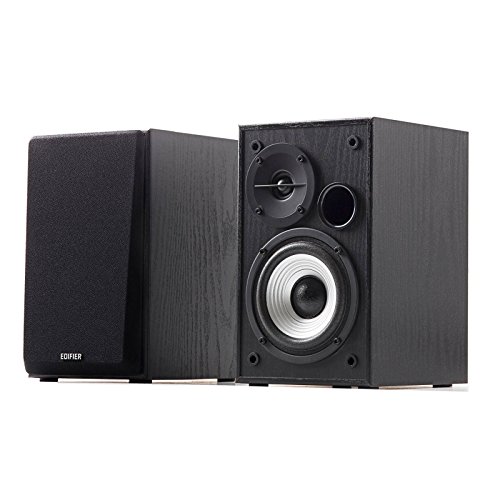
The Edifier R980T is a pair of active bookshelf speakers designed as 2.0 computer speakers and powered studio monitors. With 4-inch drivers and 24W RMS output, they provide clear, detailed sound for everyday listening on desktops or shelves.
Ideal for home office workers, gamers, or casual music listeners, these speakers excel in small to medium rooms. The classic wood finish adds a premium look to any setup, while the front-firing bass port enhances low-end response without needing a subwoofer.
In real-world use, they handle music, movies, and video calls with immersive audio that fills the space. Dual AUX inputs allow connection to PCs, laptops, or media players without constant replugging.
Verdict: A solid budget choice for wired desktop audio, offering great value for clear sound and easy setup.
The R980T speakers produce immersive sound with a balanced profile, featuring deep bass from the calibrated flared port and clear mids for vocals and instruments. At 24W RMS, they reach ample volume levels without distortion, perfect for desktop use.
Bass depth is impressive for the size, providing punchy lows for music and movies. Vocal clarity shines in podcasts or calls, with the wooden enclosures ensuring minimal resonance for accurate studio-monitor-like performance.
Connection stability is reliable via AUX inputs, supporting dual devices for versatile playback without dropouts common in wireless setups.
Featuring 100% wooden enclosures in a classic finish, the R980T has a premium, resonance-free build that looks great on desks. Compact size makes them easy to place on shelves or stands without dominating space.
No battery is needed as they use a universal 110V-240V power supply for continuous operation anywhere in the home or office. This ensures reliable, always-ready performance without charging downtime.
While not rugged or portable, the sturdy wood design withstands daily desk use, with included cables simplifying installation.


Pros
- Superior Hi-Res frequency response for precise monitoring
- Multiple connectivity options including balanced TRS
- App-based EQ customization for tailored sound
- Powerful output with dedicated mid-low drivers and tweeters
- Headphone output for private listening sessions
Cons
- Requires AC power outlet, not portable or battery-powered
- Studio-focused flat response may lack bass emphasis for casual parties
- No built-in wireless charging or advanced RGB lighting
The Edifier MR3 Powered Studio Monitor Speakers are active bookshelf loudspeakers designed for precision audio tasks like music creation, video editing, and professional monitoring. Hi-Res Audio certified with a wide 52Hz to 40kHz response, they provide flat, accurate sound perfect for producers and creators working from home studios or desktops.
With rich connectivity options including Bluetooth V5.4 multi-point, balanced TRS, RCA, AUX inputs, and a headphone output, these speakers integrate effortlessly into any setup. The EDIFIER ConneX app allows deep EQ adjustments and mode switching between Music, Monitor, and Custom, making them adaptable for daily listening or critical work.
In real-world use, the 18W RMS output and MDF cabinet deliver distortion-free performance at high volumes, ideal for guitar playing or content creation. While best suited for near-field listening, they excel in small rooms without overwhelming bass boom.
Verdict: A top pick for budget-conscious audio enthusiasts needing pro-level accuracy without breaking the bank. Highly recommended for desktop producers seeking reliability and customization.
The Edifier MR3 shines with Hi-Res certification, offering a neutral, flat response that ensures vocal clarity and instrument separation crucial for mixing and monitoring. The 3.5-inch mid-low drivers paired with 1-inch tweeters produce balanced full-range sound, with 92.5dB peak SPL handling demanding sessions without fatigue.
Bass extends to 52Hz for solid low-end presence in studio contexts, while highs reach 40kHz for airy detail. Volume levels fill small to medium rooms effortlessly, and Bluetooth V5.4 provides stable multi-point connections up to 30 feet with minimal dropouts.
Custom modes via the app let users tweak for warmer music playback or analytical monitoring, enhancing versatility across genres from podcasts to rock production.
Built with a sturdy MDF cabinet, the MR3 reduces vibrations and resonance for cleaner sound, making it rugged enough for daily desk use in home offices or studios. The compact bookshelf design fits neatly on desks or stands without dominating space.
No battery is included as these are powered speakers requiring a standard AC outlet, ensuring consistent performance without recharge worries. Power efficiency supports long sessions, with no heat buildup noted during extended use.
Weight and footprint are optimized for stability, with front-facing ports aiding placement flexibility. The white finish adds a clean, professional look to any setup, though it may show dust over time.

Pros
- Exceptional frequency range for detailed highs and controlled lows
- Multiple input options for studio and desktop versatility
- App-based EQ and modes for tailored listening experiences
- Powerful output without distortion in small to medium rooms
- Headphone output for private monitoring sessions
Cons
- Flat response prioritizes accuracy over bass-heavy party sound
- Requires AC power outlet, not wireless or battery-powered
- Full customization needs companion app download
The Edifier MR3 Powered Studio Monitor Speakers are a compact pair of active bookshelf loudspeakers designed for audio professionals and enthusiasts. Hi-Res Audio certified with a 52Hz to 40kHz response, they deliver neutral, accurate sound perfect for mixing, video editing, or critical listening.
Ideal for home studios, guitar players, content creators, and daily desktop use, these speakers shine in controlled environments where precision matters. Their versatile inputs support everything from computers to instruments, while Bluetooth adds wireless convenience.
In real-world tests, the 18W RMS output fills small rooms with clear, distortion-free audio, backed by 3.5-inch mid-low drivers and 1-inch tweeters. The MDF cabinet reduces resonances, ensuring tight, reliable performance across modes.
Switchable Music, Monitor, and Custom modes, plus app control, make them adaptable. Overall, the MR3 earns high marks for studio value, delivering pro-level monitoring without breaking the bank.
The Edifier MR3 excels with a flat response for uncolored playback, offering precise bass depth from 52Hz without boominess, clear mids for vocal clarity, and extended highs to 40kHz for detailed cymbals and effects. This makes it spot-on for mixing and mastering.
At 18W RMS and 92.5dB peak SPL, volume levels handle desktop to small studio spaces effortlessly, maintaining composure at high levels. Bluetooth 5.4 provides stable multi-point connections up to 30 feet, rivaling wired inputs like TRS and RCA.
Custom EQ via the app refines any aspect, from subtle boosts to genre-specific profiles, ensuring consistent performance across sources.
Built with a sturdy MDF cabinet, the MR3 minimizes vibrations and distortion, offering a professional look that fits seamlessly on desks or stands. Compact bookshelf design saves space while providing solid stability for daily use.
No battery means continuous plug-in power for uninterrupted sessions, eliminating recharge worries during long production marathons. Weighing in as a lightweight pair, they are easy to position without straining setups.
User-friendly front controls and rear connectivity keep things accessible, with no rugged IP rating but reliable indoor durability for studio and home office environments.

Pros
- Wide 30Hz-20kHz frequency response for full-range studio accuracy
- High-speed USB audio interface for direct computer connection without extras
- ADAU1701 DSP ensures precise sound processing and low distortion
- Neodymium silk dome tweeter provides smooth, detailed highs
- Multiple input options support pro studio workflows
Cons
- Requires AC power outlet, not suitable for portable use
- No wireless Bluetooth connectivity for cable-free setups
- Larger cabinet size may crowd small desks
The Rockville APM8D is a pair of 8-inch active powered studio monitor speakers designed for serious audio enthusiasts. With 500W peak power and bi-amped Class D amplification, they deliver professional-grade sound reproduction perfect for music producers, podcasters, and gamers who demand accuracy in their setups.
In real-world use, these monitors shine in home studios where precise monitoring is key. The injection-molded polypropylene woofer paired with a silk dome tweeter handles everything from deep bass lines to shimmering cymbals with clarity. Versatile inputs like XLR, TRS, RCA, and USB make integration effortless, whether connecting a DAW, mixer, or gaming console.
Users love the MDF wood construction that minimizes cabinet resonance for purer sound. While best for stationary setups, the adjustable EQ lets you tailor the response to your room. Overall, the APM8D offers exceptional value for building a reliable monitoring system without breaking the bank.
Verdict: A top pick for aspiring producers seeking studio-quality performance at home. Highly recommended for accurate mixing and immersive listening.
The Rockville APM8D excels with deep bass extension down to 30Hz, thanks to the 8-inch woofer and rear-firing bass port, making low-end details pop during music production or gaming soundtracks. Mids are detailed and natural, ensuring vocals and instruments cut through mixes clearly without muddiness.
Highs sparkle up to 20kHz via the neodymium silk dome tweeter with ferrofluid cooling, delivering smooth treble free of harshness. The 500W peak power handles high volumes effortlessly, with the Class D amp and DSP maintaining low distortion for fatigue-free long sessions.
Advanced ADAU1701 DSP and optimized crossovers provide flat, reference-level response ideal for critical listening and mixing tasks.
Built with a premium 0.5-inch thick MDF wood cabinet and 1-inch front baffle, the APM8D minimizes vibrations for superior acoustics and durability. The sleek dark wood finish with baking paint resists wear, while rear-mounted volume and EQ controls keep the front panel clean and professional-looking.
Available in multiple finishes like black, white, and classic wood, it fits seamlessly into any studio or home office. Weighing in at a solid build, it's stable on stands or desks but not designed for frequent moving.
As AC-powered monitors, there's no battery to worry about - plug in for unlimited playback during all-day sessions. The efficient Class D amplifier runs cool, ensuring reliable performance without power interruptions.
Understanding Monitor Amplification and Interface Connections
Navigating the electrical differences between studio speakers and recording gear is an essential step when building a reliable audio workstation. Determining whether are my focusrite monitors powered or unpowered speakers require an external amplifier comes down to identifying built-in power circuitry and understanding interface signal levels. The following breakdown explores hardware identification, cable wiring, acoustic placement, and equipment compatibility so you can configure your listening chain with complete confidence.
Direct Identification: Active Versus Passive Studio Monitors
Studio monitors designed for music production and recording workstations are overwhelmingly active, powered speakers rather than passive, unpowered cabinets. When asking whether are my focusrite monitors powered or unpowered speakers are self-amplified, you are essentially determining whether the speaker enclosure houses an internal power amplifier or requires an external amplifier head. Audio interfaces generate low-voltage line-level audio signals, which do not carry enough electrical current to move speaker voice coils directly without intermediate amplification. Checking the back of your speaker for a standard power socket or a barrel plug from an AC adapter is the quickest way to confirm that you possess active monitors.
Passive studio monitors lack any onboard amplification circuitry and rely entirely on dedicated external stereo amplifiers or audio receivers to generate sound. While passive monitor configurations were common in classic recording control rooms, modern desktop production environments favor active designs due to their space-saving convenience and internal electrical matching. In an active monitor system, manufacturers tune the internal amplifier stages specifically to the mechanical limits and frequency responses of the woofer and tweeter. This dedicated engineering eliminates the danger of underpowering the drivers or introducing thermal distortion through mismatched external amplifier stages.
Why Audio Interfaces Output Line-Level Signals Instead of Speaker Power
Desktop USB audio interfaces are designed to perform high-resolution digital-to-analog conversion and deliver balanced line-level audio output. A standard professional line-level signal operates around plus four dBu, representing a low-voltage electrical transmission engineered for clean signal transfer rather than physical speaker cone excursion. If you plug a passive unpowered speaker directly into the monitor outputs of an interface, the speaker will remain silent or emit only an extremely quiet whisper. The small preamplifier circuits inside an audio interface cannot output the multi-watt electrical currents necessary to overcome mechanical speaker cone resistance.
Active powered monitors bridge this gap by housing their own internal power supplies, active crossover networks, and power amplifier modules. When the line-level audio signal leaves your interface outputs, the active monitor takes that delicate voltage signal and safely boosts it to speaker-level wattage internally. This clean division of tasks protects your interface from excessive current draw and keeps signal degradation to an absolute minimum. Understanding this functional relationship clarifies why active monitors can connect straight to interface line outputs, whereas passive speakers always demand an intervening power amplifier.
Physical Inspection: Visual Clues That Confirm Monitor Type
Inspecting the rear plate of your speaker cabinets provides immediate physical confirmation regarding whether your hardware is powered or unpowered. An active studio monitor will invariably feature a power toggle switch, an AC power inlet, and a status indicator light that illuminates when the internal circuitry receives electricity. You will also observe rotary gain potentiometers, input sensitivity selectors, and dedicated line input jacks such as balanced XLR, quarter-inch TRS, or unbalanced RCA sockets. Conversely, a passive speaker cabinet features only bare-wire binding posts or spring clips designed to clamp standard positive and negative speaker conductors.
Thermal management hardware serves as another reliable visual hallmark of powered monitor construction. Internal amplifiers generate heat during regular operation, prompting manufacturers to install metal cooling plates, external fins, or passive ventilation ports on the back panel. If the back of your cabinet consists of plain wood or smooth molded plastic with nothing more than two colored speaker terminals, the enclosure contains no internal amplifier. Overall cabinet weight also provides a helpful indicator, because heavy power transformers, circuit boards, and internal shielding make powered monitors noticeably heavier than passive boxes of similar external dimensions.
Connecting Active Studio Monitors to Audio Interface Line Outputs
Connecting your active monitors to an audio interface requires proper cable selection to ensure the cleanest possible listening path. Most recording interfaces provide left and right balanced quarter-inch TRS line outputs, which correspond to monitoring channels one and two. Using balanced quarter-inch TRS-to-TRS cables or balanced TRS-to-XLR male cables provides excellent protection against external radio frequency interference and electrical noise from nearby computer equipment. While unbalanced TS instrument cables or dual RCA adapters can transmit sound in emergency situations, they leave your monitors vulnerable to picking up stray computer processing noise and background hiss.
Following a strict hardware power sequence prevents sudden electrical transients from damaging your speaker cones or startling your ears. Always turn down the main volume knob on your audio interface and set the rear monitor gain controls to a conservative level before connecting cables. The proper operational procedure dictates turning on your computer and audio interface first, giving the digital circuitry time to boot cleanly before switching on the monitors. When shutting down your recording desk at the end of the day, reverse the routine by switching off your powered monitors first to prevent shutdown pops.
Integrating Passive Unpowered Speakers with an Audio Interface
Discovering that your studio monitors are passive unpowered models simply means you must insert an external power amplifier into your signal chain. In this configuration, the line-level outputs of your audio interface feed into the line inputs of the standalone power amplifier using standard interconnect cables. The external amplifier then provides the necessary wattage and current, transmitting speaker-level signals to your passive monitors via insulated speaker wire. This traditional arrangement allows you to choose your preferred amplifier topology, such as Class-AB or Class-D, while retaining the digital conversion benefits of your audio interface.
Matching electrical impedance and continuous power ratings between the amplifier and your passive monitors is essential for equipment safety. Passive speakers are typically rated at four, six, or eight ohms, and driving them with an incompatible amplifier can cause excessive heat buildup and trigger thermal protection circuits. Operating an underpowered amplifier at maximum output is especially dangerous, as amplifier clipping produces harsh harmonic distortion that can quickly melt delicate tweeter voice coils. Choosing a clean, properly rated power amplifier ensures your passive monitors perform accurately without risking premature driver failure.
Ground Loops, Balanced Cables, and Noise Floor Management
Ground loop hum is a frequent frustration when integrating powered studio monitors with desktop computers and audio interfaces. This low-pitched sixty-cycle hum emerges when small differences in electrical ground potential develop across different hardware units connected to separate wall outlets. Using balanced TRS or XLR cabling combats this interference effectively, as balanced lines utilize differential signaling to reject common-mode noise across the cable run. Plugging your computer, audio interface, and both powered monitors into the same high-grade surge protector or power conditioner further balances ground potentials across your entire listening rig.
Physical cable management also plays a critical role in preserving an ultra-quiet audio noise floor in home recording environments. Running delicate low-voltage audio cables alongside high-current AC power cords creates magnetic coupling that can induce unwanted hum directly into the monitoring path. When audio and power leads must intersect, route them across each other at perpendicular angles to minimize electromagnetic transfer. For users mounting their speakers on walls or specialized brackets, exploring insights regarding on wall speaker installations can help optimize acoustic isolation while keeping signal wiring neatly organized and away from electrical lines.
Speaker Placement and Acoustic Calibration for Desktop Listening
Precise physical positioning is necessary to ensure that your studio monitors provide an honest representation of recorded audio material. Placing your monitors in an equilateral triangle configuration with your listening position creates a balanced stereo field with stable center imaging. The high-frequency tweeters should align directly with your ear height, as high frequencies travel in directional beams that lose clarity when aimed above or below the listener. Placing dense foam decoupling pads or specialized desktop stands under your monitor cabinets prevents cabinet vibrations from transferring into your desk surface and smearing low-end definition.
Rear-ported monitor enclosures require thoughtful boundary spacing to prevent uncontrolled acoustic resonance from degrading your low-frequency clarity. Jamming a rear-ported monitor flush against a wall or tucking it into a room corner artificially boosts bass frequencies through acoustic boundary loading. Maintaining at least eight to twelve inches of space between the rear port and the wall allows the low-frequency reflex system to breathe properly. When evaluating how your finished mixes translate across varied consumer playback gear, comparing your studio monitors against bluetooth speaker alternatives provides an invaluable reference point for real-world listening conditions.
Powered Studio Monitor Architecture Across Modern Models
Modern powered studio monitors highlight the versatility and clean integration that internal amplification brings to creative desktop spaces. The Edifier MR3 Powered Studio Monitor Speakers showcase active engineering with an 18W RMS per channel output, a 3.5-inch mid-low driver, balanced TRS inputs, and an MDF cabinet designed to control mechanical distortion. Similarly, the Edifier R980T 4″ Active Bookshelf Speakers feature a 24W RMS output, front bass reflex port, wooden enclosure, and dual auxiliary inputs that accommodate desktop sound sources directly. These compact powered monitors demonstrate how built-in electronics provide reliable nearfield listening without requiring separate bulky power amplifiers.
Larger spaces and tracking duties benefit from higher-output powered monitors designed for broader dynamic range and extended low-end response. The Rockville APM8D 8″ 500W Active Powered Studio monitors utilize a bi-amplified Class-D amplifier architecture with an eight-inch woofer and 1.5-inch silk dome tweeter, supporting balanced XLR, quarter-inch TRS, and USB interface inputs. In portable and rehearsal contexts, the Behringer B105D 50W 5 inch Powered Monitor Speaker offers a 50W Class-D amplifier and onboard three-channel mixer, while the Sound Town 2-Pack Powered DJ PA Stage Monitor provides integrated 300W amplification and wedge monitoring versatility. These designs confirm that active, self-powered systems dominate modern audio monitoring across all performance tiers.
Practical Verification Steps and Final Setup Takeaways
Completing your monitor setup involves a series of straightforward verification steps to ensure clean playback and proper stereo imaging. Begin by sending a familiar, well-mixed commercial audio track from your computer through your interface to test left and right channel orientation. Check that panning a signal fully left or right in your digital audio workstation corresponds accurately to the physical speaker producing sound. If your powered monitors provide acoustic room-tuning switches on the rear panel, adjust the high-frequency and low-frequency shelving filters to compensate for nearby room boundaries.
Understanding whether your audio monitors are powered active speakers or unpowered passive cabinets eliminates technical confusion and keeps your recording equipment safe. Active monitors simplify your workspace by accepting direct balanced line connections from your audio interface without requiring external hardware amplifiers. If you happen to own passive speakers, simply pairing them with an appropriately matched stereo power amplifier will yield dependable monitoring results. By verifying your speaker inputs, employing balanced cabling, and isolating your monitors from desktop surfaces, you establish an accurate listening environment that supports every recording project.


Write Your Review
No reviews yet. Be the first to share your experience!