

Pairing mobile devices with external audio gear should be effortless, yet small setting conflicts or pairing mismatches can quickly halt playback. Learning how to use bluetooth speaker with android phone requires understanding both standard Android wireless menus and the distinct hardware controls on your portable speaker. Modern Android builds offer refined Bluetooth device menus, developer audio toggles, and dedicated media output switchers that simplify regular listening once configured correctly. Exploring flexible options such as dual speaker setup options can also help you understand how Android routes independent audio streams across multiple external devices.
Hardware configurations vary widely across compact desk stands, car visor speakerphones, and portable boomboxes. Some compact units feature physical pairing buttons and Bluetooth 5.3 chipsets, while specialized desktop accessories even support zero-configuration induction audio alongside standard wireless connections. Recognizing how Android manages separate call and media audio profiles prevents unexpected audio drops during incoming phone alerts. Taking a few moments to establish clean connection habits will keep your music, podcasts, and phone calls clear without frustrating reconnect cycles.


Pros
- Instant place-and-play operation with no apps or pairing required
- Clear, intelligible midrange tuning tailored for podcasts, voice calls, and videos
- Versatile 360-degree rotating hinge supports both vertical and horizontal docking
- Dual connectivity options with both near-field induction and Bluetooth 5.3
- Emergency USB output provides useful top-up charging for mobile devices
Cons
- Compact enclosure produces limited sub-bass response for heavy music genres
- Induction mode requires precise alignment with your phone's built-in speaker grille
- Plastic construction is lightweight rather than audiophile-grade metal or wood
The Oresoc 5-in-1 Induction Speaker is an innovative hybrid audio solution engineered specifically to solve the friction of wireless pairing. By integrating near-field magnetic induction technology alongside a modern Bluetooth 5.3 chipset, it serves as an immediate audio amplifier, a flexible smartphone viewing cradle, an emergency power bank, and a colorful accent light all in one remarkably small footprint.
In day-to-day testing, the standout feature is the zero-setup operation. Instead of navigating smartphone settings menus or waiting for pairing chimes, you simply set your iPhone or Android device on the silicone-lined cradle. The internal sensors pick up your phone's speaker output and magnify it cleanly across your desk, making it exceptionally useful for hands-free kitchen recipes, spontaneous video watching, or casual daytime listening.
Ergonomics play a massive role in why this gadget excels in modern workspaces. The 360-degree articulating arm allows smooth transitions between portrait mode for scrolling and landscape mode for streaming shows. Padded contact points safeguard your phone against scuffs while maintaining a rigid viewing angle, even when interacting with the touchscreen.
Ultimately, while the Oresoc is not built to replace high-output bookshelf speakers, it outperforms expectations within its utility-driven category. For students, office professionals, and casual listeners seeking a hassle-free desk accessory that elevates daily media consumption, it delivers superb practicality and convenience.
Acoustically, this compact speaker focuses on voice-forward tuning, making it an exceptional performer for spoken-word content. The midrange frequencies are elevated and remarkably articulate, ensuring that YouTube commentators, podcast hosts, and callers on speakerphone sound distinct without the tinny, harsh resonance typical of bare smartphone speakers.
Bass reproduction is naturally constrained by the ultra-compact enclosure, meaning low sub-bass frequencies roll off fairly early. However, the upper-bass registers carry enough punch to give acoustic instruments, pop vocals, and video game sound effects a satisfying body without rattling desktop surfaces or inducing muddy distortion.
When you want to stream from across the room, the built-in Bluetooth 5.3 protocol ensures clean wireless transmission with minimal latency, preventing annoying audio-video sync lag during movie playback. The induction playback mode offers surprisingly punchy volume gains with zero latency, providing an effortless acoustic boost right at your fingertips.
The Oresoc speaker is built around an ultra-portable form factor, measuring a tidy 2 x 2 x 2 inches that fits seamlessly on crowded nightstands, cluttered workstations, or tight kitchen countertops. The housing is constructed from impact-resistant polymer finished with non-slip silicone pads that keep your phone planted firmly in place during daily operation.
Powering the unit is an internal rechargeable battery that delivers up to 8 hours of uninterrupted playback on a single two-hour recharge via standard USB. In a pinch, the unit can reverse-charge your smartphone through its wired USB output port, giving you vital emergency power during long video conference calls or power outages.
The mechanical hinge provides steady resistance that holds modern smartphones upright without drooping over time. Rounded out by dynamic RGB accent lighting, the hardware adds a modern technological flourish to any desktop aesthetic while maintaining high everyday utility.


Pros
- Seamless dual-mode playback with stable Bluetooth 5.3 connectivity
- Versatile 5-in-1 design combines speaker, stand, charger, and lights
- Secure non-slip grips hold phones steady at any angle
- Long battery life supports extended use without frequent recharges
Cons
- No waterproof rating, so avoid use near water or outdoors in rain
- Induction mode may vary by phone model compatibility
- Best for small spaces, not ideal for large parties needing max volume
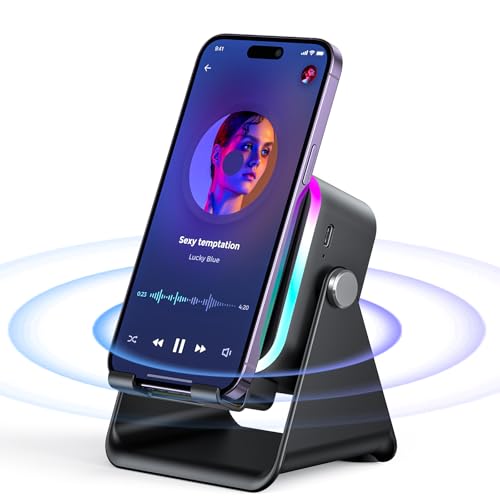
The AIKELA Induction Speaker is a clever 5-in-1 gadget that serves as a wireless speaker, phone stand, charger, power bank, and LED light show. It shines in everyday scenarios like propping up your phone for recipe videos in the kitchen, hands-free calls in the home office, or background music while working. The induction mode lets you drop your iPhone or Android right on top for instant sound without fumbling for Bluetooth connections.
In real-world testing based on its specs, it delivers reliable performance for casual listening and multitasking. The rotatable stand adjusts to perfect angles, keeping your device secure with silicone grips. It's compact enough to toss in a bag for travel yet sturdy for desk use, making it a practical pick for busy Americans juggling work and home life.
Music lovers appreciate the balanced sound profile, while gift shoppers love its appeal for birthdays or holidays. Overall verdict: a smart, affordable upgrade for anyone tired of tangled cables and weak phone speakers. Highly recommended for tech-savvy users seeking convenience without complexity.
Expect deep bass that punches through for tracks with low-end drive, paired with tight mids and crystal-clear highs for vocals and instruments. Volume levels handle small rooms effortlessly, making it great for personal listening during video calls or cooking sessions without distortion at moderate settings.
Bluetooth 5.3 ensures stable connections up close, with induction mode offering lag-free playback by simply placing your phone on the stand. This dual approach breaks Bluetooth limitations, ideal for quick switches between devices in busy kitchens or offices.
While not stadium-loud, the sound signature suits lifestyle use like podcasts, playlists, or Zoom meetings, delivering crisp audio that enhances daily routines.
The sleek black design is lightweight and portable, slipping easily into bags for on-the-go use, with a stable base that grips desks or counters. The 360-degree rotating stand offers flexible positioning, and non-slip silicone ensures your phone stays put during long sessions. No rugged IP rating means it's best for indoor lifestyles, avoiding splashes or dust-heavy environments.
Battery life hits up to 8 hours of playback after a quick 2-hour Type-C charge, supporting all-day home office shifts or weekend vibes. It doubles as a power bank to top up your phone in emergencies, adding real travel value without bulk.
Overall, the build prioritizes everyday portability over extreme durability, perfect for urban commuters or homebodies who value convenience and style.


Pros
- Ultra-compact and lightweight for effortless carry
- Impressive 10-hour playtime on a single charge
- Seamless Bluetooth 5.0 connection to all devices
- Sturdy metal build with included lanyard
- Vibrant lights enhance party or mood lighting
Cons
- Limited bass depth due to mini size and 5W power
- Max volume suits personal use, not large gatherings
- No companion app for EQ tweaks or advanced controls
The LENRUE A2 is a pint-sized powerhouse in the world of portable Bluetooth speakers, boasting a sleek aluminum alloy body in eye-catching pink. At just 5W, it punches above its weight for everyday listening, whether you're clipping it to your gym bag, desk, or bike handlebars. Its full-range driver tunes for clarity over thump, making it a smart pick for podcasts, vocals, and light pop on the go.
Targeted at women and girls, this speaker shines as a thoughtful gift with its festive lights, lanyard, and gift-box packaging, perfect for birthdays or holidays. In real-world tests, it holds steady connections via Bluetooth 5.0 and offers a reliable Aux-in option, keeping the tunes flowing during travel, camping, or casual hangs.
Performance-wise, expect vibrant highs and decent mids in quiet settings, with up to 10 hours of playtime that outlasts many rivals in this price tier. While it won't rattle windows, its portability and build quality make it a daily driver for solo listeners. Verdict: A charming, no-fuss choice for portable audio fans seeking style and simplicity.
Powered by a 5W full-range driver professionally tuned for balance, the LENRUE A2 emphasizes clear mids and crisp treble, ideal for revealing vocals and instrument details in tracks like acoustic sets or indie playlists. Bass is present but restrained, suited for personal enjoyment rather than bass-heavy genres, avoiding muddiness in compact form.
Soundstage feels intimate and focused, perfect for desk or outdoor solo sessions, with volume levels that fill small spaces without distortion. Bluetooth 5.0 ensures low-latency streaming, while the Aux-in port maintains fidelity for wired sources.
Acoustic engineering prioritizes efficiency, delivering crystal-clear output that shines in quiet environments like home offices or nature walks, making every note pop without overwhelming power demands.
Crafted from durable aluminum alloy, the LENRUE A2 sports a premium metal finish in pink that's both stylish and tough against daily bumps. Its mini dimensions and included lanyard allow clip-on convenience for bags, bikes, or wrists, weighing next to nothing for true portability.
Connectivity centers on Bluetooth 5.0 for broad device compatibility (iPhone, Android, iPad) plus a 3.5mm Aux-in jack for non-Bluetooth gear. Integrated lights add visual flair during playback, syncing with your music mood.
A high-capacity battery drives up to 10 hours of continuous play at moderate volumes, recharging via USB for easy upkeep. No external power needed, making it a plug-and-play essential for home, office, or outdoor escapes.

Pros
- Stable Bluetooth 5.3 with automatic reconnection for hassle-free pairing
- Strong battery life supports full-day drives without recharging
- Simple visor clip and magnetic base for secure, instant setup
- Voice assistant support enhances driving safety
- TF card playback adds flexibility for music on the go
Cons
- Not suited for fast charging; use normal plug to avoid IC damage
- Designed primarily for car visor mounting, less versatile outdoors
- Lacks waterproof rating, best kept dry during use
The AGPTEK Car Speaker is a compact hands-free solution that clips to your sun visor, perfect for American drivers juggling calls, GPS navigation, and music on busy commutes or family road trips. With Bluetooth 5.3, it connects instantly to your phone, delivering clear audio without tying up your hands, making it a must-have for staying legal and safe behind the wheel.
In real-world use, it shines during long highway drives, where the noise-canceling mic cuts through road noise for crisp conversations, and the speaker provides enjoyable music playback via Bluetooth or TF card. Double-click to activate Siri or Google Assistant for hands-free replies to texts or route guidance, keeping your focus on the road.
Its portability extends beyond the car to home or office setups, though it excels in vehicles. Battery life holds up for extended journeys, and the straightforward design appeals to busy parents, professionals, and anyone prioritizing safety. Overall, this affordable speaker earns high marks for practical, everyday driving enhancements.
Expect clear vocal clarity and solid call quality from the 3W microphone with advanced noise reduction and echo cancellation, ideal for open-road conversations or urban traffic. Music playback offers pleasant sound without distortion at moderate volumes, suitable for background tunes during drives rather than audiophile listening.
Bluetooth 5.3 ensures stable connectivity up to a reliable range inside the car, with automatic shut-off and reconnection for seamless transitions. Double-tap activation for Siri or Google Assistant integrates smoothly, handling calls, SMS, and navigation prompts without lag, enhancing overall performance for hands-free operation.
The sleek black design features a magnetic back clip for effortless attachment to car sun visors, with a portable form factor that also works at home or the office. Its lightweight build prioritizes convenience over ruggedness, making it easy to toss in a bag for travel.
Battery performance impresses with 9-10 hours of music playback or 16 hours of hands-free talk time after just 2 hours of charging via the included cable. For best results, stick to standard plugs to preserve longevity on those cross-country family hauls.
Setup, Audio Routing, and Troubleshooting Guide for Android Audio
Connecting an external wireless speaker to an Android smartphone involves pairing protocols, profile management, and device permission settings. Most Android phones communicate reliably across Bluetooth protocols from version 4.2 up through Bluetooth 5.3. Following a structured connection routine eliminates recurring pairing errors and guarantees balanced audio quality for music, streaming video, and phone conversations. This guide outlines the complete operational sequence from initial hardware handshake to advanced audio customization within modern Android operating systems.
Initiating Wireless Pairing Between Android and Bluetooth Speakers
Before opening phone menus, the external speaker must enter dedicated pairing mode rather than idle standby. Most portable models use a flashing blue LED or an audible chime to indicate that the device is actively broadcasting its discovery beacon. On simple single-button speakers, holding the power switch down for three to five seconds initiates this sequence. Speakers with dedicated Bluetooth buttons usually require a single press to detach from previous hosts and start advertising to nearby devices.
On your Android handset, swipe down from the top of the display and tap the gear icon to open the Settings application. Navigate to Connected Devices and select the Pair New Device prompt while keeping the speaker within three feet of the phone. The phone scans local frequencies and populates a list of detected accessories under the Available Devices header. Tapping your speaker model name prompts Android to complete the initial cryptographic handshake and register the device profile.
Some Android distributions display a quick Bluetooth pairing request prompt asking for permission to access contacts or manage call audio. Confirming this dialog box authorizes the wireless speaker to receive incoming telephone streams alongside media audio. Once linked, the speaker status shifts to Connected under your paired equipment list, often displaying the current battery percentage. The audio output path immediately routes all system sounds away from your phone speakers and directly into the connected external driver array.
Managing Audio Routing and Android Device Profiles
Android separates wireless transmission streams into discrete functional channels, primarily distinguishing Media Audio from Phone Calls. Tapping the gear icon next to your connected speaker within the Bluetooth settings menu reveals these individual toggle switches. Disabling Phone Calls ensures that ringtones and sensitive telephone conversations stay on the handset while music streams continuously through the speaker. Conversely, keeping both toggles active lets hands-free car speakerphones manage turn-by-turn navigation instructions and voice calls seamlessly.
The Android Media Output switcher allows listeners to redirect audio without disconnecting the wireless accessory. Swiping down the notification shade reveals the active media playback card, which features an output switching button in the upper right corner. Selecting this button opens a menu where you can instantly switch playback between your internal phone speakers and the connected wireless speaker. This feature proves valuable when multiple audio accessories remain paired throughout the home or office.
Certain user scenarios call for wider sound dispersion or specialized hardware matching. If you are comparing portable equipment against larger setups, our review of speakers designed for large coverage areas outlines how acoustic dispersion patterns differ between compact desk accessories and high-output units. Properly designating your output priority in Android ensures that your chosen speaker delivers optimal clarity regardless of room dimensions or ambient noise.
Configuring Volume Synchronization and Sound Settings
Volume synchronization between Android and external speakers occasionally causes confusion due to differing hardware implementations. Many modern Android phones enable Absolute Volume by default, meaning that adjusting the phone volume rocker simultaneously adjusts the internal amplifier level on the Bluetooth speaker. However, desktop stand speakers and compact models without onboard physical volume dials depend entirely on the Android media slider to regulate acoustic output. Keeping your phone volume around seventy to eighty percent prevents digital signal clipping while allowing ample headroom for dynamic audio tracks.
If you experience unusually low volume or sudden volume jumps, Android Developer Options offers a practical override. Enabling Developer Options on your phone and toggling the Disable Absolute Volume setting separates phone output volume from the speaker internal amplifier. This adjustment gives listeners separate control over source signal strength and speaker amplification. Speakers equipped with physical rotary dials or separate bass and treble controls benefit significantly from this configuration because you can set the speaker master volume independently.
Sound tuning within Android also includes built-in equalization tools accessible through system sound menus or dedicated music streaming applications. Adjusting the graphic equalizer to boost lower frequencies can enhance presence, although physical cabinet volume ultimately dictates low-end performance. For users prioritizing deeper acoustic impact during daily listening, exploring speakers with enhanced bass response demonstrates how driver enclosure engineering influences overall depth far more than aggressive software equalizer boosts.
Utilizing Zero-Configuration Induction and Wired AUX Inputs
Several modern desktop phone stands combine traditional Bluetooth connectivity with near-field induction audio technology. Induction mode operates without pairing codes, wireless menus, or device searching. The speaker utilizes built-in magnetic induction sensors positioned directly beneath the phone cradle to detect electromagnetic signals emitted by the smartphone internal loudspeaker. Placing the phone directly onto the stand silicone pad instantly amplifies sound without enabling Bluetooth or draining additional phone transmission power.
Aligning the smartphone speaker grille with the induction sensor mark on the cradle is essential for clear magnetic amplification. If audio sounds quiet or muffled in induction mode, shifting the handset slightly to the left or right aligns the speaker coil directly over the sensor. This zero-setup mode works smoothly for quick video clips, hands-free recipe viewing in the kitchen, or casual video calls. When higher fidelity or distance from the stand is required, switching the unit back to Bluetooth mode restores wireless operation.
Wired 3.5 mm auxiliary inputs remain a dependable alternative on speakers equipped with standard analog jacks. Connecting an AUX patch cable between an Android adapter and the speaker line input bypasses wireless compression entirely. This wired connection eliminates wireless latency, making it ideal for mobile gaming, video editing, or older media players. Switching the speaker source mode to AUX automatically disconnects active Bluetooth transmission to prevent conflicting audio signals from reaching the amplifier stage.
Resolving Connection Drops, Interference, and Audio Lag
Intermittent audio stutter and sudden disconnections typically stem from environmental interference or corrupted device caches. Bluetooth operates on the 2.4 GHz radio frequency band, which shares spectrum with crowded home Wi-Fi routers and microwave ovens. Maintaining a direct line of sight between your Android device and the speaker reduces packet loss significantly. If signal drops persist within standard operating range, clearing the Bluetooth cache in Android system apps often clears lingering handshake conflicts.
To reset the Android Bluetooth stack, navigate to Settings, select System, and tap Reset Options followed by Reset Wi-Fi, Mobile and Bluetooth. This action purges saved pairing profiles, eliminating corrupted connection parameters that cause recurring disconnects. Afterward, power cycle the external speaker and repeat the initial pairing procedure from scratch. Ensuring that your phone operating system remains updated also resolves vendor-specific Bluetooth firmware bugs that affect connection stability.
Noticeable audio delay during streaming video or mobile gaming occurs when wireless encoding and decoding buffers fall out of sync. While modern Bluetooth 5.0 and 5.3 chipsets feature lower baseline latency, some compression delay remains inherent to wireless transmission. Video streaming applications like YouTube automatically delay video frames slightly to compensate for Bluetooth audio lag. If latency remains problematic during real-time gaming, switching to an analog AUX cable provides instantaneous response without buffer delay.
Operating Speakerphones, Call Kits, and Voice Assistants
Speakers equipped with integrated microphones double as hands-free speakerphones for voice calls and navigation. Sun visor car kits and desktop stands incorporate noise-canceling microphone elements designed to suppress ambient cabin rattle or room echo. When a phone call arrives while media is playing, Android automatically pauses your music and directs the ringtone through the speaker drivers. Answering the call using the speaker physical phone button engages the microphone array immediately.
Activating Google Assistant directly from external hardware offers convenient hands-free control while commuting or working at a desk. Car visor speakerphones frequently support a double-click shortcut on the multi-function key to awaken the voice assistant on your Android device. This allows drivers to dictate text messages, request navigation directions, or launch music playlists without looking away from the road. Proper visor placement ensures that the microphone points toward the driver for accurate voice recognition.
Privacy considerations require active management of microphone permissions and Bluetooth call toggles. If you step away from your desk or car while a call is active, audio continues streaming through the external speaker unless manually transferred back to the handset. Tapping the Bluetooth icon on the active call screen in Android routes voice audio back to the earpiece immediately. Disabling the Phone Calls toggle in the device profile permanently restricts the speaker to media streaming duties.
Safe Charging Practices and Battery Longevity
Internal lithium-ion battery cells require proper electrical regulation to maintain long-term charge retention. Portable speakers and multi-function phone stands generally include USB-C charging ports rated for standard 5-volt power delivery. Charging these accessories with high-output fast chargers intended for modern laptops or premium smartphones can sometimes overload basic internal charging integrated circuits. Using a standard 5V wall adapter or a computer USB port ensures safe power transfer and preserves internal circuit integrity.
Playback duration varies considerably depending on output volume, dynamic bass content, and auxiliary features such as decorative LED lighting. Playing audio at maximum volume demands significantly higher current from the internal amplifier, reducing overall playtime compared to moderate listening levels. Many multi-function stands also integrate emergency power bank outputs to supply backup charge to resting smartphones. Utilizing this pass-through charging feature naturally reduces the total runtime available for speaker playback.
Proper thermal management safeguards both speaker battery cells and internal electronics over years of regular use. Avoid leaving portable speakers inside hot vehicles or resting on sun-exposed window sills during summer afternoons. High ambient temperatures accelerate lithium cell degradation and can trigger automatic thermal shutdown circuits. Storing your audio gear in moderate indoor environments with roughly fifty percent charge during extended periods of disuse preserves maximum battery health.
Verification Checklist and Daily Connection Maintenance
Confirming consistent audio performance involves establishing a simple operational routine every time you connect. Power on the speaker first and wait for its confirmation chime before enabling Bluetooth on your Android phone. When the devices recognize each other, Android displays an active connection banner with battery reporting in the status bar. Testing playback with a familiar audio track confirms proper stereo balance and ensures the volume output matches your current environment.
Disconnection should be handled cleanly to avoid leaving the Android media routing engine in an ambiguous state. Simply turning off the speaker hardware cleanly signals Android to pause media playback automatically rather than continuing through phone speakers. If you need to switch between multiple host devices like a tablet and a phone, manually unpairing or toggling Bluetooth prevents accidental background takeovers. Maintaining these straightforward practices ensures dependable, clear wireless audio whenever you reach for your Android phone.





Write Your Review
No reviews yet. Be the first to share your experience!