

Compact smart speakers provide convenient hands-free voice assistance, but their built-in drivers often lack the power needed for rich music playback. Pairing your compact device with a standalone audio system solves this problem by adding fuller acoustic response and higher volume output. Understanding how to connect echo dot to another bluetooth speaker allows you to keep Alexa voice controls while streaming songs through a more capable sound system. Listeners seeking room-filling audio often link their voice devices with Bluetooth speakers with deep bass to achieve full-range acoustic depth.
The pairing process takes only a couple of minutes through the companion mobile app or quick voice prompts. However, common issues like pairing timeouts, wireless interference, and sleep mode disconnections can disrupt playback if settings are neglected. This practical walkthrough explains the exact pairing sequence, audio routing behaviors, troubleshooting fixes, and dedicated docking solutions. You can easily upgrade your daily listening experience without replacing your existing smart home hardware.

Pros
- Enhanced bass from passive radiator fills rooms with rich low-end
- Stable Bluetooth connectivity for wireless streaming from multiple devices
- Up to 8 hours of playback on a single charge supports full-day use
- Color-changing lights add fun ambiance that syncs with music
- Dedicated Echo Dot dock simplifies portable Alexa setup
Cons
- Requires Wi-Fi for full Alexa functionality, limiting offline use
- Echo Dot sold separately, adding to overall setup cost
- No waterproof rating, so best kept indoors or in dry outdoor spots
The iHome iAV5 is a specialized portable speaker designed as a dock for the Amazon Echo Dot (2nd Gen), letting you take Alexa-powered audio and smart home control from room to room or even out to the deck. It combines Bluetooth streaming with Echo Dot integration, making it a seamless extension for Alexa enthusiasts who want more freedom than a stationary smart speaker allows.
Ideal for busy households or anyone integrating smart home devices, this speaker shines in everyday scenarios like bedside routines, kitchen multitasking, or casual outdoor lounging. The stereo sound and color-changing lights elevate music listening, while compatibility with iHome smartplugs expands control over lights and appliances.
In real-world use, it delivers consistent performance with no dropouts in Bluetooth range around the home, and the 8-hour battery holds up for extended sessions. Though not rugged for extreme conditions, its lightweight design makes it effortless to move. Overall verdict: a smart pick for Echo Dot owners craving portability, earning solid marks for convenience and fun features.
Stereo drivers paired with a passive radiator produce room-filling audio with noticeable bass depth, handling everything from podcasts to upbeat tracks without muddiness. Vocal clarity stands out during Alexa responses or Bluetooth streams, ensuring commands and lyrics cut through clearly even at higher volumes.
Volume levels reach party-ready loudness indoors, with minimal distortion, and the Bluetooth connection remains stable up to 30 feet through walls. Five color modes, including pulse-to-music, sync lights with the beat for an engaging visual experience that enhances performance during casual gatherings or solo chill sessions.
The compact, lightweight build with a dedicated MicroUSB dock for the Echo Dot makes it highly portable for home use, slipping easily into a bag for deck or patio moves. Color-changing LEDs offer five modes like slow blend or fast pulse, adding stylish flair without bulk.
Not rated for waterproof or dustproof use, it suits dry environments best to avoid damage. The internal rechargeable battery delivers up to 8 hours of playback at moderate volumes, with a full charge taking about 3-4 hours via USB, supporting worry-free all-day mobility around the house.

Pros
- Exceptional vocal intelligibility tailored for spoken-word content and podcasts
- Robust parental controls via the mobile dashboard with a dedicated mic-off privacy switch
- Automatic explicit lyric filtering across popular music streaming services
- Compact spherical footprint fits comfortably on small bedside tables
Cons
- Compact driver limits deep sub-bass response for bass-heavy music genres
- Requires an active Amazon Kids+ subscription to access the complete library of premium audiobooks
- Must stay connected to a wall outlet due to the lack of an internal battery
The newest Amazon Echo Dot Kids brings thoughtful audio curation directly into children's bedrooms and play areas. Built around a compact spherical chassis featuring the whimsical Stardust finish, this speaker bridges the gap between functional smart home hardware and child-centric entertainment. Instead of relying on screens, it encourages healthy listening habits by delivering interactive stories, guided educational challenges, and reliable morning wake-up alarms.
In everyday use, the speaker shines brightest during structured daily routines. The integrated Sleep Studio delivers soothing soundscapes, calming tracks, and bedtime narratives sourced from respected wellness services like Headspace and Calm. Parents can establish automated wind-down schedules via the Amazon Kids Parent Dashboard, effectively cutting down on bedtime negotiations while encouraging natural sleep hygiene.
Content safety remains front and center. Streaming playback through platforms like Spotify, Apple Music, and Amazon Music is automatically sanitized through active lyric filters. Children can safely discover new artists or explore ad-free podcasts from Wondery Kids without accidental exposure to inappropriate language.
Ultimately, the Echo Dot Kids is an exceptional entry point into personal audio for younger demographics. While audiophiles looking for room-rattling low end will need to look toward larger full-range drivers, this model delivers exactly what it promises: dependable vocal clarity, robust parental governance, and durable hardware backed by a two-year replacement guarantee.
Acoustically, the Echo Dot Kids is engineered with a specialized emphasis on speech intelligibility and near-field listening. Its single compact driver is tuned to boost the midrange frequencies where human speech and narrative voices reside. As a result, audiobooks from Disney or classic authors come across cleanly, without the muffled dialogue or boominess that often plagues inexpensive personal speakers.
Because the speaker measures under four inches across, physical acoustic constraints naturally limit low-end extension. Sub-bass thump is modest, prioritizing controlled, distortion-free mid-bass rather than deep subterranean punch. High frequencies remain smooth and rounded to prevent auditory fatigue during long story sessions or overnight ambient white noise playback.
Volume output is more than adequate to fill a standard child bedroom or study space without harsh breakup at moderate levels. When pushed toward its upper ceiling, onboard dynamic processing steps in to reign in peak distortion, ensuring that interactive conversations, trivia challenges, and pop songs stay pleasant and decipherable.
The Echo Dot Kids features a compact spherical silhouette measuring 3.94 inches wide by 3.53 inches tall and weighing just 0.75 pounds. Wrapped in an eye-catching Stardust motif fabric, the outer cabinet blends playfulness with modern nursery and bedroom aesthetics. A non-slip base keeps the unit stable on bedside tables, dressers, or study desks.
Physical controls on top of the dome include volume keys, an action button, and a dedicated microphone-mute switch that electronically disconnects the internal listening array for total privacy. Wireless connectivity relies on dual-band Wi-Fi for low-latency voice processing and multi-room audio streaming, alongside Bluetooth support for pairing external playback devices.
The unit operates via an included proprietary AC power adapter plugged directly into a standard 120V wall outlet, ensuring uninterrupted operation for overnight sound machines and scheduled morning alarms. Amazon also bundles a 2-year worry-free guarantee, ensuring peace of mind against typical drops and bedroom accidents.
Pros
- Exceptional vocal clarity that brings audiobooks and bedtime stories to life
- Robust parental dashboard with built-in explicit content filters and routine controls
- Compact spherical footprint fits easily on crowded nightstands and study desks
- Dedicated hardware mic-disconnect button ensures complete privacy whenever needed
Cons
- Lacks sub-bass response for bass-heavy contemporary music tracks
- Requires continuous wall power due to the absence of a built-in battery
- Full library access for premium kids content requires an ongoing subscription
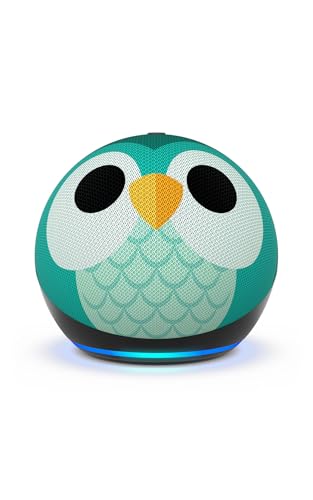
The Amazon Echo Dot Kids with the Owl design transforms modern smart audio into a kid-tailored acoustic hub. Retaining the recognizable spherical silhouette of the standard Dot platform, this edition pairs a kid-friendly visual aesthetic with proprietary software tuned specifically for young ears and curious minds. It bridges the gap between functional smart home utility and engaging, screen-free educational entertainment.
Built primarily for bedrooms, playrooms, and study areas, this speaker excels at spoken-word delivery and gentle ambient soundscapes. The curated integration with wellness platforms like Calm, Headspace, and Moshi turns chaotic bedtimes into predictable, soothing wind-down sessions. Parents gain peace of mind through an intuitive dashboard that automatically filters explicit lyrics across major streaming services while offering granular control over listening hours and active time limits.
During day-to-day playback, the speaker handles children's questions, interactive storytelling, and casual music listening with responsiveness and poise. Voice recognition proves sharp even across moderate room distances, allowing younger voices to trigger alarms, music, or educational trivia effortlessly without requiring shouted commands.
Ultimately, the Echo Dot Kids succeeds as a dedicated audio companion rather than a high-powered audiophile monitor. For families seeking an easy-to-manage, safe smart speaker that promotes daily routines and literary engagement, it stands out as one of the most cohesive solutions on the market.
From an acoustic standpoint, the Echo Dot Kids is engineered around a single front-firing dynamic driver calibrated to emphasize the vocal midrange. Dialogue in audiobooks, podcasts, and Alexa responses rings through with crisp clarity, free from boxy resonance or muffled sibilance. High frequencies remain smooth and rolled off slightly at the top end, ensuring long listening sessions remain fatigue-free during bedtime stories or afternoon study blocks.
Lower frequencies are present enough to provide warmth to acoustic instruments and pop melodies, though physical enclosure constraints prevent deep sub-bass extension. In a typical bedroom measuring 100 to 150 square feet, the speaker easily produces room-filling volume without noticeable harmonic distortion until pushed past eighty percent volume. For evening ambient noise and morning alarm duties, output levels are both pleasant and easy to dial in.
The physical construction features a sturdy spherical enclosure measuring 3.94 inches in diameter and weighing just 0.75 pounds. Wrapped in an acoustically transparent fabric bearing a detailed Owl motif, the speaker blends playful charm with resilient everyday durability. Rubberized feet on the base absorb minor driver vibrations while keeping the unit firmly anchored on smooth nightstands or bookshelves.
Physical controls sit along the top crest, including volume adjustment, action keys, and a dedicated microphone disconnect button that physically cuts power to the mic array for guaranteed privacy. Connectivity is driven by dual-band Wi-Fi and Bluetooth, supported by an external AC wall adapter for dependable, uninterrupted power delivery around the clock.
Complete Guide to Connecting an Amazon Echo Dot to an External Bluetooth Speaker
Connecting an Amazon Echo Dot to an external Bluetooth speaker routes all music, audiobooks, and podcasts to a secondary sound system while preserving Alexa voice commands. To establish the connection, place your external speaker into pairing discovery mode and open the Alexa app on your mobile device. Select your Echo Dot under the Devices menu, open Bluetooth Connections, and tap Connect a Device to pair them. Once linked, the external speaker handles all media streaming while the Echo Dot uses its own built-in microphone array to listen for voice prompts.
Essential Preparation and Pre-Pairing Device Checks
Preparing both audio devices beforehand helps avoid common pairing failures during initial setup. Ensure that your Echo Dot is connected to your local Wi-Fi network and functioning normally with standard voice inquiries. Power on your external Bluetooth speaker and verify that its internal battery is adequately charged or plugged into a wall outlet. Placing both devices in the same room within three to six feet of each other during setup ensures a strong initial wireless handshake.
Existing Bluetooth pairings on your external speaker can interfere with new connection attempts. Many portable speakers automatically connect to the most recently paired smartphone or laptop as soon as they turn on. Disconnect or temporarily turn off Bluetooth on nearby phones, tablets, and computers to keep the external speaker available for discovery. Activating the dedicated pairing button on your speaker will typically cause an indicator light to blink rapidly, signaling that it is ready to receive a connection request.
Environmental factors also influence wireless stability during pairing. Dense physical barriers such as brick walls, metal cabinets, and large household appliances can degrade the high-frequency radio signals used by Bluetooth protocols. Keeping the physical path between the Echo Dot and the secondary speaker clear minimizes potential signal dropouts. Following these basic physical checks creates a clean setup environment for the Alexa mobile application.
Step-by-Step Bluetooth Setup Through the Alexa App
The Amazon Alexa app provides the primary interface for managing hardware accessories linked to your Echo devices. Open the Alexa app on your iOS or Android smartphone and confirm that you are signed into the correct Amazon account. Tap the Devices icon located in the bottom navigation bar of the application home screen. Select the Echo and Alexa category at the top of the screen to reveal all smart speakers registered to your profile.
Locate the specific Echo Dot you want to configure and tap its name to access its individual device dashboard. Tap the settings gear icon in the top right corner, then scroll down to the Bluetooth Connections menu item. Select Bluetooth Connections to open the screen displaying all currently saved wireless audio devices. Tap the Connect a Device button to prompt your Echo Dot to begin scanning for active nearby Bluetooth broadcasts.
Your Echo Dot will scan the surrounding area for available audio hardware in pairing mode. When the name of your external Bluetooth speaker appears in the list of discovered devices, tap it to initiate pairing. Alexa will announce through the speaker that the connection is successful, and the Echo Dot will store the external speaker profile in memory. From this point forward, audio playback will automatically route to the paired external speaker whenever both units are active.
Using Alexa Voice Commands for Daily Connection Management
Managing your audio link does not require opening the smartphone app every time you want to listen to music. Once the initial pairing sequence is complete in the app, Alexa recognizes simple voice commands to control the Bluetooth link. Saying “Alexa, connect my speaker” instructs the Echo Dot to search for the most recently linked Bluetooth audio device. If the external speaker is powered on and within range, the Echo Dot reconnects within seconds and chimes to confirm.
Disconnecting the audio output is just as straightforward when you want sound to return to the internal speaker. Simply say “Alexa, disconnect my speaker” or “Alexa, disconnect Bluetooth” to sever the active wireless stream. The Echo Dot will confirm the disconnection verbally through its own internal speaker. Audio streams immediately revert to the Echo Dot internal hardware without interrupting your ongoing music queue.
If you have paired multiple external speakers over time, naming them clearly in the app improves voice accuracy. You can instruct Alexa to connect to a specific unit by saying “Alexa, connect to [Speaker Name].” The Echo Dot scans its stored pairing records and links directly with the named hardware profile. This hands-free flexibility makes switching between personal bedroom speakers and living room audio systems fast and convenient.
Understanding How Audio Routing Works During Wireless Playback
Understanding which audio elements route through the external speaker prevents unexpected listening surprises. Streamed media including music playlists, radio stations, podcast episodes, and audiobook chapters will play entirely through the external Bluetooth speaker. This separation allows you to enjoy higher output and richer frequency response from your dedicated music hardware. The Echo Dot acts purely as the digital streaming source and cloud controller during these listening sessions.
Alexa voice interactions follow a coordinated routing pattern to maintain natural conversations. Spoken answers, weather updates, news summaries, and skill audio are transmitted directly to the external speaker while the link is active. However, the Echo Dot continues to capture your spoken words using its own far-field microphone array. You must always speak toward the Echo Dot rather than the external speaker when giving voice commands.
System alerts such as timers and morning alarms behave with built-in redundancy for reliability. If the external speaker is connected, alarm tones typically sound through both the external speaker and the internal Echo Dot speaker. This dual-alert behavior prevents missed alarms if your external speaker runs out of battery or enters an idle standby mode overnight. Volume controls can be adjusted by asking Alexa to change the volume level or by adjusting the physical dial on the external speaker.
Dedicated Speaker Docks Versus Standard Bluetooth Speakers
While standard portable Bluetooth speakers offer great versatility, dedicated speaker docks present an alternative hardware approach. Products like the iHome iAV5 color changing rechargeable speaker are engineered specifically to integrate with compact smart pucks. These specialized docks feature a recessed cavity that holds the Echo Dot securely while keeping tabletop cable clutter to a minimum. They combine external amplification, ambient color-changing lights, and dedicated power connections into a single integrated chassis.
Dedicated docking systems often resolve common power delivery challenges found with standalone portable speakers. The iHome iAV5 design includes a dedicated micro-USB connection that powers the docked Echo Dot directly from the speaker base. An integrated passive radiator enhances low-frequency bass output beyond what small smart speakers can produce on their own. This setup keeps the smart puck permanently charged and ready for room-to-room portability around the house or out on a patio.
Form factor compatibility remains an essential consideration when choosing between a custom dock and a standard Bluetooth speaker. The iHome iAV5 dock is specifically built to fit puck-style second-generation Echo Dot hardware and will not accommodate spherical fourth- or fifth-generation shapes. Standard Bluetooth speakers, by contrast, connect wirelessly to any Echo Dot generation regardless of physical chassis shape or dimensions. Selecting between a form-fitted dock and a standalone speaker depends on your specific Dot hardware version and mobility preferences.
Managing Kids Editions, Sleep Studios, and Parent Dashboard Settings
Connecting an Amazon Echo Dot Kids model with Stardust or Owl styling involves unique parental management considerations. These child-focused smart speakers feature built-in parental safeguards, custom daily routines, and interactive learning features powered by Alexa. Parents often connect these units to external bedside speakers to play soothing ambient sounds or bedtime audiobooks with richer clarity. The setup process follows the same app pairing sequence but operates under the oversight of family management profiles.
The Amazon Kids Parent Dashboard allows caregivers to control and review audio content streamed to connected hardware. Parents can enable explicit lyric filters across supported music providers including Amazon Music, Apple Music, Spotify, and Pandora. Bedtime routines created in the app can trigger calming audio from the Sleep Studio, featuring content from wellness partners like Calm and Moshi. These soothing playlists stream cleanly to the paired external speaker while wind-down reminders encourage healthy sleep habits.
Hardware privacy controls remain fully accessible on the Echo Dot Kids chassis even while broadcasting over Bluetooth. The dedicated microphone disconnect button physically disengages the microphone array on the smart puck to prevent accidental voice activations. Two-year worry-free replacement guarantees provided with Kids editions apply strictly to the Echo hardware rather than third-party external speakers. Setting volume limits within the Parent Dashboard helps ensure external speaker playback remains at safe listening levels for younger ears.
Troubleshooting Disconnections, Signal Interference, and Audio Lag
The most frequent cause of unexpected disconnection involves power-saving sleep modes built into portable Bluetooth speakers. Many battery-powered speakers automatically shut down after ten to fifteen minutes of audio silence to conserve battery energy. When this occurs, the Echo Dot loses its wireless link and reverts to its internal speaker until manually reconnected. Keeping your external speaker plugged into wall power or adjusting sleep timers in the manufacturer companion app helps prevent automatic shutdowns.
Radio frequency congestion can cause intermittent audio dropouts, stuttering, or temporary connection drops. Bluetooth operates on the 2.4 GHz frequency band, which is also heavily utilized by standard home Wi-Fi routers, microwaves, and wireless baby monitors. If you experience choppy playback, moving your Echo Dot to a 5 GHz Wi-Fi network helps free up the 2.4 GHz band for Bluetooth transmission. Maintaining at least three feet of physical separation between your Echo Dot and your Wi-Fi router also reduces electromagnetic interference.
Audio latency can occasionally create slight synchronization delays between spoken prompts and audio playback. If you notice delay or distorted playback, disconnecting and re-pairing the device profile in the Alexa app often clears temporary buffer errors. Removing unused Bluetooth devices from the Echo Dot memory list also helps optimize connection stability. If you need sound for larger rooms or outdoor gatherings, using a dedicated Bluetooth speaker for large area playback can provide the necessary projection without pushing amplifier limits.
Bluetooth Output Versus Multi-Room Music and Stereo Pairing
Many owners confuse single Bluetooth output with Amazon native Multi-Room Music and stereo pairing features. When an Echo Dot pairs with an external Bluetooth speaker, it streams a single audio channel directly to that individual receiver. Multi-Room Music, by comparison, relies on home Wi-Fi networks to synchronize playback across multiple Amazon smart speakers simultaneously. The Alexa platform does not currently allow an Echo Dot to distribute audio to a Bluetooth speaker and a Multi-Room Wi-Fi group at the same time.
True stereo separation between two independent standalone Bluetooth speakers is also distinct from a single Echo Dot pairing. An Echo Dot can only transmit an active Bluetooth audio stream to one receiving speaker profile at a time. If you desire left and right channel stereo playback from an external system, you must configure a specialized dual speaker setup using speakers that feature proprietary True Wireless Stereo linking. In that arrangement, the Echo Dot connects to the primary master speaker, which then broadcasts the opposite audio channel to the secondary satellite unit.
Understanding these architectural differences helps you choose the right configuration for your room layout. For simple background listening in a home office or bedroom, a direct Bluetooth connection to a quality standalone speaker is easy to manage. For whole-home synchronization across multiple rooms, native Alexa speaker groups connected via Wi-Fi offer superior coordination without Bluetooth range constraints. Evaluating your acoustic goals ensures you select the most effective wireless setup for your listening environment.
Connecting an Amazon Echo Dot to a secondary Bluetooth speaker provides an immediate acoustic upgrade without sacrificing hands-free voice utility. Whether you link a high-output portable speaker through the Alexa app or mount a legacy unit into a dedicated docking station, the setup remains fast and dependable. Routine maintenance like clearing outdated pairings and managing speaker sleep modes ensures consistent daily performance. With your wireless connection properly configured, you can enjoy rich, room-filling sound across your favorite music playlists and smart home routines.


Write Your Review
No reviews yet. Be the first to share your experience!