


Setting up clear desktop audio often leads listeners to a frustrating choice between digital convenience and traditional analog cables. Static hiss, motherboard hum, and crowded desk ports can make listeners wonder whether are usb speakers better than 3 5mm for everyday listening and gaming. While standard analog plugs have dominated audio hardware for decades, digital connections route sound differently from your computer to the speaker drivers. Understanding how each connection handles audio conversion helps you choose the right configuration for your workspace.
Many modern workstations benefit from compact powered monitors, and exploring dedicated Bluetooth PC speaker options shows just how diverse desktop audio inputs have become. Choosing between USB and analog jacks comes down to where digital signals are decoded and whether your computer introduces electrical noise into the signal path. Both connection types offer distinct advantages depending on your motherboard hardware, audio source quality, and desk setup requirements.
Comparing USB and 3.5mm Audio for Desktop Speakers
Comparing both connection methods reveals that USB speakers excel at eliminating computer interference, while 3.5mm analog connections provide broader compatibility across audio hardware. A USB cable transmits digital data directly to an internal converter in the speaker, bypassing noisy computer soundcards. Conversely, a 3.5mm connection relies on the host device to decode and amplify the audio before sending it along a wire. The quality of your computer hardware determines which connection sounds cleanest.
The Fundamental Difference Between Digital and Analog Transmission
Audio files stored on a computer exist as numerical binary code. When speakers connect via USB, digital packets travel along the wire without undergoing analog conversion inside the computer chassis. Processing hardware inside the speaker cabinet handles the transition into sound waves. This digital transmission remains protected against electromagnetic interference generated by internal computer components.
A standard 3.5mm auxiliary cable operates on a different principle by carrying an active electrical voltage. The computer soundcard decodes the digital file first, sending an analog waveform through the headphone port. Because this voltage represents the actual sound wave, any electrical disturbance along the path directly alters the audio signal. This operational distinction explains why listeners frequently experience differing background noise levels between the two formats.
Maintaining a digital signal path until it reaches the speaker enclosure preserves source audio integrity. In setups featuring traditional passive speaker setups, separate external amplifiers and shielded converters manage these transitions carefully. Desktop speakers operate right beside dense electronics, graphics cards, and power supplies. Utilizing a USB connection removes opportunities for analog signal degradation along that desktop journey.
How Onboard Audio Interference Impacts 3.5mm Connections
Motherboards house graphics processors, memory modules, and power delivery circuits within tight dimensions. These fast-switching electronics emit electromagnetic radiation during heavy computational tasks. When an integrated sound chip shares space with these components, unshielded motherboard traces can absorb electrical chatter. Listeners often hear this noise as faint hissing, clicking, or high-pitched squealing that shifts when scrolling through web pages.
Demanding three-dimensional rendering and gaming introduce another issue known as GPU coil whine. Power delivery chokes on high-performance graphics cards vibrate under electrical load, inducing noise into nearby analog audio circuits. Because 3.5mm cables transmit raw electrical audio waveforms, that interference translates into unwanted noise at the speaker cone. USB audio remains immune to this problem because digital packets are not altered by minor electrical leakage.
Shifting the conversion process away from the motherboard creates a noticeably cleaner listening environment. USB speakers receive numeric audio packets through differential data lines that discard stray electrical noise. Even affordable desktop setups can achieve a quiet noise floor by bypassing integrated motherboard audio entirely. For users plagued by constant background hiss during quiet podcasts or movies, USB connections solve the root cause.
Digital-to-Analog Converters: Internal Versus External Processing
Every digital sound file requires a digital-to-analog converter, or DAC, before physical speaker drivers can produce sound. When plugged into a 3.5mm port, audio quality depends on the converter built into your computer, monitor, or phone. While premium motherboards feature respectable audio chips, budget laptops often rely on basic converters with limited dynamic range. If the onboard DAC produces muddy frequencies or harsh treble, connected 3.5mm speakers reproduce those flaws.
USB speakers house their own internal DAC and amplifier circuit directly inside the speaker cabinet. This self-contained architecture allows manufacturers to tailor the digital converter to the exact acoustic parameters of the drivers. A well-matched internal DAC can produce balanced frequency response and low harmonic distortion tailored to that enclosure. However, the quality of this hardware varies across brands, meaning cheap USB speakers may contain basic converters.
Choosing between USB and 3.5mm often comes down to which converter in your setup provides higher fidelity. If you own a dedicated sound card or an external audio interface, its 3.5mm analog output will likely outshine an entry-level USB speaker. On the other hand, if your current source is an office laptop with a noisy headphone jack, a USB speaker offers an immediate upgrade. Assessing your existing sound hardware helps determine whether external digital decoding is necessary.
Power Delivery and Cable Management Differences
A notable benefit of USB speakers is their ability to carry digital audio and DC electrical power across a single cord. Standard USB ports provide 5 volts of direct current, enabling compact desktop speakers to run without an external power brick. This streamlined design reduces cable clutter around computer desks and simplifies portable workstations. For mobile users moving between desks, a single connection for power and sound is convenient.
Relying exclusively on USB bus power introduces clear limitations regarding volume output and bass impact. Standard USB ports supply limited electrical wattage, which restricts amplifier output and dynamic headroom during demanding musical passages. When heavy bass notes demand quick bursts of current, underpowered amplifiers can clip and distort. Speakers equipped with dedicated wall adapters, whether using 3.5mm or USB connections, provide significantly fuller acoustic power.
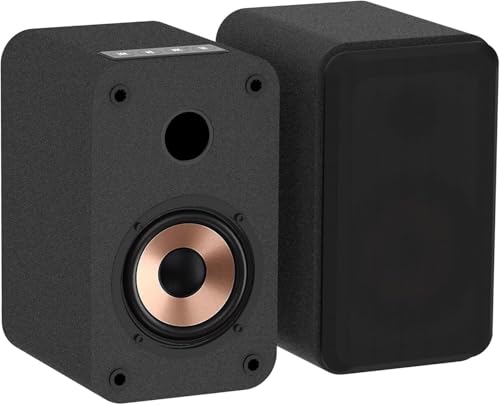
Active desktop monitors like the LONPOO Blueooth Computer Speakers for Desktop PC resolve this power dilemma by using dedicated wall power alongside versatile input options. The manufacturer specifies this active bookshelf model as delivering 30W RMS output with a 3-inch full-range speaker, ensuring ample acoustic power without draining computer ports. It supports USB playback while retaining standard auxiliary inputs and a front-facing 3.5mm earphone port. Independent electrical power guarantees dynamic stability across both digital and analog listening modes.
Universal Device Compatibility and Port Availability
Universal compatibility remains the primary strength of standard 3.5mm audio connections. This legacy interface exists on smartphones, portable gaming consoles, televisions, monitors, and audio mixers without needing software setup. You can unplug a 3.5mm cable from a desktop tower and immediately connect it to a mobile tablet or digital piano. For listeners who regularly swap speakers between different hardware platforms, analog connections provide effortless flexibility.
USB speakers require a compatible host system running an operating system with native USB Audio Class support. Desktop operating systems like Windows and macOS handle these devices automatically, but specialized electronics often lack compatible drivers. Smart televisions, standalone media streamers, and gaming consoles do not always route digital audio through generic USB ports. If your entertainment space relies on multiple media devices, a speaker restricted strictly to USB may limit your connection options.
Available port space on modern computers also dictates which connection makes practical sense. Laptops and compact desktop cases often feature limited USB ports, which quickly fill up with external storage, mice, and webcams. Dedicating a fast USB port exclusively to computer speakers may require purchasing an external expansion hub. In contrast, the 3.5mm audio jack rarely conflicts with other computer accessories, keeping your data ports available for daily tasks.
Latency, Control Integration, and Two-Way Communication
USB operates as a bidirectional communication bus, allowing speakers to interact directly with the computer operating system. Adjusting a physical volume dial on a compliant USB speaker automatically updates the system volume slider on your screen. USB connections also support synchronized mute controls, software equalizer profiles, and firmware improvements from the manufacturer. Analog 3.5mm cables can only transmit audio outward, leaving your operating system unaware of physical adjustments made on the speaker.
Signal latency differences between both formats can influence time-sensitive activities like gaming and audio monitoring. A 3.5mm analog connection transfers electrical waveforms instantaneously with no digital buffering. USB audio introduces a tiny processing delay as the operating system packages digital samples and transmits them across the bus to the speaker controller. In general multimedia playback and video streaming, this minor delay remains completely imperceptible to human ears.
Competitive gamers and musicians monitoring live microphone feeds may prefer analog lines to ensure minimal processing lag. While standard USB Audio Class drivers keep latency well under noticeable thresholds, specialized audio monitoring often favors zero-latency analog routing. For standard desktop gaming, movie watching, and everyday office use, USB processing speeds perform reliably without timing issues. Matching the connection type to your specific workflow ensures your audio remains responsive.
Ground Loops and Electrical Hum: Diagnosing Connection Noise
Desktop computer setups frequently suffer from an irritating low-frequency hum caused by ground loops. This issue commonly appears when budget speakers draw USB power from a computer while simultaneously taking audio from the computer 3.5mm headphone jack. Because both cables link to the same internal electrical ground, a circular current loop forms between the audio and power paths. Small differences in ground potential create a steady 60Hz hum or static buzz that intensifies under processor load.
Dedicated USB speakers eliminate this specific ground loop trap by handling power and audio through a unified, engineered circuit path. When digital packets travel across the USB line, there is no separate analog audio ground to create circular electrical interference. If you currently experience buzzing from a 3.5mm speaker powered by USB, plugging the power cable into an external wall charger often silences the hum. Alternatively, switching to an integrated USB audio connection eliminates the problem permanently.
Analog cables also face physical wear, oxidation on plug contacts, and bent connector pins over time. A loose or damaged 3.5mm jack can introduce crackling sounds when touched, uneven stereo balance, or signal cutouts. Modern USB connectors feature robust outer shells that maintain secure physical retention inside the port. While USB cables can fail if strained, they do not suffer from the scratchy static typical of aging analog connectors.
Practical Setup Scenarios: Choosing the Right Connection
Minimalist laptop workstations represent one of the best applications for dedicated USB audio hardware. Many modern portable computers omit standalone audio ports or use combined headphone jacks that struggle to drive desktop speakers cleanly. Running a single USB cable provides the laptop with clean sound while keeping desktop surfaces tidy. Listeners seeking speakers built for high fidelity sound frequently prefer digital connections in tight spaces to bypass mediocre laptop sound hardware.
Complex gaming desks and media centers often demand the broader flexibility that analog auxiliary inputs provide. When your desk accommodates a PC tower, an external gaming console, and a display monitor, 3.5mm routing simplifies multi-device management. Connecting your monitor audio output directly to a speaker auxiliary port allows any active console to play through the speakers without software configuration. Having analog connectivity ensures that non-computer hardware integrates smoothly into your sound setup.
Hybrid speaker designs that include both digital and analog interfaces provide the best solution for diverse desktop needs. Modern active bookshelf systems frequently integrate Bluetooth, USB playback, and auxiliary inputs within a single pair of enclosures. The LONPOO Blueooth Computer Speakers for Desktop PC illustrate this versatility by pairing plug-and-play USB playback with auxiliary inputs and a dedicated 3.5mm headphone port. Having multiple input formats enables digital computer listening while keeping analog ports available for secondary devices.
Practical Recommendations for Cleaner Desktop Audio
Determining whether USB speakers are better than 3.5mm comes down to identifying the specific weak point in your current audio chain. If your current speakers suffer from motherboard buzzing, background hiss, or electrical interference through an analog port, USB provides an immediate fix. The digital boundary blocks electromagnetic noise and ensures audio data reaches the internal converter uncorrupted. If your computer analog output is already quiet and clear, switching to a basic USB speaker will not noticeably change sound quality.
A speaker overall acoustic performance depends far more on driver design, cabinet construction, and clean amplification than on the connection jack alone. A well-engineered speaker using a standard 3.5mm cable will easily outperform a cheap, plastic USB speaker with undersized drivers. Quality 3-inch drivers, solid acoustic enclosures, and capable power output contribute much more to musical clarity and dynamic range than transmission protocols. Always prioritize overall acoustic build quality over connection type when choosing desktop audio.
Before purchasing new desktop speakers, test your existing computer ports with a pair of wired headphones. Listening through headphones reveals whether audio interference originates from your computer soundcard or from an unshielded speaker cable. If the headphone audio is completely silent and crisp, your computer analog output can comfortably drive quality analog speakers. If static or interference is immediately noticeable through the headphones, choosing a USB audio connection is the most reliable way to achieve clean desktop sound.


Write Your Review
No reviews yet. Be the first to share your experience!