


Tabletop and portable radios often feature small built-in drivers that struggle to produce clear speech and balanced sound. If you already have a set of powered computer monitors or a desktop soundbar on your desk, you might wonder whether you can route your broadcast listening through them. The short answer to whether can i use desktop speakers with a radio is yes, provided your radio and speakers share compatible audio connections and proper power delivery. Many listeners pair an analog tuner or communications receiver with desktop audio speakers for music to achieve fuller fidelity without purchasing a dedicated stereo receiver.
Success depends entirely on the physical ports available on both devices. Standard active speakers with an auxiliary input or dual RCA connectors can easily receive signals from a headphone jack or line-level output. However, compact digital speakers that rely entirely on a USB data cable cannot interpret audio directly from a standard radio port. Understanding these audio signal differences helps you connect your equipment safely, prevent distortion, and enjoy static-free broadcasts throughout your room.

Pros
- True plug-and-play setup requiring no software drivers or 3.5mm audio cables
- Included USB-C adapter ensures instant compatibility with modern Apple and PC laptops
- Intuitive top-mounted capacitive touch controls for quick volume and mute adjustments
- Clear vocal reproduction and wide stereo field driven by internal DSP decoding
Cons
- Lacks wireless Bluetooth capability for cord-free phone streaming
- Requires a powered USB port to function since there is no internal rechargeable battery
- Compact 2-inch drivers cannot replace the deep sub-bass of a standalone subwoofer
The XKX Computer Sound Bar is a streamlined audio upgrade engineered to resolve the weak, muffled sound typical of modern desktop monitors and laptops. Featuring dual 2-inch full-range drivers and an integrated digital sound processing chip, this 8-inch sound bar fits neatly beneath your screen to reclaim valuable desk territory while delivering clean stereo imaging.
Designed specifically for office workers, students, and everyday content consumers, this speaker makes setup effortless. Unlike traditional computer speakers that require separate power bricks and 3.5mm auxiliary cords, this unit channels digital sound and electrical power through a single USB cable. An included USB-C adapter guarantees smooth plug-and-play operation across Windows desktops, MacBooks, Chromebooks, and tablets without manual driver installations.
In practical daily use, the speaker shines during video calls, webinars, and streaming entertainment. Dialogue comes through crisp and intelligible, preventing listener fatigue during lengthy conference calls. While it does not deliver the window-rattling rumble of a separate home theater subwoofer, the acoustic bass port provides a respectable thump that brings energy to music playlists and casual gaming sessions.
Overall, this compact audio bar is a dependable, cost-effective desk companion that replaces wire clutter with crisp digital performance. If you want hassle-free installation, intuitive touch controls, and clear sound directly from your computer, this streamlined speaker earns an enthusiastic recommendation for any workspace.
Powered by an onboard high-definition DSP decoding chip, the speaker delivers 10W of clear, uncompressed digital sound. The 2.0-channel architecture provides remarkable stereo separation, giving music tracks and video scenes a much broader desktop soundstage than integrated laptop speakers can muster. Vocal clarity is especially impressive, rendering speech transparently even when background game music or video effects are active.
Low-end frequencies receive a noticeable lift thanks to an engineered bass-boosting acoustic port. This specialized chamber optimizes the airflow from the dual 2-inch drivers, providing tight, responsive bass that avoids muddy resonance. While audiophiles seeking subsonic bass will still want a dedicated woofer, this small enclosure produces a full, rhythmic low end that punches well above its compact size.
Because the audio signal travels directly over a wired USB connection rather than over the air, users experience zero latency and complete freedom from wireless interference. Volume levels get surprisingly loud without breakup or harsh distortion at peak levels, making it easy to fill a home office, dorm room, or study nook with clean sound.
Built with a space-saving horizontal profile, this 8-inch speaker measures just 2 by 8.4 by 2.8 inches, allowing it to slide effortlessly beneath computer monitors or laptop stands. The matte black finish offers a discreet, professional aesthetic that blends seamlessly into minimalist office environments, while the sturdy enclosure keeps vibrations from rattling your desk surface.
Instead of relying on an internal battery that eventually degrades over time or requires constant recharging cycles, this unit operates on continuous USB bus power. Drawing power directly from your computer or hub means you will never face unexpected shutdowns in the middle of an important video meeting or media session. It is always charged, always connected, and ready when you are.
Daily interaction is made effortless by three touch-sensitive controls positioned conveniently on the top panel. Light taps allow you to raise the volume, lower it, or mute your system instantly without fumbling for keyboard shortcuts or operating system menus. Combined with the bundled USB-C adapter, this durable, cable-efficient design ensures reliable performance wherever your laptop setup travels.

Pros
- Distortion-free surge stereo sound with immersive cinema-like effects
- Space-saving compact design fits under monitors without clutter
- Effortless plug-and-play with no drivers needed
- Unique touch lights enhance gaming desk aesthetics
- Easy volume control and broad OS compatibility
Cons
- Wired 3.5mm audio connection limits wireless freedom
- Relies on USB power from host device with no built-in battery
- Lights may distract in quiet office environments
The LENRUE G11 is a compact pair of desktop computer speakers designed for PC users who want powerful sound without sacrificing desk space. Featuring four large amplifier IC horns, it delivers surge stereo audio that's perfect for everyday computing tasks like video calls, streaming, and light gaming.
Targeted at home office professionals, gamers, and anyone with a cluttered desk, these speakers slip neatly under your monitor. The glued-together cables and all-in-one design keep your workspace organized, while the touch controls add a modern gaming flair without complicated buttons.
In real-world use, the G11 shines with clear, noiseless sound that enhances movies and music without distortion, even at higher volumes. Setup is truly plug-and-play, connecting via USB-C for power and 3.5mm for audio across Windows, Mac, and Chrome OS systems.
Overall verdict: A top pick for budget-conscious desktop users seeking reliable, immersive audio in a tiny footprint. It transforms ordinary PC sound into something engaging and fun.
The LENRUE G11 boasts surge stereo sound powered by four amplifier ICs, providing distortion-free and noiseless audio with an immersive cinema effect. Vocals come through with excellent clarity, making it great for videos, podcasts, and calls, while the stereo separation adds depth to music and games.
Volume levels reach desk-filling heights without breakup, thanks to the robust amplification. Though wired via 3.5mm, the connection delivers stable, low-latency performance ideal for gaming where Bluetooth lag isn't an issue.
Bass response is punchy for its size, punching above weight for desktop use, though it won't rival larger tower speakers. Expect consistent clarity across mids and highs for everyday productivity and entertainment.
The G11's compact, all-in-one design measures just right to fit under most monitors, with glued cables preventing tangles and desk mess. Touch angular game lights offer one-tap on/off for a dynamic RGB glow that elevates gaming setups without bulk.
Built tough for daily desk duty, it lacks an IP rating but handles typical home office vibrations well. Weighing lightly, it's easy to position and reposition as needed.
USB-C powered directly from your PC or laptop, it offers unlimited playback as long as your device is on, eliminating battery concerns or recharging downtime. No separate charging needed, making it always ready for extended sessions.


Pros
- Combined audio and power via a single USB cable eliminates messy desktop power cords
- Padded monitor clamp mounts firmly on top or bottom bezels without scratching screens
- Dual EQ presets make speech significantly easier to hear during calls and podcasts
- Low-latency digital wired link prevents audio lag during video playback and gaming
Cons
- Does not feature a built-in microphone for voice chat or video conferencing
- Not compatible with Xbox consoles, smart TVs, or monitor pass-through USB hubs
- Compact enclosure naturally limits ultra-low sub-bass rumble in heavy action movies
The ABRRU 14W Computer Speaker provides an elegant solution for users tired of tinny integrated laptop speakers and bulky desktop soundbars that consume precious workspace. Engineered to clamp directly onto your display, this ultra-compact soundbar elevates your personal acoustic space while maintaining a tidy, minimalist footprint. It is purposefully crafted for remote professionals, college students, and casual desktop gamers who demand clear sound without cable clutter.
In everyday use, the unit excels in convenience and immediate utility. Featuring an integrated 2-in-1 USB-C and USB-A cable, the speaker handles both high-resolution digital audio streaming and bus power via one cord. Setup requires zero drivers, allowing seamless plug-and-play compatibility across Windows desktops, MacBooks, Chromebooks, and PlayStation 5 consoles. The absence of an external power brick is a massive convenience for power-strip management.
Daily control is smooth and modern. The speaker faceplate is wrapped in a tactile acoustic fabric with integrated touch-sensitive controls. A simple tap lets you adjust volume or mute sound instantly, while holding the mute sensor toggles between two tailored equalization profiles. Whether you are sorting through morning emails with a podcast in Vocal Mode or firing up an evening gaming session in Bass Mode, tonal adjustments happen in seconds.
While it is not designed to replace high-wattage multi-channel studio monitors, this clip-on speaker achieves an impressive balance of vocal clarity, punchy output, and space-saving hardware design. For anyone seeking a practical, reliable desktop audio upgrade at an approachable entry point, it delivers solid performance that easily outclasses factory display speakers.
Acoustically, the ABRRU soundbar is driven by dual custom 1.77-inch neodymium full-range transducers coupled to an exposed front-firing passive bass diaphragm. Neodymium motor assemblies deliver swift transient response, reproducing upper-midrange details and treble frequencies with clarity and low harmonic distortion. High frequencies remain smooth and open, avoiding the harsh sibilance often found in standard plastic desktop speakers.
The dual hardware EQ modes allow users to fine-tune the frequency response to match their media. In Vocal Mode, the low-end frequencies are contoured to prioritize speech clarity, making virtual meetings, YouTube tutorials, and dialogue-heavy dramas crisp and easily intelligible. Switching to Bass Mode deepens the mid-bass presence, lending rewarding body and impact to music tracks, game effects, and cinematic soundtracks.
Because the speaker operates directly facing the listener in the near field, stereo separation is coherent and focused. The 14W peak audio output easily fills small to medium-sized home offices without breaking into audible clipping at high listening levels, offering a substantial acoustic leap over factory monitor speakers.
The physical design of this desktop speaker centers on ergonomic efficiency and desk decluttering. Measuring 1.69 by 8.82 by 3.46 inches and weighing under eleven ounces, its slim profile mounts neatly on flat or curved computer monitors. The spring-loaded mounting clamp opens up to 1.38 inches (3.5 cm) and features soft protective silicone pads that grip display frames tightly without marking or scratching your screen.
Hardware build quality feels durable, combining an impact-resistant polymer body with an attractive woven mesh grille that enhances sound transparency. Touching the top fabric surface provides quick access to mute and volume adjustments without needing to navigate desktop software menus.
Connectivity relies on a dedicated 55-inch (1.4m) high-grade cable wired with a tinned copper core and magnetic shielding. This design shields the audio signal from static, radio frequency interference, and latency issues, ensuring video and audio stay in perfect lockstep. Power is drawn directly from the host USB port, meaning no wall adapters are needed for everyday operation.
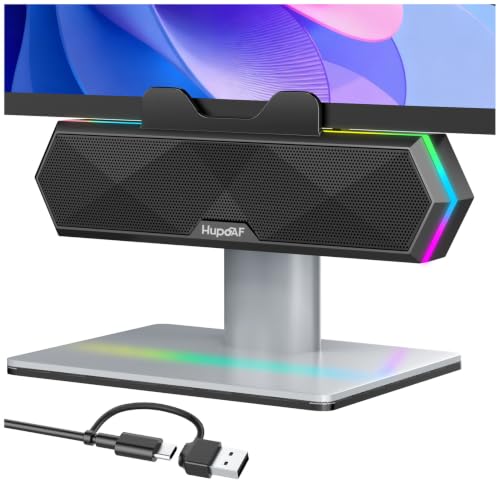

Pros
- Multiple high-res inputs including 24-bit USB-C DAC, optical, AUX, and Bluetooth 5.3
- Front-mounted physical dials make treble, bass, and volume tuning effortless
- Dedicated silk-dome tweeters deliver clean, fatigue-free vocal clarity
- Compact footprint fits neatly on small to medium workstation desks
Cons
- Powered via AC wall outlet, so it cannot be used as an outdoor portable unit
- Does not include an infrared remote control for across-the-room adjustments
- Lacks the sub-bass rumble found in systems with a standalone dedicated subwoofer
The IBALL·BOX H1 is a dedicated 2.0 powered desktop speaker system engineered to solve the problem of thin, muffled audio produced by modern computer monitors and laptops. Built for home office professionals, PC gamers, and students, this setup delivers a serious acoustic upgrade without commanding excessive desk real estate. Its clean matte black finish blends effortlessly into contemporary workstations, giving you a refined audio hub that looks right at home next to your display.
In daily use, the standout advantage is its plug-and-play versatility. Thanks to an integrated 24-bit USB-C DAC, connecting to a computer requires only a single cable for pristine digital decoding, bypassing noisy internal motherboard sound cards. In addition, optical and 3.5mm AUX inputs let you hook up consoles, streaming boxes, or secondary devices simultaneously, while modern Bluetooth 5.3 allows instant pairing with your smartphone when you want to switch from work tasks to casual listening.
Hands-on tone shaping is made simple through hardware knobs conveniently located on the front panel. Instead of digging through software menus or operating system equalizers, you can quickly trim the treble during harsh conference calls or boost the bass for gaming action and movie streaming. The system achieves a balanced frequency response from 40Hz to 20KHz, offering an articulate soundstage that makes vocals pop and sound effects hit with satisfying impact.
Ultimately, the IBALL·BOX H1 hits the sweet spot for everyday PC users seeking richer stereo performance without the clutter of bulky subwoofers or external amplifiers. With its robust wired connectivity, flexible wireless options, and dedicated driver pairing, this speaker stands out as a dependable, high-value addition to any modern desktop arrangement.
Performance on the IBALL·BOX H1 centers on a dedicated two-way driver configuration featuring dual 3-inch carbon-fiber woofers paired with dual 1-inch silk-dome tweeters. The silk-dome tweeters produce smooth, shimmering highs that reveal fine details in music and vocal recordings without introducing piercing sibilance. Dialogue in video calls, podcasts, and competitive gaming callouts remains clear and intelligible even at lower listening volumes.
On the low end, the carbon-fiber cones work in tandem with rear-firing bass reflex ports to deliver punchy, controlled mid-bass. While it does not recreate the floor-shaking rumble of a giant standalone subwoofer box, the low frequencies are tight, quick, and free from muddy resonance. With 60W of total output and a signal-to-noise ratio of at least 95dB, the speaker provides plenty of headroom to fill average-sized bedrooms and home offices with loud, undistorted audio.
Wireless connectivity is backed by Bluetooth 5.3, which ensures rapid pairing, minimal latency, and consistent audio streaming from smartphones, tablets, or laptops. You can step across the room without worrying about dropouts or choppy playback, making it just as practical for relaxed background music as it is for intense, wired desktop gaming sessions.
Measuring approximately 5.39 by 4.57 by 7.09 inches, the IBALL·BOX H1 speaker cabinets are engineered specifically for tight desktop spaces. The dense enclosure helps isolate vibrations, keeping your desk steady during high-volume playback. Its understated aesthetic avoids aggressive gaming styling, allowing it to integrate cleanly into professional corporate workstations, creative studios, and minimalist battlestations alike.
Because this system is an AC-powered desktop monitor pair, it does not rely on an internal rechargeable battery. This stationary power architecture means you never have to deal with battery drain, degradation over time, or charging downtime during marathon workdays and extended gaming nights. Simply connect the power cable to a wall outlet or surge protector for continuous, uninterrupted audio delivery.
While this unit is designed strictly for indoor desktop use rather than portable outdoor conditions with waterproof IP ratings, the sturdy build quality resists daily wear and tear. Tactile front dials for volume, bass, and treble provide immediate physical feedback, ensuring smooth operation and long-term durability on your desk.

Pros
- Unmatched input variety including Micro SD, USB flash drive, and 3.5mm AUX ports
- Impressive vocal clarity and volume output for a desktop-friendly speaker
- Built-in FM tuner lets you enjoy local broadcasts without needing a phone connection
- Solid, lightweight build with intuitive top-mounted physical control buttons
Cons
- Operates on older Bluetooth 3.0 technology instead of modern wireless versions
- No digital LED screen to display FM radio frequencies during station tuning
- Lacks an IP water resistance rating, making it best suited for indoor use
The i-Tentek DY22 is a multi-functional sound system designed to bridge the gap between traditional audio media and wireless streaming. Featuring dual acoustic drivers with passive bass enhancement, this compact unit serves as a versatile tabletop centerpiece for bedrooms, garages, and home offices. Rather than forcing you to rely exclusively on a phone connection, it offers remarkable independence by playing music directly from physical storage cards or over-the-air radio stations.
This speaker is built for listeners who prioritize everyday convenience and audio flexibility over overly complex smart features. It is a fantastic match for workshop hobbyists, students in dorm rooms, or anyone who keeps a personal music library stored on a thumb drive or Micro SD card. Setup is virtually instantaneous, allowing users of all tech backgrounds to power on and start enjoying audio within seconds.
In practical daily testing, the audio output punches above its physical size, easily filling small to medium rooms with clear, articulate sound. The physical button controls on top are tactile and responsive, making it simple to toggle inputs, answer hands-free phone calls, or skip tracks. While tuning radio stations requires patience without a visual screen, reception remains steady once your favorite local station is locked in.
Ultimately, the i-Tentek delivers reliable, multi-source audio at an approachable entry point. If you want a dependable indoor audio companion that can switch from streaming podcasts to playing albums off a memory card without missing a beat, this speaker offers great overall utility.
Powered by two 10-watt acoustic drivers paired with a central passive radiator, this speaker focuses on delivering clean, balanced sonic output. Midrange frequencies are prominently featured, ensuring that podcasts, audiobooks, and vocal-heavy music genres sound warm, present, and natural. Bass response is sufficient to give acoustic and pop tracks enjoyable body without overwhelming the soundstage.
Volume levels are surprisingly potent for a desktop-sized enclosure. The internal acoustic tuning keeps distortion minimal even when pushing the volume to fill a living room or garage workspace. It provides plenty of headroom for casual house gatherings, family dinners, or personal background music during busy workdays.
Wireless performance offers stable audio transmission across standard indoor distances. While utilizing an earlier wireless protocol, it reliably maintains playback from smartphones, tablets, and computers. For zero wireless latency, the included auxiliary input and onboard USB and SD card slots provide instant, lossless physical playback.
Measuring 8.7 inches long and weighing an easy-to-carry 1.4 pounds, the speaker sports a streamlined cylindrical design that slides easily into a backpack or rests comfortably beneath a computer monitor. The dual-tone finish adds a modern touch to shelves and side tables, while rubberized base feet keep the unit firmly planted during high-volume playback.
Because this model lacks a certified waterproof or dustproof rating, it is primarily engineered for indoor spaces, covered patios, and dry environments. It handles routine daily handling with ease, but it should be kept safely away from poolside splashes, heavy humidity, and sudden rain showers.
Power is supplied by an internal 2200mAh rechargeable lithium battery that provides between 8 to 10 hours of continuous playtime at moderate listening levels. Recharging via a standard USB cable is quick and hassle-free, ensuring the speaker is always primed to power your workday soundtrack or weekend relaxation sessions.
Connecting Desktop Speakers to a Radio: Compatibility, Cables, and Setup
Active desktop speakers can easily elevate the listening experience of an AM, FM, shortwave, or internet radio broadcast. Most standard radio units feature built-in amplifiers tuned for small internal drivers, which can leave voice news muffled and music lacking low-end presence. Routing the tuner signal to external desktop speakers solves this issue immediately by providing dedicated amplification and wider frequency separation. The entire setup hinges on matching the radio audio output with the speaker input while managing electrical power and potential interference.
Understanding Radio Audio Output Types
Before choosing cables or adjusting settings, inspect the rear and side panels of your radio to identify the available output ports. The most common connector on modern and vintage radios is a standard 3.5mm stereo or mono headphone jack. Some larger tabletop tuners and communications receivers also provide dual RCA line-out jacks or a dedicated 3.5mm auxiliary line output. Each output type delivers an audio signal at a specific voltage level, which dictates how you will configure your system.
Headphone jacks provide a variable output signal controlled by the physical volume dial on the radio chassis. A dedicated line-out port, in contrast, delivers a fixed line-level signal designed to feed an external amplifier or active speaker system directly. Using a line output provides the purest audio signal because it bypasses the radio internal headphone amplifier circuitry. If your radio only offers a headphone jack, you can still use it successfully by keeping the radio volume dial within a moderate operating range.
Desktop Speaker Input Compatibility and Port Standards
Desktop speakers generally fall into two categories: analog-capable active monitors and pure USB digital speakers. Traditional active computer speakers include a 3.5mm auxiliary input jack or dual RCA inputs on the master speaker enclosure. These models house an internal preamplifier and power amplifier that readily accept analog signals from portable radios, tuners, and mobile devices. Models with multiple inputs make switching between a computer workstation and a radio tuner seamless.
Higher-end powered stereo pairs often provide both 3.5mm auxiliary and dual RCA connections on their rear interface plate. Having both options makes it easy to leave your computer connected to one port while routing the radio signal into the other. Some desktop monitors also feature input selection switches that allow you to toggle sources without unplugging cables. Many listeners choose flexible multimedia speaker setups for this exact reason when building versatile desk arrangements.
Why Pure USB Digital Speakers Cannot Connect to Radios
Pure USB speakers represent a major compatibility trap for radio listeners attempting desktop integration. These compact soundbars and speaker pairs contain an integrated digital-to-analog converter that requires an active operating system host to function. Operating systems such as Windows, macOS, ChromeOS, or Linux communicate with the internal digital sound chip via software drivers. A standalone radio does not have an operating system or the software drivers needed to transmit digital audio streams over USB.
Many modern tabletop and emergency radios feature USB-A ports, which often creates confusion for buyers. On a radio, a USB port almost universally functions as an input for MP3 playback from flash drives or as an emergency power bank output. The radio hardware cannot route its internal AM or FM tuner audio stream outbound through that USB socket. If a desktop speaker only has a single USB cable for both power and sound, it cannot produce audio from a radio.
Powering Desktop Speakers Independently from the Radio
Unlike passive stereo speakers that draw wattage directly through speaker wire from a receiver, desktop speakers require their own electrical power source. Many larger desktop systems use an internal power supply connected to a standard AC wall outlet via a two-prong or three-prong cord. Smaller desktop soundbars and compact pairs often draw operating power through a 5V USB cable. This distinction affects where and how you place your equipment relative to power outlets.
When using USB-powered speakers alongside a radio, power delivery must remain separate from the audio path. You should connect the speaker USB power cable to a reliable USB wall adapter rather than attempting to power it from an unverified radio port. Some radios feature USB ports that lack sufficient amperage to handle dynamic audio peaks, causing the speaker to cut out during loud passages. Using a dedicated wall charger ensures the speaker internal amplifier receives clean, steady current at all times.
Selecting Audio Cables and Adapters for Stereo and Mono
Connecting an analog radio to desktop speakers usually requires simple, widely available audio interconnects. If both your radio and desktop speakers feature standard 3.5mm jacks, a basic 3.5mm male-to-male stereo auxiliary cable is all you need. For radios equipped with RCA line outputs, you will need a 3.5mm to dual-RCA stereo cable, matching the red and white plugs to the corresponding output channels. Selecting well-shielded cables helps protect the delicate analog signal from ambient electronic noise.
Vintage radios and older portable shortwave receivers often use a mono 3.5mm or 1/4-inch headphone output. Plugging a standard stereo 3.5mm cable into a mono jack can result in sound playing through only one speaker channel. In this scenario, using a mono-to-stereo adapter or a 1/4-inch to 3.5mm converter splits the single broadcast channel evenly between both desktop drivers. These inexpensive gold-plated adapters ensure a snug mechanical fit without degrading audio frequency response.
Wireless Bluetooth Pairing Options and Transmitters
Modern desktop audio setups frequently incorporate wireless connectivity to eliminate cable clutter. If your radio includes an integrated Bluetooth transmitter, you can pair it directly with Bluetooth-capable desktop speakers or soundbars. The pairing process typically involves setting the speakers to discovery mode and confirming the connection through the radio menu. This setup provides flexible placement, allowing the radio to sit near a window for optimal reception while the speakers remain on your desk.
For traditional analog radios that lack built-in wireless capability, an external Bluetooth audio transmitter provides an easy bridge. These small battery-powered or USB-powered transmitters plug directly into the radio 3.5mm headphone jack. Once paired with wireless Bluetooth desktop speakers, the transmitter broadcasts the radio audio stream across the room without latency issues. This method keeps desktop surfaces tidy while giving older hardware modern streaming convenience.
Eliminating Ground Loops, Electrical Hum, and Interference
Electromagnetic interference is one of the most frustrating challenges when combining radios with desktop computing gear. Desktop speakers with switching power supplies, unshielded audio leads, or active digital signal processors can radiate high-frequency noise. This electronic interference often manifests as buzzing, clicking, or steady background hiss across the AM band and weaker FM stations. Placing the radio tuner at least a few feet away from the speaker power adapters minimizes this stray radiation.
Ground loops present another common noise issue when both the radio and powered speakers plug into wall outlets. A ground loop creates an audible 60Hz hum that persists regardless of the radio volume setting. If you experience this persistent hum, installing an inexpensive 3.5mm ground loop isolator between the radio output and speaker input breaks the ground path while passing the audio cleanly. Snapping clip-on ferrite cores onto the audio and power cables further suppresses unwanted radio frequency interference.
Proper Gain Staging and Volume Balancing
Achieving clean sound quality requires proper gain staging between the radio output and the desktop speaker amplifier. When using a radio headphone jack, the audio signal passes through the radio internal volume control before reaching the external speakers. Setting the radio volume knob too high forces the internal headphone amplifier into clipping, resulting in harsh, distorted audio from the desktop drivers. Conversely, setting the radio volume too low forces the desktop speaker amplifier to work harder, amplifying baseline thermal hiss.
The ideal setup procedure begins by setting the desktop speakers to approximately half volume. Next, adjust the radio volume control slowly upward until the broadcast sounds clear and full without any crackling or harshness. Once this sweet spot is established, use the desktop speaker physical knob or remote control for daily volume adjustments. This division of labor keeps the signal clean while preventing distortion during high-energy radio announcements or musical peaks.
Audio Equalization and Dialogue Clarity for Broadcasts
Broadcast radio content differs significantly from modern compressed streaming audio files and digital music tracks. News, talk radio, and sports programming concentrate acoustic energy in the vocal midrange frequencies between 300Hz and 3,000Hz. If your desktop speakers have pronounced bass tuning or a dedicated subwoofer, male voices can sound boomy or unnaturally thick. Adjusting your speaker tone controls helps tailor the sound profile specifically for broadcast listening.
Many powered desktop speakers include physical bass and treble adjustment knobs on the front or side panel. Dialing back the bass knob slightly eliminates cabinet resonance and chesty boom during extended talk radio listening. Boosting the treble slightly can improve consonant articulation, making fast-paced sports commentary and distant AM news broadcasts easier to understand. If your speakers feature preset equalizer modes, switching from movie mode to dialogue or vocal mode provides an immediate clarity boost.
Troubleshooting Weak, Distorted, or One-Sided Sound
If you connect your radio to desktop speakers and hear no sound at all, systematically verify each connection point. Ensure the desktop speakers are turned on, switched to the correct auxiliary input mode, and receiving adequate electrical power. Check that the audio cable plug is seated completely into both the radio output jack and the speaker input port, as partial insertion can cut the connection. Testing the speaker auxiliary input with a smartphone or tablet confirms whether the issue lies in the cable or the radio.
One-sided audio or sound playing through only the left or right speaker is another frequent symptom in mixed audio setups. This problem typically stems from using a modern four-conductor TRRS headset cable in a standard three-conductor TRS stereo jack. The extra microphone ring on a TRRS plug can misalign with the internal contacts of older radio ports, shorting out one audio channel. Replacing the lead with a standard three-conductor TRS audio cable quickly restores balanced two-channel sound.
Distorted or buzzing sound during loud broadcast passages usually points to an overdriven input stage. Lower the volume dial on the radio headphone jack and raise the master volume on the desktop speakers to see if the distortion disappears. If a persistent buzzing remains even at very low volume, inspect the cable connectors for physical dirt or corrosion. Cleaning the metal plugs with a dry lint-free cloth and reseating them firmly often eliminates intermittent crackling and restores pristine playback.
Long-Term Setup Tips for Everyday Radio Listening
Integrating a radio into your daily desktop routine offers an engaging way to stay informed without relying on web browser tabs or streaming subscriptions. Designating a permanent spot on your desk for the radio tuner keeps cable runs short and prevents accidental disconnections. Routing the audio cables alongside your existing keyboard and monitor wires keeps the workspace uncluttered. Using small cable ties or adhesive clips prevents strain on the radio headphone socket over time.
Taking the time to match the right cables, manage electrical power, and position antennas properly guarantees a reliable audio setup. Desktop speakers breathe new life into compact radios, delivering room-filling warmth and crystal-clear voice reproduction that built-in drivers cannot match. Whether you enjoy morning news, local sports, or late-night shortwave exploring, external desktop speakers provide an accessible audio upgrade. With basic attention to signal compatibility, your radio will deliver enjoyable broadcast fidelity for years to come.


Write Your Review
No reviews yet. Be the first to share your experience!