


Unboxing a curved desktop display often brings immediate visual satisfaction, yet audio can present an unexpected roadblock during daily multimedia tasks. Many users connect their computer or gaming console through an HDMI cable, start a video stream, and find themselves wondering whether does samsung c24f390 have speakers directly within its curved frame. The complete silence can be disorienting because modern operating systems frequently list connected HDMI displays as active sound endpoints. Understanding how this specific monitor handles incoming digital audio helps you avoid unnecessary troubleshooting and pinpoint the exact gear needed for a complete workstation setup.
While some premium computer screens include basic internal drivers, compact budget-friendly panels often eliminate them to keep the chassis lightweight and affordable. Relying on external multimedia stereo speakers or desktop headphones provides a massive leap in audio clarity compared to any cramped built-in speaker module. Exploring the connection ports on the rear panel reveals how the display routes audio signals from connected devices. Learning these connection methods ensures you can enjoy clear dialogue, crisp gaming cues, and balanced music playback without unnecessary frustration.


Pros
- Exact match for Samsung proprietary rear speaker connectors with no modifications needed
- Generous 4-meter (13.1 ft) length offers superior room placement flexibility
- Maintains clear, distortion-free surround channel effects and ambient sound cues
- Durable, flexible insulation that is easy to tuck out of sight along trim
Cons
- Proprietary connector design makes them incompatible with standard non-Samsung audio equipment
- Only available in black, which may stand out against white baseboards if not hidden
- Fixed wire gauge is optimized for satellite speakers rather than high-power passive speakers
Finding replacement cables for Samsung home theater wireless rear kits can be frustrating due to Samsung's proprietary terminal design. The Tendodo AH81-02137A Rear Speaker Wires are engineered specifically to solve this dilemma, offering a direct plug-and-play replacement for Samsung SWA series satellite speaker systems including the SWA-9200S, SWA-9100S, and SWA-8000S.
For home theater enthusiasts looking to restore lost rear surround channels or reposition speakers further away from the receiver module, this two-pack of 4-meter (13.1-foot) cables delivers reliable performance. The factory-style terminations fit snugly into the rear speaker inputs, preventing frustrating disconnects or static bursts during action-heavy movie scenes.
In real-world testing, these cables effortlessly bridge the wireless receiver module and the rear speakers with zero degradation in audio clarity. Whether you are running multichannel Dolby Atmos content or standard 5.1 surround mixes, sound effects pan seamlessly across the rear soundfield with instantaneous responsiveness.
Ultimately, the Tendodo AH81-02137A speaker wires provide an affordable, hassle-free repair or extension solution. They save you from having to purchase an entirely new rear surround kit just because of a damaged or missing proprietary cable.
While speaker wire is often overlooked, consistent signal transmission is critical for immersive rear surround effects. These cables utilize high-conductivity copper core wiring that preserves the full dynamic range of your Samsung sound system. High frequencies come through crisp and clear, ensuring subtle spatial cues like footsteps, rainfall, and distant echoes remain distinct.
Midrange reproduction remains clean and articulate, maintaining the balance needed when movie soundtracks route vocal panning or ambient atmospheric cues to the rear satellites. Signal resistance remains remarkably low across the entire 4-meter span, eliminating the risk of volume drop-offs or muddy frequency responses that often plague generic replacement wires.
Each cable in this pair measures 4 meters (approximately 13.1 feet), providing plenty of slack to route along baseboards, weave through wall conduits, or tuck beneath area rugs. The outer PVC jacket is pliable and smooth, allowing it to navigate tight corners and furniture legs without kinking or stripping under tension.
The hardware highlight is the custom-molded AH81-02137A terminal plug. Designed to interface directly with Samsung rear speaker ports, the connector clicks firmly into position without requiring wire stripping, crimping, or specialized tools. The opposite ends are prepared for immediate connection, creating a straightforward setup that takes only minutes to finalize.

Pros
- Restores original speakerphone clarity and ringer volume without audio buzzing
- Includes dedicated disassembly tool kit for straightforward replacement
- Direct drop-in fit matching OEM phone chamber dimensions
- Pre-tested components minimize risk of dead-on-arrival hardware
Cons
- Does not include printed installation instructions, requiring video tutorial reference
- Installation requires careful phone disassembly and adhesive handling
- Only compatible with Galaxy S23 Ultra models, not base S23 or S23 Plus
The YWLRONG Loudspeaker Replacement Assembly is an essential repair component designed specifically for the Samsung Galaxy S23 Ultra 5G. When an internal bottom speaker suffers water ingress, physical drops, or prolonged high-volume strain, audio quality quickly degrades into tinny distortion or complete silence. This replacement unit targets mobile users and DIY enthusiasts who want to restore their flagship phone to its original acoustic capabilities without the high cost of manufacturer service centers.
In practical application, this module directly replaces the internal buzzer and speaker enclosure located at the bottom of the device. Swapping out a degraded speaker with this unit instantly eliminates the annoying rasp and vibration often heard on ruined smartphone drivers. Whether taking hands-free speakerphone business calls or streaming videos on YouTube, audio output returns to crisp, balanced levels with intelligible speech and clear alert chimes.
The package thoughtfully bundles foundational repair tools, easing the friction of disassembling modern glass-sandwich smartphones. While opening an IP68-rated flagship phone requires patience, a steady hand, and heat to loosen rear glass adhesives, this drop-in replacement part requires no soldering. For anyone facing silent notifications or blown-out audio on an S23 Ultra, this module delivers an accessible and dependable road to recovery.
A blown smartphone speaker severely compromises daily device usability, turning high-definition media into muffled noise. This replacement loudspeaker module features a precision-tuned micro-driver that faithfully restores standard frequency response across vocal mids and upper-register rings. Dialogue on conference calls cuts through background noise cleanly, while notifications and alarms regain their punchy, room-audible clarity.
Acoustic volume projection matches OEM expectations, preventing the unwanted distortion and clipping that plague sub-par third-party clones at maximum volume. The sealed acoustic chamber helps reinforce lower midrange body, preventing the thin, grating sound profile typical of poorly sealed transducers. The result is a balanced, clean audio experience that brings your Galaxy S23 Ultra back to factory standards.
Engineered to exact OEM specifications, this replacement module integrates the bottom ringer transducer within a molded plastic acoustic housing. It aligns flawlessly with the internal chassis of the Samsung Galaxy S23 Ultra (SM-S918U, S918U1, S918B, and S918W variants), ensuring that internal pressure points, microphone channels, and antenna pass-throughs remain completely unhindered.
The unit features gold-plated spring contacts that make firm, solderless contact with the device motherboard for clean signal transmission. Along with the replacement speaker assembly, YWLRONG provides a precision tool set including drivers and pry picks to assist in removing the phone rear panel and mid-frame brackets. A careful DIY repair with this hardware restores the bottom audio architecture without altering the physical exterior of your device.
Pros
- Booming low-end response and loud projection easily cover wide outdoor yards and tailgates
- Telescopic handle and rolling wheels make moving the 29-inch cabinet remarkably painless
- Integrated inputs for microphone and guitar transform the speaker into a portable PA or karaoke station
- Excellent battery endurance allows for all-day music playback without hunting for wall outlets
Cons
- Tandem woofer design creates a tall, bulky form factor that demands trunk space during transit
- IPX4 protection resists only light splashes, meaning it cannot be submerged or left out in heavy downpours
- Bass-heavy sound profile may require EQ tuning for listeners seeking a neutral acoustic balance
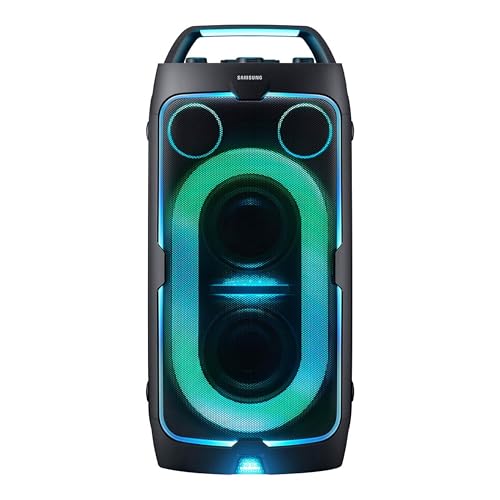
The Samsung Sound Tower ST50F is designed from the ground up to solve a common problem for outdoor hosts: how to project robust, crowd-energizing sound without dragging along extension cords or separate audio amplifiers. Engineered with dual 6.5-inch woofers paired with high-efficiency 1-inch tweeters, this party speaker commands attention the moment you power it on. Its upright tower configuration naturally elevates the soundstage, ensuring vocals and rhythmic beats project across crowded patios, pool decks, and open tailgate lots.
Where the ST50F truly excels is its versatility as a mobile entertainment hub. Moving beyond conventional Bluetooth streaming, Samsung equipped this tower with dedicated instrument and microphone inputs. Whether hosting a competitive backyard karaoke battle or plugging in an acoustic guitar for a campfire sing-along, the setup requires zero external mixers. The companion Sound Tower app further complements the experience, allowing you to manipulate DJ filter sweeps, customize rhythmic light sequences, and manage input sources right from your phone.
Portability on a speaker this large can often become a headache, but the ST50F sidesteps logistical hurdles with smart hardware design. The sturdy luggage-style telescopic handle extends to five distinct heights, while smooth-rolling rear wheels allow you to glide effortlessly across concrete, deck boards, or firm turf. With a rechargeable power cell that yields up to 18 hours of continuous operation, you can leave the AC power cable behind and keep the music pumping from sunrise tailgates well past midnight.
Overall, the Samsung Sound Tower ST50F delivers an impressive balance of high-decibel performance, rugged convenience, and interactive fun. While audio purists may find the default tuning decidedly low-end dominant, party enthusiasts and weekend entertainers will appreciate the visceral impact, stellar battery life, and bulletproof functionality this powerhouse provides.
Acoustically tuned for maximum party presence, the Samsung Sound Tower ST50F relies on a multi-driver arrangement that prioritizes volume output and physical bass impact. The dual 6.5-inch woofers generate deep, chest-thumping low frequencies that remain authoritative even in open-air environments where bass dissipation usually poses an issue. Complementing the low-end authority, twin 1-inch dome tweeters deliver crisp highs that prevent modern pop, hip-hop, and electronic tracks from turning muddy under heavy volume.
Even at higher listening levels, the speaker maintains solid acoustic composure without noticeable cabinet distortion or harsh treble breakup. The vertical dispersion pattern projects sound over the heads of seated listeners, helping audio travel further across outdoor gatherings. For listeners who want to adjust the acoustic profile, the Sound Tower smartphone app provides responsive equalizer presets that allow you to boost vocal clarity for karaoke or ramp up the sub-bass for high-energy dance tracks.
The cabinet of the Samsung Sound Tower ST50F measures approximately 14.4 by 13.9 by 29 inches and is built from heavy-gauge, impact-resistant matte polymers designed to withstand the knocks of outdoor travel. A durable front grille safeguards the internal drivers, while the exterior incorporates an IPX4 splash-resistant rating. This weatherproofing ensures that drink spills, pool splashes, or passing light rain showers will not interrupt your playlist.
Hardware connectivity is straightforward and thoroughly practical for live entertainment. The rear control panel houses dual 1/4-inch inputs capable of accepting two microphones or a combination of a microphone and an electric-acoustic guitar, each with dedicated level controls. For wireless streaming, high-bandwidth Bluetooth enables low-latency playback from smartphones, tablets, or laptops. When the internal 18-hour battery finally runs low, an included standard AC power connection provides continuous playback while simultaneously recharging the internal cells.
Samsung C24F390 Audio Capabilities and Sound Setup Solutions
The short answer is no, the Samsung C24F390 does not have built-in internal speakers. While this curved monitor cannot produce sound on its own, it is not detached from your computer audio. The display features an integrated digital-to-analog converter that extracts audio signals from incoming HDMI connections and routes them through a rear 3.5mm jack. This audio path allows you to connect desktop speakers or headphones easily.
Direct Clarification on the Samsung C24F390 Audio Architecture
Many buyers assume modern desktop monitors include sound hardware, but the Samsung C24F390 is strictly a visual panel. The manufacturer designed this curved display primarily for everyday office tasks, casual gaming, and workspace efficiency. To keep the chassis slim and budget accessible, internal speaker cones, magnets, and amplifier circuits were omitted entirely. When you send audio over HDMI, the monitor receives the digital stream without any speakers to broadcast it.
The panel features a single 3.5mm stereo headphone port on the rear connection panel next to the HDMI port. This jack acts as an audio pass-through port, converting the digital HDMI stream into an analog stereo signal. Because this port outputs unamplified line-level audio, it cannot drive passive speaker cabinets directly. Plugging in powered computer speakers or standard stereo headphones allows you to hear incoming audio clearly.
Curved display enclosures present unique acoustic challenges that often lead manufacturers to skip built-in speakers. The curved profile gathers internal components into a tight casing that leaves minimal space for acoustic resonance chambers. Basic monitor speakers in budget panels usually sound tinny and prone to distortion at moderate volume. Leaving out internal speakers keeps the monitor lightweight while letting users select higher quality external audio hardware.
Why Users Expect Sound: HDMI Endpoints and Volume Menus
Operating system behavior often leads users to believe the C24F390 includes built-in speakers. When connected through an HDMI cable, Windows and macOS identify the monitor as an active audio device named Samsung C24F390. This happens because the HDMI protocol detects the monitor audio controller regardless of physical speakers. Selecting this display as your default playback device sends sound over the cable, producing silence until you connect external gear.
The on-screen display menu of the monitor adds to this confusion by displaying an adjustable volume slider. Using the rear JOG directional button opens an on-screen volume control ranging from zero to one hundred. This setting does not control internal speakers; rather, it regulates the output voltage of the rear 3.5mm audio jack. Adjusting this slider changes the volume level sent directly to your connected headphones or powered desktop speakers.
Physical design elements on the rear casing can also mislead users into searching for integrated speaker grilles. The back shell features horizontal lines and ventilation cutouts intended to release heat from the internal power components and backlight. These ventilation openings frequently resemble speaker grilles found on consumer electronics. A close inspection shows that these openings serve thermal cooling purposes and contain no speaker cones underneath.
Step-by-Step Guide to Connecting External Speakers to the C24F390
Connecting powered speakers to the display requires only a standard 3.5mm stereo auxiliary cable. Locate the headphone icon on the rear interface panel next to the HDMI port and insert the cable connector firmly. Connect the opposite end of the auxiliary cable to the line input on your powered desktop soundbar or speaker system. Because the monitor supplies an unamplified signal, your speakers must use an independent power source.
Users who prefer a tidy desk frequently pair the monitor with compact notebook speakers designed to deliver clear stereo separation without taking up excess room. Position the left and right speakers on either side of the curved screen to establish balanced sound. Turn on the power switch on your external speakers and adjust their hardware volume dial to roughly midpoint. This setup provides ample headroom to fine-tune volume levels directly from your operating system.
Balancing volume levels across multiple controls helps prevent audio distortion and unwanted electrical hiss. Keep your computer master volume set between eighty and ninety percent to ensure a clean digital signal reaches the screen. Use the rear JOG button on the Samsung panel to set the monitor internal volume to approximately seventy percent. Finally, use the physical knob on your powered speakers to adjust overall listening loudness comfortably.
Ground loop hum can occur when powered speakers draw power from a computer USB port while receiving audio from the monitor. This issue happens when the electrical grounds of both devices operate at slightly different potentials, introducing an audible buzz. Powering your desktop speakers with an independent USB wall charger rather than a computer port typically eliminates this hum immediately. Using a quality shielded auxiliary cable also protects the analog signal from interference.
Alternative Audio Routing Methods for PC and Console Setups
Bypassing the monitor audio pass-through is often the most reliable method for desktop computer setups. Motherboards feature dedicated onboard sound chips and rear 3.5mm green audio ports that connect straight to your speakers. Routing sound directly from the motherboard avoids the monitor digital-to-analog converter entirely. This setup also lets you utilize motherboard equalization software, spatial audio features, and dedicated microphone inputs without interference.
Gaming consoles offer separate audio routing pathways when paired with the C24F390 on a gaming desk. While HDMI delivers game sound directly to the screen, many players prefer connecting headsets to the 3.5mm port on their handheld controller. Consoles also support compatible USB audio adapters and gaming soundbars connected to front console ports. These direct USB connections bypass the monitor entirely and provide separate volume controls for game audio and chat.
Bluetooth connectivity provides another flexible option for listeners who want to eliminate audio cables across their desks. Because the C24F390 lacks integrated Bluetooth transmission hardware, the wireless signal must originate directly from your computer or streaming device. Pairing your PC with dedicated desktop sound solutions enables clean wireless audio transmission without cords behind the display. Keep in mind that standard Bluetooth connections can introduce minor latency during fast-paced competitive gaming.
Compact USB-powered soundbars represent a popular solution for desks where space underneath the curved screen is limited. These horizontal units connect straight to a computer USB port to handle both digital audio streaming and electrical power simultaneously. Positioning a slim soundbar directly beneath the bottom bezel of the C24F390 conserves desk space while directing sound toward the listener. This setup avoids using the monitor rear audio port entirely.
Troubleshooting Common Audio Issues on the Samsung C24F390
Encountering complete silence after connecting headphones to the rear port is usually caused by an incorrect default playback device. Open the sound settings on your computer and verify that the output device is set to the Samsung monitor rather than motherboard speakers. If the system output is directed elsewhere, the audio stream will never travel through the HDMI cable. Selecting the monitor as your active playback device sends sound to the display immediately.
Low output volume through connected headphones is another common problem among C24F390 users. This issue often occurs when the internal volume slider in the monitor on-screen menu is turned down low. Press the JOG button on the back of the casing, open the volume menu, and verify the level is set high. Also make sure the 3.5mm plug is pushed completely into the jack, as loose connectors cause faint sound.
HDMI handshake dropouts can occasionally cause the monitor audio endpoint to disappear from your system sound settings. This glitch typically occurs after graphics driver updates, waking from sleep mode, or changing display refresh rates. Unplugging the HDMI cable from both the monitor and computer, waiting ten seconds, and reconnecting it resets the digital handshake. Restarting your computer or updating graphics drivers can also restore missing HDMI audio options.
Noticeable audio delay during video playback or gaming can disrupt your experience when routing sound through display pass-through ports. Digital-to-analog conversion inside budget displays can introduce a fraction of a millisecond of latency as the internal chip decodes HDMI audio. If audio lag becomes noticeable during games, connecting your speakers directly to your computer sound card eliminates the delay. Direct computer connections ensure that audio and video process without extra decoding steps.
Understanding Audio Hardware in the Broader Samsung Ecosystem
Comparing the silent design of the C24F390 with other Samsung product categories illustrates how different devices handle acoustic needs. While compact office monitors omit sound drivers entirely, Samsung television displays integrate dedicated internal speaker cores designed for speech clarity. For television owners facing distorted sound, replacement units like the Tjweiqing BN96-25565A/B/C/D/E/F/R/M TV speaker compatible core provide direct internal replacement options for compatible television sets. These specialized television modules demonstrate the internal space required for balanced sound.
Home theater audio systems within the brand ecosystem require precise physical cabling to maintain multi-channel surround sound integrity. For example, the Tendodo AH81-02137A A/S rear speaker wires for Samsung surround modules feature specialized molded connector terminals designed for specific wireless receiver units. These cables allow listeners to position rear satellite speakers across living rooms without splicing raw wires. Understanding these dedicated connections helps consumers distinguish between standard 3.5mm auxiliary cords and proprietary home theater interconnects.
When home audio setups require substantial acoustic power for entertainment or outdoor gatherings, compact desktop soundbars give way to high-output standalone units. Standalone party speakers such as the Samsung Sound Tower ST50F portable party speaker incorporate dual woofers, tweeters, and battery operation to deliver room-filling sound coverage. While such heavy-duty audio gear is far beyond what a modest desk monitor requires, it demonstrates the variety of audio solutions available for different listening environments.
Mobile devices also handle acoustic transducers differently compared to stationary computer monitors and living room theater systems. Smartphone replacement components like the YWLRONG for Samsung Galaxy S23 Ultra loud speaker assembly highlight how micro-acoustic buzzers function in tight handheld enclosures. These tiny modules utilize micro-magnets and specialized seals to generate ringtones, speakerphone audio, and media playback inside compact housings. Recognizing these engineering differences explains why slim desktop monitors rely on external sound gear.
Choosing the Right Sound Solution for Your Workspace
Selecting the ideal audio gear for your workstation depends heavily on available surface area and daily listening habits. The 24-inch curved profile of the C24F390 creates a compact workspace footprint that pairs neatly with small desktop speaker pairs or under-monitor soundbars. If your desk has limited depth, placing large bookshelf speakers beside the panel can create visual clutter. Measuring your desk space prior to purchasing external speakers ensures a clean, ergonomic arrangement that complements the curved display.
Listeners who prioritize deep bass performance over minimal clutter often prefer a 2.1 speaker system featuring a separate floor subwoofer. Dedicated subwoofers handle low-frequency bass notes that compact desktop speakers simply cannot reproduce effectively. Placing the satellite speakers on your desk alongside the monitor while tucking the subwoofer under the desk keeps the workspace tidy. This configuration delivers immersive sound for movies and gaming sessions without crowding the desktop.
Headphones remain the most practical sound solution for shared office environments, dorm rooms, and late-night gaming sessions. Connecting closed-back headphones or comfortable in-ear monitors directly into the rear 3.5mm jack of the C24F390 keeps your audio private without disturbing others. Because the monitor pass-through jack delivers standard line-level power, it easily drives consumer headphones with standard impedance ratings. For high-impedance studio headphones, pairing an external desktop amplifier ensures adequate dynamic range.
Practical Audio Recommendations and Final Setup Verdict
Discovering that your curved screen lacks built-in speakers might feel like an initial drawback, but it ultimately leads to a superior sound experience. Built-in monitor speakers rarely deliver the clarity, volume, or bass response necessary for enjoyable media consumption or productive communication. Equipping your setup with dedicated external speakers or a quality headset allows you to customize your sound profile to match your preferences. The integrated 3.5mm audio jack on the C24F390 provides a reliable bridge between your video source and external speakers.
Taking a few minutes to configure your operating system audio settings, secure your physical cables, and adjust the monitor internal volume ensures stable operation. Keeping cables neatly routed behind the curved display stand prevents snagging and maintains an attractive desktop aesthetic. Whether you opt for a sleek horizontal soundbar, compact stereo satellites, or a comfortable gaming headset, your audio performance will easily surpass basic monitor sound. Verifying your connections and gain stages will reward you with clean, balanced sound.




Write Your Review
No reviews yet. Be the first to share your experience!