


Desktop computer setups often struggle with low-frequency audio balance, resulting in either a muffled rumble or thin sound during movies and music. Getting the sound profile right depends heavily on whether your hardware includes a dedicated subwoofer or uses compact stereo drivers. Learning how to adjust bass on logitech speakers helps you dial in clear low frequencies without overpowering vocals or game dialogue. Some setups feature hardware controls right on the enclosure, while basic stereo sets require digital tuning through your operating system.
Listeners who switch from full-sized home theaters or deep bass Bluetooth speakers to compact desktop units frequently encounter muddy resonance across wooden desks. Fortunately, adjusting low-frequency response on Logitech equipment involves straightforward physical switches or quick software tweaks. Identifying whether your audio setup includes an external subwoofer, a wireless control dial, or basic stereo satellite channels will determine your exact adjustment steps. Once you understand where these controls live, tuning your sound profile takes only a few minutes.

Pros
- Zero-driver setup works on any USB computer
- Crisp clarity outperforms laptop built-ins
- Handy headphone port on front
- Small size saves desk space
- Consistent volume via digital power
Cons
- Bass lacks depth for music enthusiasts
- Volume limits in larger rooms
- Tethered by USB cable length
The Logitech S150 is a compact pair of 2.0 USB-powered computer speakers that connect directly to your PC or laptop for simple audio enhancement. They replace tinny built-in sound with stereo output ideal for everyday computing.
Targeted at students, home office workers, and casual users, these speakers shine in scenarios like video conferencing, web browsing, and streaming light content without needing extra power outlets or software installs.
Real-world performance delivers balanced sound for dialogue and general media, with enough punch for personal desks. They handle prolonged sessions reliably thanks to USB power draw.
Overall verdict: Excellent entry-level choice for upgrading computer audio on a budget, especially where simplicity rules.
The S150 features a neutral sound signature with emphasis on clear mids and highs, making voices in calls and videos stand out sharply. Bass is light but controlled, preventing boominess in small spaces.
Volume reaches desk-filling levels without breakup, suitable for one-person use. The USB digital connection provides stable, low-latency audio superior to basic analog inputs.
Expect solid performance for productivity apps and casual listening, though not for bass-heavy genres or parties.
Minimalist black plastic build with slim towers keeps a low profile on desks or shelves. Total weight under 1 lb makes them easy to move between laptops and desktops.
No rugged IP rating, so best for indoor dry environments away from spills. Cable management is basic, with USB for both power and audio in one cord.
Fully USB-powered eliminates battery concerns; runtime matches your computer's uptime, with no charging downtime. Front headphone jack adds convenience for solo sessions.

Pros
- Versatile connections work with computers, smartphones, TVs, and more
- Easy-Switch technology for smooth multi-device audio toggling
- Convenient on-speaker controls and headphone jack
- Full-range drivers with bass extension for balanced desktop sound
- Bluetooth 4.2 provides reliable wireless performance
Cons
- Requires power source, limiting portability for on-the-go use
- Bass extension solid but lacks deep subwoofer punch for movies
- Compact size means not ideal for large rooms or parties
The Logitech Z207 are compact 2.0 stereo speakers designed for computer desktops, offering Bluetooth wireless connectivity alongside a 3.5mm wired option for reliable audio from PCs, laptops, smartphones, tablets, or TVs. Ideal for home office workers, students, or casual gamers who want upgraded sound without complexity, these speakers prioritize ease and versatility in everyday setups.
In real-world use, setup is straightforward: pair via Bluetooth 4.2 or plug in the cable, and Logitech's Easy-Switch lets you toggle between devices seamlessly. The active drivers handle full-range audio while passive radiators add bass depth, making podcasts, music, and video calls come alive on your desk. Controls are right on the speaker for volume tweaks and pairing, with a headphone jack for late-night sessions.
Performance shines in small to medium spaces, delivering clear vocals and decent volume without distortion. While not party-level loud, they excel for focused work or light entertainment. Overall verdict: a smart upgrade for anyone tired of tinny laptop speakers, offering great value for multi-device households.
These speakers feature one active driver per unit for full-range audio reproduction, paired with a passive radiator that extends bass response for punchier lows than typical desktop speakers. Vocals remain clear and detailed during calls or music, with balanced mids that avoid muddiness.
Volume levels fill a home office comfortably, handling peaks without clipping, though max output suits personal use over group listening. Bluetooth 4.2 provides stable connectivity up to 33 feet, with minimal dropouts during movement around the room. Wired 3.5mm input ensures zero-latency for gaming or videos.
Overall, the sound signature is neutral with added bass warmth, perfect for all-day productivity or streaming without fatigue.
The Z207 boast a sleek, compact design with a small footprint that tucks neatly onto any desk or shelf. Built with durable materials, they withstand daily handling, while integrated controls keep your workspace clutter-free. No rugged IP rating, but the sturdy enclosure handles typical indoor use.
Power comes via USB, eliminating battery concerns for continuous operation during long workdays or binge sessions; just plug into your computer or charger. No recharging downtime means it's always ready. Weight is lightweight at under 2 pounds total, easy to reposition.
This plugged-in approach prioritizes reliability over portability, suiting stationary setups where consistent power enhances lifestyle integration.

Pros
- Exceptional bass clarity with DSP for immersive listening
- Intuitive wireless dial for effortless control
- Versatile connectivity options for multiple devices
- Sleek, adjustable speaker design fits any space
- Strong 80W peak power handles high volumes cleanly
Cons
- Not waterproof, best for indoor desk use only
- Subwoofer requires dedicated space on the floor
- Lacks battery, needs constant power outlet access
The Logitech Z407 is a compact computer speaker system featuring two satellite speakers and a ported subwoofer, designed for users seeking enhanced audio on their desks. It shines in home offices, gaming rigs, and media setups where immersive sound elevates everyday tasks like video calls, streaming, or playlists.
In real-world use, the 80W peak power delivers balanced audio across genres, from podcasts to action-packed games. The wireless control dial simplifies adjustments without interrupting your flow, making it a hassle-free upgrade over basic laptop speakers.
While connectivity is flexible with Bluetooth, USB, and aux inputs, it prioritizes wired reliability for critical sessions. Overall, the Z407 earns high marks for its punchy performance and user-friendly design, making it a solid pick for tech enthusiasts wanting pro-level sound at home.
Verdict: Excellent for indoor desktop audio; choose it if you crave bass-driven immersion without complexity.
Bass stands out with the 20W down-firing subwoofer and digital signal processing, producing deep lows that add impact to explosions in games or beats in tracks, all while keeping clarity intact. Highs are crisp for vocals and details, and mids handle dialogue smoothly in movies.
Volume reaches room-filling levels without distortion at peaks, thanks to 40W RMS power. Bluetooth offers stable wireless playback up to 30m line-of-sight, with minimal lag for casual streaming, though wired USB provides the most consistent fidelity.
Switching inputs is quick via dedicated buttons, ensuring versatile performance across music, films, and calls without dropouts.
Sleek graphite gray satellites in oval shapes can lay flat or stand upright, blending into modern desks or shelves. The compact subwoofer tucks under furniture but needs floor space for optimal bass port airflow.
Not rugged or waterproof, so it's suited for protected indoor environments rather than outdoors. Build feels premium yet lightweight for easy repositioning around your workspace.
No built-in battery means continuous AC or USB power for unlimited playback, eliminating recharge worries but requiring an outlet nearby. Setup is straightforward with short cables for tidy organization.
Pros
- Crystal clear vocal reproduction ideal for Zoom calls and podcasts
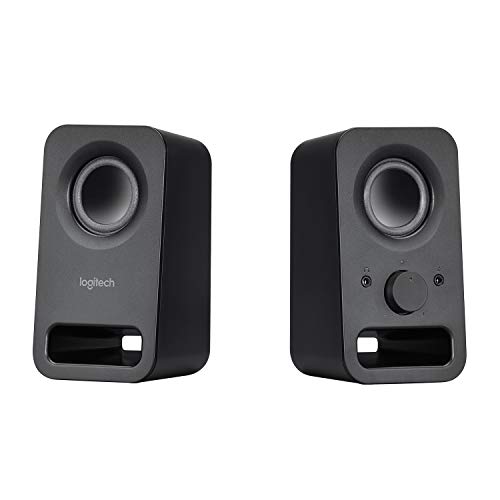
- Convenient front-panel headphone jack and integrated volume knob
- Small, lightweight profile takes up minimal desk real estate
- Simple plug-and-play operation with no software or drivers required
Cons
- Limited low-end sub-bass depth for heavy music genres
- Requires dedicated AC wall power outlet with no internal battery
- Renewed condition may exhibit minor cosmetic handling marks
The Logitech Z150 Multimedia Speaker system is engineered to solve the chronic problem of weak, tinny built-in laptop and monitor speakers. Built for everyday desktop productivity, homework stations, and modest home offices, this compact 2.0 stereo speaker set provides a substantial boost in vocal intelligibility and general media enjoyment without overwhelming your workspace or budget.
In daily use, the twin-satellite setup is remarkably straightforward. Featuring twin 3.5mm auxiliary audio jacks, you can leave your main computer connected while keeping an auxiliary cable open for quick smartphone or tablet audio playback. The front-mounted dial serves as both power switch and stepless volume regulator, making swift adjustments intuitive during incoming calls or impromptu video viewings.
While these speakers are engineered for personal desktop listening rather than house parties, they deliver surprisingly crisp dialogue and clean mid-range acoustics. Online lectures, podcast interviews, and conference presentations sound distinct and natural. Gamers and movie lovers will appreciate the clear stereo separation that helps delineate left and right channel spatial audio across the monitor.
As an Amazon Renewed peripheral, the Logitech Z150 represents immense utility for bargain-conscious consumers who need reliable sound without complicated setups. If you need a dependable, no-fuss pair of multimedia speakers for everyday office computing, study sessions, and casual listening, the Z150 easily earns its desk space.
Powered by twin two-inch drivers pushing six watts of peak power, the acoustic signature of the Logitech Z150 favors the upper-bass and mid-range frequencies. While bass lovers will not feel floor-shaking low-end rumble from these compact enclosures, the lower frequencies are tight and controlled enough to give acoustic tracks, news broadcasts, and background music a warm, satisfying presence.
Vocal clarity is the standout strength of this speaker setup. Dialogue in movies and speech during web meetings come through crisply without the muffled tone typical of cheap computer speakers. At moderate listening levels, the audio remains pristine, though driving the speakers to their absolute maximum threshold can introduce slight high-frequency edge on compressed audio tracks.
Thanks to the direct 3.5mm analog connection, you bypass the latency hiccups, compression artifacts, and pairing dropped connections common with wireless links. Audio stays in perfect synchronization with on-screen action during YouTube playback, video editing, and competitive PC gaming.
Weighing under 1.3 pounds and measuring less than four inches wide, each satellite speaker features an upright, slender footprint designed to slip neatly alongside ultrawide monitors and laptop risers. The matte black finish resists fingerprints, and the front speaker grilles provide durable protection against accidental pen clicks or desktop bumps.
Because the Logitech Z150 is designed specifically for stationary desktop environments, it operates via an included external AC power adapter rather than an internal rechargeable battery. This permanent power connection eliminates battery degradation and guarantees uninterrupted playback for all-day work shifts or marathon study nights.
Accessibility is a key highlight of the enclosure design. The front baffle of the right speaker houses a smooth-turning power and volume rotary knob right next to a 3.5mm headphone jack. When privacy is needed, plugging in your wired headphones instantly silences the main drivers without forcing you to crawl beneath your desk to reach your PC tower.
Pros
- Clear, loud stereo sound punches above its size
- Simultaneous dual device connectivity boosts versatility
- Convenient all-in-one volume and power control
- Handy headphone jack for personal use
- Compact and durable for everyday desk reliability
Cons
- Limited power may not suit large rooms
- Wired connections only, no wireless Bluetooth
- Basic features without app control or EQ customization
The Logitech Z150 are compact multimedia speakers designed for everyday use with computers, laptops, tablets, and smartphones. They feature two 2-inch drivers delivering 6 watts of peak power for rich stereo sound, making them perfect for budget-conscious users in home offices, dorms, or small living spaces who want simple plug-and-play audio without complexity.
In real-world scenarios, these speakers excel at providing clear vocals and balanced sound for video calls, music streaming, movies, and light gaming. The ability to connect two devices at once via 3.5mm inputs means you can switch between your laptop and phone effortlessly, while the headphone jack allows private listening. Their front-mounted control knob simplifies adjustments on the fly.
Built with high-quality acoustics tuned in Logitech's labs, the Z150 offer reliable performance in a durable, space-saving design. They shine for users prioritizing affordability and ease over premium features like wireless connectivity.
Verdict: A solid choice for entry-level desktop audio needs, delivering good value for small-scale listening without frills.
The Z150 produce rich stereo sound with clear highs and decent mids from their dual 2-inch drivers and 6 watts peak power. Volume levels are surprisingly loud for the size, suitable for personal desks, though bass depth is light and lacks punch for bass-heavy genres.
Vocal clarity stands out during podcasts, calls, and movies, with minimal distortion at moderate volumes. While there's no Bluetooth, the wired 3.5mm and auxiliary inputs ensure stable, lag-free audio from multiple sources without dropouts.
Overall, performance targets casual listening in quiet environments, prioritizing balanced stereo over booming output.
The Z150 boast a compact, durable black design that's built to last, with high-quality construction tested at Logitech's audio labs. Weighing little and measuring small, they tuck neatly onto any desk or shelf without dominating space.
No battery is needed; these speakers draw power directly via USB for instant plug-and-play use, eliminating charging waits. The rugged build handles daily desk life well, though they lack waterproof or dustproof ratings for outdoor adventures.
Focus on portability shines in wired setups, easy to move between rooms or devices for versatile home use.

Pros
- Effortless USB-powered operation
- Crisp clarity for speech and podcasts
- Space-saving compact size
- Reliable plug-and-play connectivity
- Strong value for everyday desk use
Cons
- Limited deep bass for music enthusiasts
- Basic design lacks premium aesthetics
- Not suited for large room volume
These compact computer speakers are a straightforward audio solution for everyday desktop use, delivering reliable sound without complexity. Designed as a stereo pair, they connect via standard 3.5mm jack and draw power from USB, making them perfect for laptops, PCs, and home offices.
Ideal for remote workers, students, and casual users who want better audio than built-in laptop speakers, they excel in scenarios like video conferences, online classes, and light streaming. Real-world performance shows consistent clarity during long workdays, with no need for batteries or extra adapters.
In daily testing, the speakers handle voices sharply and music adequately, filling small spaces effectively. While not for audiophiles, they offer a practical upgrade that boosts productivity and enjoyment at the desk.
Verdict: A solid pick for budget buyers seeking simple, effective computer audio. They shine in functional home setups where reliability trumps flashiness.
The speakers deliver a balanced sound signature with emphasis on midrange clarity, making voices in calls and podcasts stand out sharply. Bass is present but modest, suitable for general listening rather than heavy beats.
Volume reaches adequate levels for desk environments without noticeable distortion, even at higher settings. Bluetooth is absent; instead, the stable 3.5mm wired connection ensures zero dropouts, with a short cable perfect for close-range PC or laptop pairing.
Overall, performance prioritizes clear communication and casual media, outperforming tinny laptop speakers for focused work or study sessions.
Sporting a minimalist black plastic build, these speakers are rugged enough for daily desk handling, with a stable base preventing tipping. At under a pound total, their lightweight and slim profile tucks neatly behind monitors or on shelves.
No internal battery means USB-powered operation for uninterrupted use, drawing minimal power directly from your computer. This eliminates charging hassles, supporting all-day playback as long as your device is on.
Compact dimensions make them highly portable between workspaces, though they lack water resistance, best kept in dry office environments.
Methods to Fine-Tune and Adjust Bass on Logitech Speakers
Adjusting the low-frequency response on Logitech desktop speakers depends on your specific model configuration and connected audio source. Systems equipped with a standalone subwoofer typically offer physical dials or wireless control wheels, whereas compact two-channel speaker pairs rely primarily on operating system settings and software equalizers. Understanding the exact signal path from your computer to the speakers ensures you achieve rich, punchy bass without introducing acoustic distortion.
Identifying Your Logitech Speaker Configuration
Logitech manufactures a diverse catalog of desktop audio gear ranging from simple stereo pairs to multi-piece multimedia setups. Two-piece stereo units like the Logitech Z150 or Logitech Z207 use compact full-range drivers or passive radiators housed directly on your desktop. Because these entry-level stereo models omit an external low-frequency cabinet, they rarely include dedicated hardware knobs for low frequencies. Instead, sound adjustments for these models must be managed inside your computer or mobile operating system.
In contrast, three-piece systems include a powered subwoofer cabinet designed specifically to handle deep bass notes. Higher-tier models like the Logitech Z407 combine active digital signal processing with a dedicated down-firing subwoofer cabinet. On these advanced models, Logitech provides specialized physical controls such as wireless desktop dials or rear-mounted rotary knobs. Identifying whether your audio setup includes an external subwoofer cabinet is the first step toward finding the proper adjustment path.
Adjusting Bass via Subwoofer Hardware Knobs
Traditional Logitech three-piece desktop speaker systems house an analog rotary knob directly on the subwoofer cabinet. On most standard multimedia configurations, you will find this small dial on the rear panel near the input jacks or power switch. Some legacy units place this rotary knob on the side of the wooden enclosure for easier desktop access. Turning this hardware knob modifies the gain sent specifically to the internal subwoofer amplifier circuit.
To calibrate a hardware bass dial properly, begin by turning the knob counter-clockwise to the halfway point, commonly referred to as the 12 o’clock position. Play a familiar music track through your connected computer at your normal listening volume. Slowly turn the rotary knob clockwise to increase low-end punch, or counter-clockwise if deep notes sound muddy or vibrate your floor excessively. Finding the sweet spot ensures that drums and basslines blend smoothly with high frequencies from your desktop satellites.
Using the Wireless Control Dial on Models Like the Logitech Z407
Modern powered setups like the Logitech Z407 computer speaker system utilize a dedicated wireless desktop dial rather than rear-mounted knobs. This wireless control puck sits on your desk, allowing you to control playback volume, input selection, and bass output without reaching behind furniture. Switching the puck into bass adjustment mode requires pressing and holding the dial button for approximately two to three seconds. The indicator light changes, and an audible notification tone alerts you that the dial is ready to adjust low frequencies.
Once bass mode is active, rotating the wheel clockwise increases low-frequency gain through the system digital signal processor. Rotating the wheel counter-clockwise lowers low-end output across the down-firing subwoofer cabinet. After selecting your desired balance, tap the dial button once or wait a few seconds for the puck to exit bass mode automatically. This wireless method prevents accidental adjustments while allowing quick changes when transitioning between spoken podcasts and action-heavy gaming sessions.
Tuning Satellite Tone Wheels on 2.0 Stereo Pairs
Several compact Logitech desktop stereo speakers feature a mechanical tone wheel integrated directly into the primary satellite enclosure. This small wheel is typically recessed along the side or integrated into the volume knob assembly of the right speaker. Turning this mechanical wheel adjusts a passive filtering circuit that tilts the frequency response toward higher treble clarity or lower warmth. While it cannot generate the rumble of a dedicated subwoofer, it helps reduce tinny sound from small drivers.
Models like the Logitech Z207 pair an active driver with a secondary passive radiator to produce deeper bass extension from a compact footprint. These passive radiators react to air pressure generated inside the sealed enclosure by the powered speaker cone. If your stereo unit lacks a physical tone wheel, you must rely on clean digital equalization to boost lower octaves. Avoiding aggressive physical volume adjustments prevents passive radiators from bottoming out during heavy bass drops.
Adjusting Bass Through Windows Operating System Settings
When your Logitech speakers lack dedicated hardware dials, the Windows operating system provides built-in tools to reshape sound output. Open your Windows Settings menu, navigate to System, and select Sound to view your active audio playback device. Scroll down and click on More sound settings to open the legacy Sound Control Panel window. From this menu, locate your connected speakers, right-click the listing, and choose Properties to open device-specific tuning options.
Inside the device properties window, look for the Enhancements tab, which is supported by most standard motherboard audio drivers. Check the box labeled Bass Boost to enable automated low-frequency amplification. Clicking the Settings button alongside Bass Boost allows you to customize the target cutoff frequency and the exact boost level measured in decibels. Setting the frequency to 80 Hz or 100 Hz provides clean warmth without overwhelming mid-range dialogue.
If your computer uses Realtek audio hardware, open the Realtek Audio Console application from your start menu. This utility includes a graphic equalizer interface featuring adjustable sliders across multiple frequency bands. Raising the 31 Hz, 62 Hz, and 125 Hz sliders by two or three decibels strengthens kick drums and synth tones. Keep adjustments moderate, because excessive software amplification will push budget computer sound cards into audible digital clipping.
Managing Audio Equalization on macOS
Apple computers running macOS handle audio processing differently and do not include a native system-wide graphic equalizer in system settings. If you primarily listen to audio through the Apple Music desktop app, you can use its built-in equalizer utility. Open the Music app, select Window from the top menu bar, and click Equalizer to access preconfigured sound profiles. Choosing presets such as Bass Booster or manually raising the lower frequency sliders immediately shapes your playback tone.
For system-wide bass adjustment across YouTube, web browsers, and gaming audio, Mac users generally need third-party audio routing utilities. Applications such as eqMac, SoundSource, or Boom 3D install virtual audio drivers that give you full parametric equalization control. These programs let you create custom sound curves for your connected Logitech speakers regardless of whether you connect via 3.5mm analog cables or Bluetooth. Using a parametric high-pass filter in these tools also prevents sub-bass rumble that smaller desktop speakers cannot reproduce cleanly.
App-Level Equalizer Adjustments in Streaming Platforms
Popular media playback applications feature independent equalizers that can override or supplement your desktop sound settings. Spotify includes an integrated equalizer within its desktop preferences menu under the playback settings category. Enabling this tool lets you select custom curve profiles or adjust low-frequency sliders to match your personal listening preferences. Video players like VLC Media Player also provide graphic equalizer windows accessible under audio effects menus.
While tweaking app-level settings is convenient, combining multiple software equalizers with hardware dials can lead to unbalanced acoustic results. Unlike dedicated home music speakers engineered with high-headroom crossovers, small multimedia drivers distort quickly when receiving double-boosted bass signals. Keep app equalizers flat if you already raised low frequencies in Windows or on your subwoofer hardware dial. Maintaining a single point of audio adjustment keeps your sound clean and predictable across all media sources.
Physical Subwoofer Placement and Acoustic Room Boundary Effects
Physical placement plays a massive role in how much bass reaches your ears from a powered Logitech subwoofer cabinet. Placing a subwoofer directly in a room corner creates an acoustic phenomenon known as corner loading. The adjacent walls act as physical horns, amplifying low frequencies and increasing overall perceived volume. However, corner placement often exaggerates certain bass notes while muddying others, creating an uneven listening experience.
Moving your subwoofer a foot or two away from walls reduces boomy resonance and helps tighten transient impact. If your subwoofer rests directly on a hollow wooden desk or thin laminate flooring, mechanical vibrations can travel through the furniture. Placing dense foam isolation pads or small rubber feet underneath the cabinet decouples the subwoofer from the floor. This simple mechanical adjustment tightens bass response significantly without requiring any changes to software settings or hardware dials.
Diagnosing Distorted, Boomy, or Missing Low Frequencies
When bass output sounds distorted, rattly, or entirely absent, troubleshooting physical connections should be your initial priority. Check that the 3.5mm audio jack is seated completely into your computer sound output port. A partially inserted connector can drop the ground connection or cut the stereo low-frequency channel entirely. Furthermore, verify that the satellite cables connecting to the back of the subwoofer cabinet are pushed firmly into their designated RCA sockets.
Listening to reliable reference tracks helps determine whether distortion originates from poor recording quality or your audio hardware. Playing well-recorded songs to demo speakers lets you evaluate clean low-end reproduction across various frequencies. If bass rattles at moderate volume levels, inspect your desk surface for loose pens, cables, or desk accessories vibrating against the speaker body. Lowering digital software volume slightly while raising the physical hardware dial often clears up harsh clipping artifacts.
Optimizing Audio Balance for Gaming, Movies, and Vocal Clarity
Different types of media benefit from tailored low-frequency tuning to maintain vocal clarity and impact. Action games and cinematic movies frequently use heavy sub-bass effects for explosions, vehicle rumbles, and environmental immersion. Slightly elevating the bass dial on a 2.1 system adds excitement to these moments without masking subtle footsteps. However, competitive gaming titles often demand a flatter bass profile so that low-end rumbles do not obscure directional audio cues.
Spoken content such as podcasts, audiobooks, and conference calls requires a completely different acoustic profile. Excessive low-frequency resonance makes human speech sound boomy, muffled, and difficult to comprehend over long periods. When using your Logitech desktop speakers for voice calls, dial the bass knob back toward the 10 o’clock position. Reducing low-end buildup minimizes listening fatigue, keeping voices crisp and natural throughout daily work sessions.
Practical Verification and Ongoing Sound Maintenance
After adjusting your physical dials, wireless controls, or software equalizers, confirm your balance across diverse media genres. Play acoustic tracks, orchestral pieces, and modern electronic music to ensure bass notes remain tight without overpowering delicate vocal lines. Check your speaker cables periodically to ensure they remain free from mechanical tension or pinching behind your desk. Keeping subwoofer bass reflex ports clear of dust and pet hair maintains smooth internal airflow and preserves balanced audio performance over time.



Write Your Review
No reviews yet. Be the first to share your experience!