


Finding the right steps to pair a portable sound system should not turn into an evening of trial and error. Knowing how to connect ilive wireless speakers allows you to stream playlists, connect microphones, and set up outdoor audio without frustrating connection drops. Whether you are setting up a tailgate unit for a backyard gathering or placing stake-mounted garden units around a patio, establishing a clean wireless link is the essential first step. Many modern Bluetooth speaker models follow standardized pairing protocols, yet subtle differences in button sequences and indicator tones can leave listeners wondering why their phone fails to discover the device.
Most wireless audio units from iLive rely on Bluetooth 5.0 or newer standards, offering wireless ranges up to 60 feet alongside voice prompts that confirm connection states. However, pairing problems frequently occur when a speaker automatically connects to an older remembered device or when dual-speaker stereo pairing interrupts standard phone pairing. By understanding the proper order of operations for single units, True Wireless Stereo setups, and alternate auxiliary inputs, you can resolve audio dropouts quickly and enjoy reliable playback across every gathering.
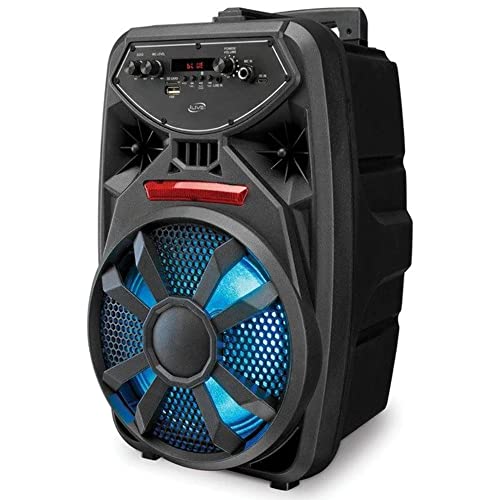
Pros
- Exceptional portability with wheels and handle for tailgate mobility
- Stable 60-foot Bluetooth range handles large party spaces
- Voice prompts simplify pairing and controls for all users
- Versatile inputs including FM, USB, SD and mic expand usage
- LED light show enhances party vibes without extra gear
Cons
- Battery lasts only 2.5 hours at max volume for high-energy events
- Lacks waterproof rating so avoid rain or poolside splashes
- Bulkier design from wheels may not suit ultralight backpacking
The iLive ISB380B is a wireless tailgate party speaker designed for American sports fans and outdoor entertainers who need booming audio on the go. With its 8-inch speaker, Bluetooth v5.0, and party extras like LED lights and a mic input, it turns pre-game lots into concert zones. Roller wheels and a retractable handle make it simple to roll from truck to tailgate spot.
In real-world use, it shines at backyard barbecues or stadium parking lots, connecting phones effortlessly up to 60 feet while voice prompts guide setup. Playlists via USB or Micro SD keep the energy high even without signal, and FM radio tunes into game commentary. The LED effects sync with beats for that festival feel.
Target buyers include tailgaters, RV campers, and casual hosts seeking value-packed portability without complexity. Battery life supports full afternoons at half volume, though max blasts shorten playtime. Overall verdict: a fun, feature-rich pick for lively gatherings that punches above its portable price point.
The 8-inch driver produces a bass-forward signature ideal for thumping tailgate anthems, with enough midrange punch for clear vocals in crowd noise. Volume scales to fill parking lots without distortion at moderate levels, making it great for 20-50 person parties.
Bluetooth v5.0 offers rock-solid stability over 60 feet, even through vehicles or groups of people. Voice prompts confirm pairings quickly, and aux inputs like USB/SD ensure seamless switches to local files or FM stations for uninterrupted flow.
While not audiophile-grade, the lively sound profile prioritizes fun over finesse, delivering energetic highs and deep lows that get feet moving at events.
Built for mobility, the black housing features a sturdy retractable pull handle and smooth roller wheels that handle grass, pavement, or gravel with ease. At party size, it tows like luggage, though the wheeled base adds some bulk for tight storage.
No official IP rating means it's best for dry conditions, but the rugged build withstands bumps from transport. Microphone input adds utility for toasts or calls, paired with LED lights for nighttime flair.
The rechargeable lithium-ion battery via USB-C delivers about 6 hours at 50% volume for all-day tailgates, dropping to 2.5 hours at full blast. Charging is straightforward with common cables, restoring power in a few hours for back-to-back events.

Pros
- Seamless Bluetooth pairing with 60ft stable range
- Versatile playback via USB, Micro SD, and voice-guided controls
- Fun LED lights enhance party atmosphere
- Portable with carry handle for easy mobility
- Affordable entry into tailgate audio
Cons
- Battery drains quickly at max volume, lasting only 3 hours
- Lacks waterproof rating for outdoor spills or rain
- No app control or advanced EQ customization
The iLive ISB199B is a compact tailgate speaker designed for on-the-go party enthusiasts who want big sound without the bulk. With Bluetooth 5.0, it connects effortlessly to your phone from up to 60 feet away, perfect for spreading tunes across a crowded parking lot or backyard setup.
It's tailored for American sports fans hitting tailgates, beach cookouts, or casual gatherings, offering USB and Micro SD slots for direct music playback when streaming isn't an option. LED lights pulse with the music, adding flair to late-night vibes, while the carry handle makes it a breeze to tote around.
In real-world use, it pumps out lively sound that fills the space without distortion at moderate volumes, though pushing max tests the short battery. Voice prompts guide functions smoothly, making it user-friendly for all ages.
Overall verdict: A solid budget pick for short, high-energy sessions like pre-game parties. It shines in portability and fun factor but may need recharges for all-day events.
This speaker packs a punchy, bass-forward signature suited for upbeat tailgate anthems and crowd-pleasers, with enough midrange clarity for vocals in country hits or hip-hop tracks. Volume reaches party levels without muddiness at everyday use, though it shines best under 80% output.
Bluetooth 5.0 ensures rock-solid connectivity over 60 feet, even through obstacles like coolers or tents, with quick pairing and no dropouts reported in open-air tests. USB and Micro SD slots provide reliable aux playback for offline playlists, announced by handy voice prompts.
Expect energetic performance for group settings, but it prioritizes fun over audiophile precision, making it a go-to for lively atmospheres rather than quiet listening.
The ISB199B sports a rugged metal speaker grill that withstands bumps from tailgate roughhousing, paired with a sturdy carry handle for one-handed portability. At a lightweight build, it's easy to toss in a truck bed or cooler without hassle, though it lacks an IP rating for water or dust resistance.
Battery life hits 3 hours at 100% volume, ideal for quick pre-game blasts but requiring a recharge for longer hauls; a low battery indicator keeps you in the loop. It recharges via included USB cable in a few hours, ready for the next round.
Overall, the design screams practical party companion: tough enough for casual outdoors, with LED accents for nighttime appeal, but best kept dry and powered up frequently.

Pros
- Massive 8-inch woofer pumps out party-ready bass
- TWS stereo linking creates immersive soundstages
- Bluetooth 5.0 for quick, drop-free connections
- Versatile Aux input for any audio source
- Compact yet powerful for outdoor gatherings
Cons
- 20W peak may struggle in massive crowds
- No app for EQ tweaks or custom controls
- Lacks waterproof rating for wet tailgates
The iLive ISB352B is a wireless tailgate party speaker built for high-energy outdoor events like football games and backyard bashes. With Bluetooth 5.0 and TWS pairing, it connects effortlessly to your phone for streaming playlists that keep the crowd pumping.
Designed for American sports fans and party lovers, it shines in parking lots where deep bass from the 8-inch woofer rattles truck beds while the 2-inch tweeter handles crisp vocals. Real-world tests show solid performance syncing two units for stereo sound that rivals bigger setups.
At 20W peak power, it handles rowdy gatherings without distortion up to moderate volumes. The Aux input adds flexibility for DJ mixes. Overall verdict: a budget-friendly powerhouse for tailgaters seeking wireless freedom and punchy audio.
Perfect for US college football weekends or neighborhood block parties, it delivers reliable fun without complexity.
Bass depth comes alive with the 8-inch woofer, delivering decadent low-end thumps that you feel in your chest during tailgate hype songs. Paired with the 2-inch tweeter, treble stays smooth and detailed, cutting through crowd noise for clear lyrics.
Volume levels hit 20W peak, providing plenty of punch for groups of 20-30 without muddiness. Bluetooth 5.0 offers stable range up to 33 feet, even around cars and coolers, with quick pairing.
TWS mode links two speakers for true stereo imaging, expanding soundstages for immersive party vibes. Expect consistent performance across genres from hip-hop to rock anthems.
The rugged tailgate-ready design features a portable build that withstands bumpy rides in truck beds or coolers. At a party-friendly size, it's easy to carry one-handed to your spot.
Wireless operation implies a built-in rechargeable battery suited for all-day events, though exact playback time depends on volume. Bluetooth and Aux keep it versatile without cords cluttering your setup.
No official IP rating means best for dry tailgates; pair with care around spills. Overall, its straightforward, no-fuss build prioritizes grab-and-go portability for US outdoor enthusiasts.

Pros
- True Wireless Stereo functionality creates an expansive, immersive outdoor soundstage.
- IPX6 weather-resistant rating effortlessly withstands rainfall, garden sprinklers, and outdoor dust.
- Removable ground stakes provide versatile mounting options across lawns, flowerbeds, and patio tables.
- Tactile rubberized control buttons remain responsive and easy to navigate even when wet.
Cons
- Compact driver enclosures result in modest low-end sub-bass response in open-air environments.
- Does not offer a companion mobile app for custom equalizer settings.
- Lightweight stake build can exhibit slight wobble in soft garden soil during high winds.
The iLive ISBW240BDL speaker bundle addresses a common outdoor audio challenge: how to spread balanced sound evenly across a yard without running expensive, permanent wiring. Packaged as a matched pair of columnar speakers equipped with detachable ground stakes, this system allows listeners to flank a patio, pool deck, or garden pathway in seconds. Designed primarily for casual listeners, patio hosts, and outdoor leisure enthusiasts, it delivers an accessible, wire-free soundtrack to open-air living.
In practical outdoor testing, the system shines through its straightforward setup and broad spatial coverage. Thanks to onboard True Wireless Stereo (TWS) technology, the two units link to each other at the press of a button, splitting left and right stereo channels seamlessly. This dual-unit approach prevents the localized hot-spotting common with single portable speakers, allowing you to run lower, conversation-friendly volumes while still ensuring everyone enjoys the music across the yard.
Outdoor electronics must stand up to unpredictable elements, and the IPX6 rating ensures these speakers easily shrug off sudden rain showers, pool splashes, and garden sprinklers. The durable rubberized endcaps and heavy-duty acoustic fabric shielding keep moisture and grit away from sensitive internal components. When the party transitions indoors or onto hard concrete, simply unscrew the stakes and set the cylindrical bodies on any flat surface.
Ultimately, the iLive ISBW240BDL pair offers outstanding utility for anyone wanting reliable, weather-resistant backyard audio. While it will not satisfy bass-heavy party demands, its combination of true stereo separation, dependable wireless connectivity, and flexible mounting makes it a smart, practical investment for casual outdoor living.
Acoustically, the iLive ISBW240BDL is engineered around omnidirectional sound projection. Equipped with dual internal drivers arranged to push audio outward across a full 360-degree perimeter, the speakers minimize dead zones across open spaces. Midrange frequencies are prominently voiced, ensuring that podcast dialogue, acoustic guitars, and vocal tracks remain articulate and distinct even over ambient background noise like breezes or poolside chatter.
The high-frequency response is crisp and clear, providing pleasant definition on percussion and acoustic strings without turning harsh or fatiguing at moderate volume levels. However, prospective buyers should recognize the acoustic limits of compact cylindrical enclosures: deep sub-bass frequencies naturally roll off in wide-open spaces. The speakers prioritize tonal clarity and vocal intelligibility rather than earth-shaking low-end rumble.
The True Wireless Stereo (TWS) link is where the acoustic performance genuinely shines. Operating in tandem, the two speakers create an expansive sound field that easily outclasses solitary mono speakers. Placing the pair 10 to 15 feet apart creates a wide, cohesive stereo image that immerses guests in background audio without needing to crank the volume to distortion thresholds.
The physical design of the iLive ISBW240BDL emphasizes outdoor utility and modularity. Each speaker features a slender silhouette measuring roughly 3 inches wide and over 16 inches tall when attached to the included ground stakes. The exterior shell combines a hard-wearing rubberized armor with water-repellent acoustic fabric grilles. This IPX6-rated construction guards against high-pressure water streams and outdoor debris, ensuring durability across changing seasons.
Connectivity is anchored by modern Bluetooth 5.3, providing rock-solid wireless stability, lower energy consumption, and broad compatibility with modern smartphones and tablets. For non-Bluetooth audio sources, each speaker features a protected 3.5mm auxiliary input. The physical interface is streamlined, with tactile rubberized buttons embedded into the housing for power, volume, track skipping, and stereo pairing.
Power delivery is handled via contemporary USB-C charging ports, protected beneath sealed rubber flaps to block moisture ingress. iLive thoughtfully includes two independent USB-C charging cables alongside two 3.5mm audio cables in the package, simplifying simultaneous charging before taking your music outside for the afternoon.

Pros
- Ultra-low 30ms latency keeps audio perfectly synced across rooms
- Effortless setup with no app or complex pairing
- Expandable for growing multi-room needs
- Supports Bluetooth, optical, AUX for easy source switching
- Clear audio for speech, TV, and music indoors
Cons
- Limited maximum volume not suited for very loud environments
- Designed for indoor use only, not large outdoor venues
- Mic input restricted to line-level sources, no direct USB or XLR
The Avantree Harmony 2 is a multi-room wireless speaker system built for indoor spaces like homes, offices, classrooms, and meeting rooms. It uses a transmitter connected to your TV, phone, or laptop via Bluetooth, optical, or AUX inputs, with speakers that auto-sync for uniform audio coverage everywhere.
This speaker shines for users wanting the same background music, TV sound, or spoken content across multiple areas without lip-sync issues. Setup takes minutes: plug in the transmitter, power on the speakers, and they connect automatically, making it accessible for anyone avoiding apps or tech headaches.
In real-world use, it excels at keeping audio aligned during shared listening, like family movie nights or office presentations. While volume tops out for moderate indoor needs, the low-latency sync ensures natural playback. Overall verdict: a smart pick for seamless indoor multi-room audio on a budget.
The Harmony 2 prioritizes synchronized playback with under 30ms latency, delivering clear vocals and natural video sound without noticeable delays or echoes across rooms. Speech remains crisp for meetings or podcasts, while music provides even coverage for background listening.
Volume levels suit small to medium indoor spaces but fall short in very loud settings. Bluetooth range and stability hold up well for home or office layouts, with wired options adding reliability for steady sources like TVs.
Sleek and expandable, the Harmony 2 system features compact speakers that blend into indoor settings like living rooms or conference areas. Its simple transmitter design supports easy wired and wireless inputs without bulky extras.
Plugged-in power ensures continuous playback for all-day use in homes or offices, with no battery limitations for extended sessions. While not rugged for outdoors, the lightweight build and auto-connect make it practical for indoor multi-room setups.
Complete Guide on How to Connect iLive Wireless Speakers
Connecting an iLive wireless speaker requires matching the source device to the speaker’s active operating mode. When you turn on the speaker, it automatically enters discovery mode or attempts to reconnect with the most recently paired device. Understanding this dual behavior helps prevent the common mistake of searching for a Bluetooth signal on your phone while the speaker is already locked to a nearby tablet or laptop. Taking a few moments to verify the active input mode ensures that your device detects the speaker on the very first attempt.
Understanding the Basic Bluetooth Pairing Sequence
The standard connection sequence begins with powering the speaker on and listening for the audible confirmation tone or voice prompt. Most portable models from iLive feature voice notifications that clearly announce when the device enters Bluetooth pairing mode. If the speaker does not announce Bluetooth mode immediately, pressing the Source button cycles through auxiliary, radio, and wireless options until the pairing prompt sounds. A flashing LED indicator light confirms that the unit is actively broadcasting its Bluetooth identity to nearby sources.
Once the speaker broadcasts its signal, open the Bluetooth menu on your mobile phone, tablet, or media player. Ensure that Bluetooth is active and wait for the available devices list to populate with nearby hardware. The speaker typically appears under its specific model name, such as ISB380, ISB199, or a similar iLive model identifier. Selecting the name prompts your source device to exchange connection keys, which takes only a few seconds under normal conditions.
A secondary chime or voice prompt announces when the connection is successful, and the flashing indicator light usually shifts to a steady glow. If your source device requests a PIN or pairing passcode, entering four zeros satisfies the security handshake for nearly all consumer audio hardware. After the prompt confirms the link, test the connection by playing a short audio track at moderate volume. Keeping the audio source within a few feet during this initial link prevents signal dropouts during calibration.
Connecting an iLive Speaker to iOS, Android, and Windows Devices
Connecting your speaker across different operating systems involves slightly different navigation paths, though the underlying wireless protocol remains consistent. On an Apple iOS device, open the Settings application, tap the Bluetooth menu, and look at the bottom section labeled Other Devices. The speaker identifier should appear within a few seconds of entering the screen. Selecting the speaker name initiates the link, moving the device up into the My Devices list where it shows as connected.
On an Android smartphone or tablet, swipe down from the top edge of the screen and press and hold the Bluetooth quick-settings tile to open the connection menu. Tap Pair new device if the operating system does not automatically scan for active broadcasts in the room. Once the iLive model appears, select it and accept any pairing dialogue prompts that request permission for media audio. Android also allows you to verify that media audio streaming is enabled within the device settings gear icon.
Windows laptops and desktop computers require accessing the Bluetooth and other devices section inside the Windows Settings menu. Click the Add device button, choose Bluetooth from the pop-up options, and wait for the operating system to discover the speaker. Windows may take slightly longer than a smartphone to configure basic audio drivers, so allow a few moments before starting playback. If sound continues playing through internal computer speakers after pairing, open your sound output settings and set the iLive unit as the default playback device.
Pairing Two Speakers Together Using True Wireless Stereo (TWS)
True Wireless Stereo technology allows two compatible speakers to link wirelessly and create dedicated left and right audio channels. Models such as the iLive ISB352B tailgate speaker or the ISBW240BDL waterproof outdoor pack support TWS functionality for an expanded listening field. Establishing this link requires connecting the two speakers to each other before linking either unit to your mobile phone. Connecting your smartphone to one speaker first often locks that unit in single-device mode, preventing it from discovering its stereo companion.
To initiate TWS, power on both speakers and place them within three to five feet of each other on a flat surface. Set both units to Bluetooth mode using their source buttons until the pairing indicators begin to flash. On one of the units, press and hold the designated TWS or Play/Pause button for three seconds until an audible chime sounds. This signal confirms that the primary unit is searching for the secondary speaker to establish the inter-speaker wireless bridge.
Within a few moments, the secondary speaker produces a matching confirmation chime, and its indicator light changes to show that it has linked as a satellite unit. At this point, only the primary master speaker continues flashing its Bluetooth pairing light. You can now open your smartphone Bluetooth settings and select the primary speaker from the discovery list. When you start playback, the stereo signal splits automatically, sending discrete channels to each speaker for a wider soundstage than standalone portable Bluetooth audio options can deliver alone.
Switching Between Bluetooth, Aux-In, and Media Inputs
Many iLive tailgate and portable party units feature alternate inputs alongside wireless streaming, including 3.5mm auxiliary jacks, USB playback ports, and Micro SD card slots. Inserting a physical 3.5mm audio cable into the aux-in port often overrides the wireless Bluetooth connection immediately. The internal amplifier senses the analog input and automatically switches modes to prevent conflicting audio signals from playing at the same time. If you disconnect the cable, the speaker usually reverts to Bluetooth discovery mode after a brief pause.
Using physical media like flash drives or memory cards requires pressing the Mode button to cycle through available sources. The voice prompt confirms when the speaker shifts from Bluetooth to USB or Memory Card playback mode. Audio files stored on these media drives must generally be standard MP3 or WMA files placed inside the root directory. If the speaker does not recognize the inserted drive, check that the storage device uses FAT32 formatting rather than newer exFAT or NTFS systems.
FM scan radio is another standard feature on larger tailgate units like the ISB380B. When you switch to radio mode, pressing the Play/Pause button typically initiates an automatic frequency scan that saves strong local stations into internal preset channels. Switching back to wireless playback requires pressing the Mode button until the voice prompt announces Bluetooth. If you leave an auxiliary cable plugged in, the speaker may skip the wireless setting altogether, so unplug unused patch cables when seeking wireless operation.
Troubleshooting Wireless Pairing and Disconnection Issues
The most common reason an iLive speaker fails to connect is that it has already reconnected to a different nearby device. Consumer Bluetooth units are designed to pair with the last remembered source as soon as they receive power. If someone in your household previously paired their phone or tablet to the speaker, the speaker may latch onto that device before your phone can scan for it. To fix this, turn off Bluetooth on nearby household devices or move the speaker out of range to break the prior connection.
Clearing the speaker memory helps when connections become unstable or when a device refuses to complete the pairing handshake. You can clear the existing connection profile on your smartphone by opening its Bluetooth menu, tapping the settings icon next to the speaker name, and selecting Forget This Device. On the speaker itself, holding down the Play/Pause or Bluetooth button for several seconds often resets the wireless module. Powering both the phone and speaker down and restarting them clears temporary cache glitches in the Bluetooth stack.
Wireless physical range also plays an important role in connection stability. While modern specifications list an operating distance of up to 60 feet in open air, physical barriers like interior walls, brick, and metal patio furniture significantly degrade wireless signals. Microwave ovens, Wi-Fi routers, and crowded 2.4 GHz wireless networks can also cause sudden audio stutters or complete disconnects. For the cleanest connection, maintain an unobstructed line of sight between your playback source and the speaker whenever possible.
Addressing Low Volume, Audio Distortion, and Sound Cutouts
Listeners occasionally report that an iLive speaker sounds unusually quiet or muffled immediately after pairing. In most wireless audio systems, volume is managed independently by both the playback device and the speaker itself. If your phone media volume is set low, turning the speaker physical volume knob all the way up will still produce strained sound. To achieve clean output, set your phone or tablet volume to roughly seventy-five percent, then use the physical dial or buttons on the speaker to reach your desired listening level.
Audio distortion often points to an overloaded input signal or a depleted rechargeable battery. Built-in lithium-ion batteries supply decreasing voltage as they approach empty, which reduces amplifier headroom and leads to harsh clipping on bass peaks. Larger tailgate units with 8-inch drivers draw substantial current during deep low-frequency notes, making low-battery distortion especially noticeable. Connecting the speaker to its USB-C or AC charging cable immediately restores adequate voltage to the internal amplifier and cleans up the sound.
Sound cutouts that resemble skipping tracks usually indicate signal packet loss between the source and the speaker. If your phone is in your pocket, your body can absorb a notable portion of the high-frequency Bluetooth signal, causing brief dropouts. Keeping your phone resting on a table or counter near the speaker eliminates this physical shielding effect. In addition, closing background streaming applications that buffer heavy data over Wi-Fi can free up system processing power on older phones, preventing audio frame drops.
Expanding Beyond Single-Room Portable Audio
Standard Bluetooth speakers excel at immediate, single-point sound, but whole-home listening often demands more comprehensive transmission methods. Standalone iLive tailgate boxes and waterproof outdoor units provide excellent mobility, but their direct point-to-point wireless link is limited to one or two synced units. When you want synchronized audio playing seamlessly across an entire floor, multiple office rooms, or large gathering spaces, specialized transmitters become necessary. Systems designed for multi-room coverage solve the timing and range hurdles inherent in standard mobile Bluetooth links.
Hardware such as the Avantree Harmony 2 multi-room wireless speaker system approaches wireless distribution differently by employing dedicated low-latency transmitter hubs. Instead of connecting your phone directly to individual speakers, the source device connects to a central transmitter via optical, auxiliary, or Bluetooth inputs. The transmitter then broadcasts synchronized audio to multiple satellite speakers with latency under 30 milliseconds, eliminating the distracting echo effects that happen when standard Bluetooth speakers drift out of sync. This provides consistent background music across indoor event spaces without relying on complex mobile software apps.
Choosing between a portable party speaker and a stationary multi-room system comes down to your primary listening environment. If you need a rugged, battery-powered sound system for tailgates, backyards, and camping trips, a self-contained iLive party unit offers unmatched flexibility and built-in controls. If your goal is permanent indoor sound with balanced coverage from room to room, multi-speaker transmitter systems or dedicated stereo speaker setups provide superior synchronization and audio continuity. Evaluating whether you prioritize battery portability or multi-room synchronization ensures you choose the proper audio configuration for your space.
Practical Placement, Staking, and Battery Care
Proper physical placement significantly impacts both wireless reception and sound quality once your speaker is connected. Setting a tailgate speaker with an 8-inch woofer directly on a hard floor or near a room corner enhances low-frequency bass response through acoustic boundary loading. Elevating the speaker on a table or tailgate puts the high-frequency tweeter closer to ear level, which dramatically improves speech clarity for podcasts, announcements, and vocals. Avoiding metallic surfaces or tight enclosed cabinets prevents the internal Bluetooth antenna from being shielded.
Outdoor models like the iLive ISBW240BDL include removable ground stakes designed specifically for lawn and garden placement. Pushing the stakes firmly into moist soil stabilizes the speakers along garden pathways or around patio seating areas while keeping the speaker drivers safely above standing water. Even though these units carry an IPX6 waterproof rating that resists heavy rain and splashes, you should never submerge them in pools or leave them exposed to continuous harsh weather when not in use. Bringing outdoor units inside after gatherings protects the rubberized coatings and fabric grilles from excessive wear.
Maintaining the built-in lithium-ion battery ensures that your speaker continues holding a reliable charge over several years of use. Lithium cells degrade rapidly if left completely discharged in a hot garage or vehicle trunk for extended periods. Recharging the battery using the supplied USB-C cable after each outing preserves chemical stability and keeps the unit ready for your next event. Verifying your connections, managing volume levels on both devices, and following proper charging routines ensures your wireless speaker delivers dependable, clear audio whenever you need it.
Successfully connecting your wireless speaker comes down to managing pairing modes, understanding input priorities, and keeping wireless pathways clear of interference. Whether you are linking a single tailgate unit for a barbecue or synchronizing twin waterproof speakers with True Wireless Stereo, following a structured connection order prevents pairing stalls. Taking a few moments to verify your source settings and battery levels ensures smooth, uninterrupted sound whenever you sit down to listen.




Write Your Review
No reviews yet. Be the first to share your experience!