


Setting up a desktop workspace with premium audio often leads listeners to ask whether can a pc connect to sonos speakers without complicated workarounds or frustrating audio delay. While these multiroom audio components originally focused on home network streaming from mobile devices, modern desktop setups require direct compatibility for games, web videos, and system alerts. Standard computer setups often rely on dedicated Bluetooth speakers for computer setups to handle daily playback, but integrating existing multiroom hardware offers a cleaner and more versatile sound environment. The exact connection path you choose depends heavily on the specific speaker hardware you own, the ports available on your motherboard, and whether you need real-time audio synchronization.
The short answer is yes, though the setup method changes significantly across different models in the hardware lineup. Some listeners rely on direct Bluetooth pairing, while others use physical auxiliary adapters, optical soundbar connections, or the official desktop controller app. Understanding the difference between simple music streaming and real-time desktop audio output is essential before adjusting your sound settings or buying additional accessories. Exploring the hardware options listed below helps clarify which connection method delivers the clearest sound for your specific desktop requirements.


Pros
- Effortlessly integrates vintage audio gear with modern smart speaker setups
- Pristine, uncolored audio conversion with high-fidelity digital output
- Rock-solid multi-room synchronization with zero latency across zones
- Instant setup and smooth streaming via Apple AirPlay 2 and the Sonos app
Cons
- Requires external amplification or active powered speakers to produce audio
- Lacks native Bluetooth audio input, relying strictly on Wi-Fi and AirPlay 2
- Higher investment cost compared to entry-level streaming adapters
The Sonos Port is a dedicated wireless streaming component engineered to bridge the gap between traditional stereo gear and modern smart multi-room speaker systems. Whether you have high-end vintage floorstanders, an integrated amplifier, or an audio-video receiver, the Port plugs into your existing setup to provide full access to streaming music services, internet radio, and multi-room grouping.
This device is tailor-made for audio enthusiasts who already own beloved traditional speaker rigs or turntables and want the convenience of Sonos without abandoning their existing components. Thanks to the integrated analog audio line-in, you can hook up a vinyl turntable or CD player and stream that physical media wirelessly to other Sonos smart speakers located throughout your home.
In everyday use, the Sonos Port delivers rock-solid connectivity and hassle-free operation through the Sonos app or Apple AirPlay 2. Setting it up takes only minutes, and the included 12V trigger output can automatically wake up compatible power amps when you start streaming from your smartphone or tablet, providing an intuitive, hands-off listening experience.
If you want to expand your home audio without sacrificing the power and tone of your current speaker setup, the Sonos Port is the premier smart audio bridge on the market today. It provides reliable performance, pristine sound transfer, and unmatched ecosystem integration that justifies the investment for any dedicated home audio setup.
The Sonos Port features an upgraded digital-to-analog converter that preserves the original depth of your tracks, delivering deep, well-defined bass notes and clear, textured vocals. Because it acts as a transparent audio bridge, it does not color or compress the signal, allowing your connected amplifier and speaker system to reproduce dynamic, room-filling sound with complete detail.
Operating over high-speed Wi-Fi rather than standard Bluetooth, the Sonos Port ensures lossless transmission across vast home spaces without dropouts or range limitations. You get full output volume control directly through the Sonos app, maintaining pristine audio clarity from whisper-quiet background acoustics up to concert-level amplification with zero audible hiss or background hum.
Built with a minimalist, matte-black finish, the Sonos Port measures just 1.61 inches high and weighs just over one pound, making it easy to tuck onto an AV rack, bookshelf, or media console alongside your speaker gear. While not designed for outdoor poolside use or rugged off-grid portability, its durable polycarbonate chassis protects the internal audio components from dust and daily wear in indoor home environments.
Unlike portable battery-powered speakers that require frequent recharging and face battery degradation over time, the Sonos Port is engineered for continuous, always-on household operation using an included AC power adapter. This permanent power connection ensures zero downtime and instant wake times, keeping your entire multi-room speaker network ready to stream music 24 hours a day without ever worrying about battery limits.

Pros
- Exceptional stereo imaging and bass depth for its size
- Versatile connectivity including WiFi, Bluetooth, and line-in
- Trueplay technology ensures tailored, optimal sound in any space
- Rapid unboxing to playback with intuitive app setup
- Alexa integration for voice-controlled smart home audio
Cons
- Requires constant power outlet as it lacks a built-in battery
- Best performance within Sonos ecosystem, limiting standalone flexibility
- Line-in adapter sold separately for wired sources
The Sonos Era 100 is a compact wireless smart speaker powered by a 47% faster processor, delivering next-gen audio in a sleek black design. It shines in home settings like kitchens, offices, or bedrooms, where its stereo architecture and bass-focused midwoofer create an immersive listening experience without needing multiple units.
Aimed at tech-savvy Americans who value high-quality sound and smart features, it streams effortlessly from services over WiFi, pairs with Bluetooth devices instantly, and supports line-in for vinyl or other sources. Setup is a breeze: plug in, connect via the Sonos app, and Trueplay tunes it to your room's acoustics for perfect playback every time.
In real-world use, it excels at filling small to medium spaces with clear, detailed sound, making it great for podcasts, music, or Alexa routines. While it thrives in the Sonos multi-room setup, its standalone versatility makes it a solid entry point for upgrading home audio.
Overall verdict: A top pick for those seeking premium smart speaker performance in everyday home spots, blending power, ease, and intelligence seamlessly.
With a dual-tweeter setup and 25% larger midwoofer, the Era 100 produces detailed stereo separation and noticeably deeper bass, ideal for genres from rock to classical. Vocals come through with clarity, thanks to the faster processor handling complex tracks without muddiness.
Volume levels reach room-filling heights without distortion, perfect for lively kitchen sessions or desk work focus. Bluetooth range stays stable up to 30 feet in open spaces, while WiFi ensures uninterrupted streaming from apps like Spotify or Apple Music.
Trueplay analyzes your room and fine-tunes EQ on the fly, elevating performance in varied acoustics like echoey living rooms or cozy nightstands.
The Era 100 boasts a compact, elegant black design that blends into any home decor, from bookshelves to countertops. Its small footprint ensures versatile placement without dominating space, emphasizing sleek, modern aesthetics over rugged portability.
Lacking an IP rating, it's best for indoor use away from moisture, prioritizing premium build quality for daily home reliability. Weight is light enough for easy repositioning between rooms.
As an AC-powered speaker, it delivers continuous play without battery limits, simply plug in for non-stop performance. No charging downtime means it's always ready for your playlists or voice commands.

Pros
- Exceptional clarity and bass from precision drivers
- Rugged IP67 build survives water and dust exposure
- 10-hour rechargeable battery with fast USB-C or wireless charging
- Seamless Bluetooth and WiFi for stable, versatile connectivity
- Tactile buttons prevent accidental presses during active use
Cons
- Full features require WiFi and Sonos app setup
- No auxiliary input for wired connections
- Battery life shortens at max volume outdoors
The Sonos Roam 2 is a powerhouse portable speaker that brings premium Sonos audio to your on-the-go lifestyle. Ultra-compact and lightweight, it packs precision-engineered drivers for impressive clarity and bass that defies its size, making it perfect for beach outings, tailgating, or backyard barbecues.
Designed for active users, it features IP67 waterproof and dustproof protection, ensuring it thrives in harsh conditions like splashes, sand, or dust storms. With up to 10 hours of playtime, hands-free voice control via Alexa or Sonos Voice Control, and automatic Trueplay tuning, it adapts effortlessly to new environments for optimal sound.
In real-world use, the Roam 2 shines with stable Bluetooth connectivity and the option to expand into a multiroom system over WiFi. Its versatile design and tactile controls add practicality for everyday adventures. Verdict: A top pick for quality-conscious Americans seeking rugged, high-fidelity portable audio.
Precision drivers deliver deep, size-defying bass and exceptional vocal clarity, filling outdoor spaces with rich, balanced sound. Automatic Trueplay fine-tunes acoustics in real-time for every setting, from echoing patios to quiet home offices.
Volume reaches party levels without distortion, and Bluetooth range stays reliable up to 30 feet even through obstacles. WiFi mode enhances stability for multi-speaker setups, while voice controls keep hands-free operation smooth during hikes or workouts.
Overall, it excels in dynamic playback, making it a go-to for bass lovers and audiophiles who demand portability without compromise.
Built rugged with IP67 waterproof and dustproof ratings, the Roam 2 survives full submersion, drops, and dusty trails, ideal for beach days or construction sites. Its ultra-compact, lightweight form stands upright or lies on its side for flexible placement.
Tactile buttons offer intuitive control without accidental presses, and it charges via included USB-C cable or any compatible wireless pad for convenience on the road. The rechargeable battery provides up to 10 hours of playback, though real-world use at high volumes may trim it to 8 hours.
Charging takes about 2 hours to full, keeping downtime minimal for non-stop adventures.

Pros
- Impressive clarity and deep bass response for a compact portable enclosure
- Seamless handoff between home Wi-Fi and outdoor Bluetooth streaming
- Outstanding 24-hour battery endurance with a convenient charging cradle
- Extreme IP67 water, dust, and drop resistance built for travel
Cons
- Slightly heavier than typical ultra-compact travel speakers at nearly three pounds
- Requires the Sonos companion app for initial network setup and full EQ customization
- No auxiliary 3.5mm wired input for analog sources
The Sonos Play Portable is engineered to bridge the gap between high-fidelity multi-room home audio and rugged outdoor sound. Designed for listeners who refuse to compromise on acoustic fidelity when moving from the living room to the patio, this speaker packs custom acoustic architecture into a durable, grab-and-go form factor. It gives you the full power of the Sonos ecosystem at home alongside standalone Bluetooth flexibility on the road.
In real-world testing, the speaker impresses with its versatility and resilience. Its robust build shrugs off drops, splashes, and dust without skipping a beat, while the intelligent dual-band wireless connectivity ensures you never drop a stream. Transitioning between Wi-Fi on your home network and Bluetooth while traveling is virtually frictionless, making it an effortless centerpiece for backyard barbecues, beach outings, or relaxed desktop listening sessions.
Ultimately, the Sonos Play Portable stands out as a premium all-rounder for audiophiles and casual listeners alike. While it carries a bit more heft than pocket-sized options, the exceptional 24-hour battery reserve and room-filling output easily justify the weight. If you seek a single speaker capable of handling daily indoor high-res listening and rugged weekend getaways, this versatile performer easily earns a spot on your shortlist.
Acoustically, the Sonos Play Portable punches well above its weight class, delivering a balanced and energetic sound signature. The custom-tuned mid-woofer produces deep, controlled bass that avoids muddying the lower midrange, allowing vocalists and acoustic instruments to maintain crisp definition. High frequencies are handled with impressive extension and zero harshness, ensuring cymbal crashes and brass sections sound clear even at elevated listening levels.
The stereo imaging creates a surprisingly wide soundstage for a single cabinet, dispersing sound evenly across open-air environments and medium-sized rooms. Even when pushed toward maximum volume, the onboard digital signal processing prevents distortion, preserving dynamic impact and clarity across complex musical arrangements.
Measuring 3.02 by 4.43 by 7.57 inches and weighing 2.89 pounds, the speaker strikes a deliberate balance between solid acoustic mass and grab-and-go portability. The chassis is finished in an elegant matte white with drop-resistant end caps and a reinforced grille. Boasting an IP67 rating, the unit is fully dust-tight and capable of surviving complete submersion in up to three feet of water for thirty minutes.
Under the hood, modern wireless connectivity includes dual-band Wi-Fi and Bluetooth for reliable low-latency streaming. The internal battery provides up to 24 hours of continuous playback on a single charge, supported by an included low-profile wireless charging base that doubles as a permanent home dock. Additionally, a user-replaceable battery design ensures long-term serviceability and eco-friendly longevity for years to come.
Pros
- Revitalizes existing high-end speakers and stereo receivers with modern wireless streaming
- Zero-latency multi-room audio synchronization across the entire Sonos ecosystem
- Clean, bit-perfect digital audio outputs maintain pristine sound fidelity
- Straightforward setup with intuitive app control and streaming service integration
Cons
- Requires constant AC wall power with no internal battery for portable outdoor use
- Renewed condition may exhibit minor cosmetic blemishes or arrive in generic packaging
- Relies strictly on Wi-Fi and local networks rather than direct device pairing
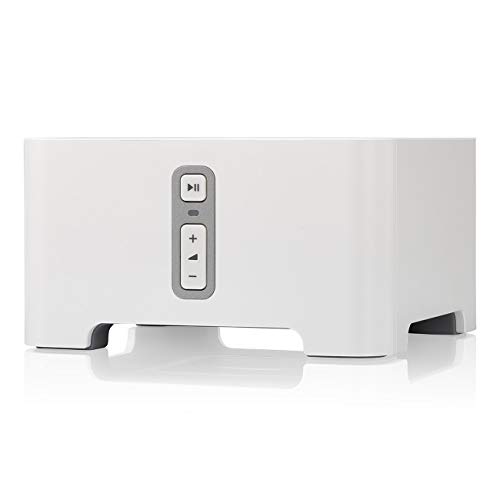
The Sonos Connect gives traditional audio setups a powerful new lease on life by bridging the gap between vintage hi-fi gear and the modern streaming era. If you have invested in high-quality receivers, turntables, or passive stereo speakers over the years, this dedicated streaming component integrates directly into your existing hardware. It bypasses the need to replace your beloved equipment, acting as a smart digital bridge that brings your living room or media room into the Sonos multi-room ecosystem.
Tailored for audio enthusiasts and everyday listeners alike, setup is straightforward using the companion app. Once plugged into your stereo receiver via optical, digital coaxial, or analog RCA cables, the device immediately shows up on your home Wi-Fi network. Pairing it with an Amazon Echo or Alexa device allows for effortless voice commands, making music selection as simple as asking for your favorite album, artist, or curated radio station.
In everyday use, the unit delivers rock-solid audio stability. Whether you are blasting lively beats during family gatherings or running ambient background music during quiet evenings, the synchronization across multiple Sonos devices is virtually instantaneous with zero audio drift. For anyone wanting to modernize their current home speaker setup without sacrificing physical amplifier performance, this renewed unit represents an intelligent, cost-effective solution.
Because the Sonos Connect acts as a pure audio streamer and digital pre-amp, its sound signature depends on your attached amplifier and speakers, but its internal digital-to-analog converter preserves superb sonic accuracy. Bass reproduction is deep and controlled, driving subwoofers with clean low-end authority. High frequencies and vocal tracks remain transparent and articulate, ensuring that acoustic sets and classical arrangements retain their natural spatial separation.
Network stability is stellar, easily outperforming traditional wireless methods. By streaming directly over your home Wi-Fi network or dual-band Ethernet, the unit avoids the compression, stutter, and limited range typically associated with standard wireless links. Phone notifications and incoming calls will never interrupt your music playback, giving you uninterrupted, high-fidelity sound throughout the home.
The Sonos Connect features a clean, minimalist design finished in a discreet light gray casing that blends effortlessly alongside modern AV receivers and media center shelving. Measuring just over five inches wide and under three inches tall, its compact footprint fits into tight entertainment centers without cluttering your room. The build is sturdy and well-ventilated, ensuring cool, whisper-quiet operation during extended all-day listening sessions.
Engineered specifically as a stationary home component, the device operates on continuous AC wall power rather than an internal rechargeable battery. While this means it is not intended for rugged outdoor use or beach excursions, it completely eliminates battery degradation and the hassle of frequent recharging. You get dependable 24/7 power readiness, ensuring your home speaker system is always primed to play whenever you press start.
Connecting a PC to Sonos Speakers: Methods, Latency, and Setup Guide
A Windows personal computer can interact with Sonos hardware in several distinct ways, but the experience depends on whether your goal is real-time PC audio or casual music streaming. Multiroom wireless speakers are primarily engineered to pull audio streams directly from cloud servers or local network storage rather than serving as passive computer monitors. Because of this core architecture, connecting a computer requires choosing between direct wireless pairing, physical cable adapters, or network-based controllers. Knowing how each connection handles audio buffering will help you avoid frustrating delays while gaming or watching video content.
Direct Bluetooth Pairing for Portable and Modern Speakers
Recent hardware releases from Sonos have introduced direct Bluetooth capabilities, significantly simplifying the process of sending computer sound to your speakers. Models such as the Sonos Era 100, Roam 2, and the portable Sonos Play series feature dedicated Bluetooth radios that bypass the traditional home network pipeline. When paired directly to a Windows computer, these speakers function just like standard wireless audio peripherals. This direct wireless bridge sends all desktop audio, including browser video playback, notification chimes, and gaming sound effects, straight to the speaker without needing the Sonos controller application.
Initiating this connection requires placing the speaker into pairing mode using its physical hardware controls. On the Era 100, pressing and holding the dedicated Bluetooth button on the rear panel activates pairing mode, signaled by a changing status light. On portable units like the Roam 2, holding the power button for several seconds triggers the same pairing chime. Once the speaker is broadcasting, open the Windows Settings menu, navigate to Devices, select Bluetooth, and choose the speaker from the list of available audio outputs.
Direct Bluetooth provides reasonable audio synchronization for everyday video viewing, though it operates outside the multiroom grouping features when active on certain models. While older wireless speakers were restricted strictly to local network streaming, versatile portable Bluetooth speaker options give desktop listeners the freedom to move hardware between a home office and outdoor spaces. Keep in mind that computer Bluetooth cards vary widely in signal strength and antenna quality. An outdated motherboard Bluetooth adapter can introduce occasional audio dropouts, so maintaining updated wireless drivers in Windows Device Manager is recommended.
Wired Auxiliary and USB-C Line-In Connections
Listeners who demand consistent audio fidelity and minimal lag often favor physical wired connections over wireless streaming protocols. Sonos speakers do not typically feature traditional 3.5mm headphone jacks directly on their chassis, requiring specialized adapters or dedicated audio components. The Sonos Era 100, for example, utilizes a proprietary USB-C line-in adapter that converts an analog 3.5mm stereo cable into a digital input stream. By connecting a standard male-to-male auxiliary cable from your computer motherboard audio output into this adapter, you create a direct physical pipeline for desktop sound.
For users managing existing desktop amplifier setups or powered speakers, streaming components like the Sonos Port or the classic Sonos Connect offer standard analog RCA line-in ports. Connecting your computer audio line-out to the RCA inputs of a Sonos Port allows the PC to serve as an analog audio source for your broader multiroom environment. In this configuration, the computer output is digitized and can be distributed to any grouped speaker in your home. This approach is especially practical if your desk already houses high-end sound equipment that you want to integrate into the wireless ecosystem.
Physical line-in connections require proper configuration within the Sonos mobile app to achieve optimal performance. Within the room settings for the connected device, you must enable the line-in source and adjust the input source level to match the output volume of your sound card. Setting the line-in compression setting to uncompressed reduces internal processing, while selecting the shortest audio delay buffer of 75 milliseconds keeps sound relatively close to real-time. Even with these adjustments, that 75-millisecond processing buffer exists because the hardware digitizes the signal for multiroom network distribution, which can be noticeable during fast-paced competitive gaming.
Digital Optical Connections Using Desktop Soundbars
Using a compact television soundbar at a computer desk is an increasingly popular way to achieve wide stereo imaging and clear dialogue. The Sonos Ray is specifically engineered as a compact standalone soundbar that utilizes an optical audio input connection. Because many desktop motherboards and discrete computer sound cards include an optical SPDIF Toslink port, the Sonos Ray can connect directly to your PC without third-party streaming software. This digital connection bypasses network buffering entirely, treating the computer as a primary home theater audio source.
If your computer motherboard lacks a dedicated optical port, you can add an inexpensive USB-to-SPDIF digital audio converter to your setup. These compact external sound cards plug into a standard USB port on your PC and output an optical digital signal compatible with the Sonos Ray. Windows recognizes the converter as an external sound device, requiring no special software installation. Once connected, running the optical cable from the converter to the soundbar provides a clean digital audio stream free from internal computer electrical interference.
The primary benefit of the optical connection is zero-latency playback, making it the most practical Sonos option for desktop gaming and video editing. Because television audio protocols are engineered for instant lip-sync accuracy, the soundbar plays sound immediately as it leaves the computer. You will need to configure the Windows sound output settings to output stereo PCM audio, as Sonos soundbars generally require uncompressed stereo or standard Dolby Digital signals over optical cables. This configuration delivers robust desktop sound while maintaining full access to the Sonos multiroom ecosystem through the mobile application.
Sonos Desktop Controller App for Wi-Fi Music Streaming
Sonos provides an official desktop controller application for Windows and macOS, but new users frequently misunderstand its primary function. The desktop application is not a virtual audio driver and does not redirect standard computer system sound to your speakers. Instead, the desktop controller acts as a remote control interface that commands your speakers over the local Wi-Fi network. Opening YouTube, launching a PC video game, or playing a video file in media player software will not send sound through this application.
Despite this limitation, the desktop controller remains a capable tool for managing background listening during work sessions. The application allows you to search and stream tracks directly from integrated cloud services like Spotify, Apple Music, and Amazon Music without touching your phone. It also manages room groupings, volume levels, and EQ settings across every connected speaker in your household. For home office workers who simply want high-fidelity music playing while they work, the desktop software provides complete playback control without draining phone battery.
Another major asset of the Windows application is its ability to index and stream local music files stored directly on your computer hard drive. By designating a music folder in the application settings, the software configures local network file sharing to allow your speakers to access your stored MP3, FLAC, or AAC files. This music library feature operates independently of computer volume controls and system sound notifications. It provides an efficient way to enjoy personal audio collections across multiroom hardware without requiring specialized media server software.
Third-Party Wi-Fi Streaming Software and Latency Trade-Offs
When physical cables and Bluetooth are not practical options, third-party software utilities can capture Windows system sound and transmit it over Wi-Fi. Programs such as Stream What You Hear and TuneBlade function by capturing the active audio output stream from Windows and broadcasting it as a local network stream. Sonos speakers can then tune into this local stream using their network playback features or AirPlay emulation. This configuration allows older network-only speakers to play audio generated by any PC desktop application.
While software streaming bridges the hardware compatibility gap, it introduces significant audio latency that affects media consumption. Encoding system audio in real time and buffering it across a local network creates an inherent delay that typically ranges from two to five seconds. Because of this lag, third-party streaming tools are unusable for watching movies, streaming video clips, or playing interactive games. Audio alerts and keyboard clicks will arrive noticeably after the corresponding on-screen action occurs.
These software workarounds are best reserved for continuous, non-visual audio tasks such as streaming internet radio stations, background podcasts, or long playlist playback. For casual listening where synchronization does not matter, utilities like TuneBlade provide an accessible alternative to buying extra hardware. However, listeners seeking precise desktop monitoring or media synchronization will find far better performance from dedicated powered loudspeakers and dedicated monitors that accept direct analog or USB inputs without network processing buffers.
Latency, Lip-Sync, and Real-Time Desktop Performance
Understanding audio latency is crucial when deciding how to integrate multiroom wireless speakers into a desktop computing environment. Sonos hardware is fundamentally designed to synchronize audio across multiple rooms with millisecond precision over Wi-Fi networks. To achieve flawless multiroom synchronization without dropouts, the system intentionally introduces an internal memory buffer. While this buffer is invisible when streaming music from cloud platforms, it becomes immediately apparent when attempting to sync dialogue with a computer screen.
Direct optical connections provide the lowest latency, delivering instantaneous sound reproduction that perfectly matches fast-paced gaming and video playback. Bluetooth connections rank second in desktop responsiveness, offering acceptable synchronization for streaming television shows and movies, although occasional minor lip-sync offsets may appear depending on your computer Bluetooth card. Physical line-in connections introduce a consistent 75-millisecond delay when configured to the lowest buffer setting, which is imperceptible for casual video but noticeable in competitive gaming. Network streaming tools sit at the bottom of the latency scale, producing multi-second delays that limit their utility strictly to audio-only playback.
If you regularly watch video files through desktop media players like VLC, you can easily compensate for minor connection latency using built-in software tools. VLC Media Player, for example, includes an audio desynchronization adjustment that allows you to advance or delay the audio track relative to the video feed. Pressing keyboard shortcuts shifts the audio timing by increments of 50 milliseconds until the actors lips match the dialogue precisely. While this fix works wonders for pre-recorded media files, it cannot resolve latency during live browser streaming or interactive video gameplay.
Troubleshooting Common PC to Sonos Connection Issues
Connecting a computer to wireless multiroom speakers occasionally introduces configuration hurdles that require systematic troubleshooting. When using Bluetooth on modern speakers like the Era 100 or Roam 2, intermittent audio stuttering often stems from interference on the 2.4 GHz wireless band. Because standard Bluetooth shares this frequency with legacy Wi-Fi networks and computer peripherals, moving wireless dongles away from the speaker can dramatically improve stability. Updating the Bluetooth adapter drivers in Windows Device Manager frequently resolves persistent pairing failures and unexpected sound dropouts.
Wired line-in connections require verification across both the physical hardware and the mobile management application. If your computer is playing sound but the connected Sonos Era 100 or Port remains silent, check that the line-in source is selected as the active audio feed in the Sonos app. Enabling the Autoplay feature within the app room settings tells the speaker to automatically switch to the computer input whenever it detects an incoming audio signal. Additionally, ensure the Windows sound output volume is raised to at least eighty percent to provide a robust line-level signal that triggers the input sensor.
For optical setups utilizing the Sonos Ray soundbar, the most common issue is receiving silence or static instead of clean stereo sound. This problem typically occurs when the computer sound card attempts to send an unsupported multi-channel format such as uncompressed multi-channel LPCM. Entering the Windows Sound Control Panel, selecting the optical digital output, and changing the default format to 16-bit, 48000 Hz stereo PCM instantly restores clean playback. Verifying that the protective plastic caps have been removed from both ends of the optical Toslink cable is another simple physical check that prevents connection failure.
Practical Component Selection for Desktop Audio
Selecting the best hardware configuration depends on your available desk space, primary listening habits, and overall audio requirements. If your desk accommodates a compact soundbar directly beneath your computer monitor, the Sonos Ray provides an outstanding all-in-one solution. Its native optical input guarantees zero-latency performance for movies, editing, and gaming, while seamlessly joining your broader home sound system. The soundbar form factor also eliminates the need for dual speaker stands and cable clutter on smaller desks.
For compact desktop listening where versatility and footprint matter most, the Sonos Era 100 or portable Roam 2 offer distinct advantages. The Era 100 delivers detailed stereo separation from a single cabinet and supports both Bluetooth wireless pairing and a wired USB-C auxiliary connection with an optional adapter. The Roam 2 serves double duty as a lightweight Bluetooth speaker for mobile computer use while returning to your home Wi-Fi network when docked at your desk. Both options provide smooth integration without requiring complex audio routing hardware.
If you already own high-end desktop monitors or an external receiver, components like the Sonos Port or renewed Sonos Connect offer the ideal bridge between PC audio and multiroom listening. Connecting your computer sound card into their RCA inputs lets you enjoy the precision of dedicated desktop hardware while simultaneously broadcasting your audio to other rooms. Before purchasing additional adapters or components, review your computer motherboard connection ports and clarify your primary audio needs. Choosing the right connection method ensures reliable desktop sound that enhances both productivity and everyday entertainment.




Write Your Review
No reviews yet. Be the first to share your experience!