


Getting your audio setup running smoothly should not feel complicated, but pairing issues can stall your favorite playlists or desktop media. Understanding %how to connect edifier speakers bluetooth% requires knowing how your specific speaker toggles inputs, enters discovery mode, and communicates with your host device. Many active speakers feature multiple physical inputs alongside wireless connectivity, which means setting the right channel is the first essential move. If you are configuring your workspace with Bluetooth speakers for computer setups, establishing a reliable wireless link ensures clean audio without cluttering your desk.
While models like classic powered monitors or modern studio designs share standard wireless protocols, differences in side knobs, remotes, and status indicator lights can cause confusion. Source devices running Android, iOS, Windows, or macOS handle discovery differently, requiring specific audio output selections once the initial handshake completes. Taking time to verify input modes, clear stale device memories, and inspect cable interference makes pairing quick and seamless. This practical walkthrough covers the exact steps needed to establish a stable wireless connection, verify optimal playback, and troubleshoot common connection hiccups.
Pros
- Natural sound reproduction from premium tweeter and driver
- Multiple input options for versatile connectivity
- Full remote and side controls for easy adjustments
- High-quality wooden enclosure for premium look and resonance
Cons
- No Bluetooth or wireless connectivity
- Requires AC power outlet, not portable
- Limited to wired AUX inputs only
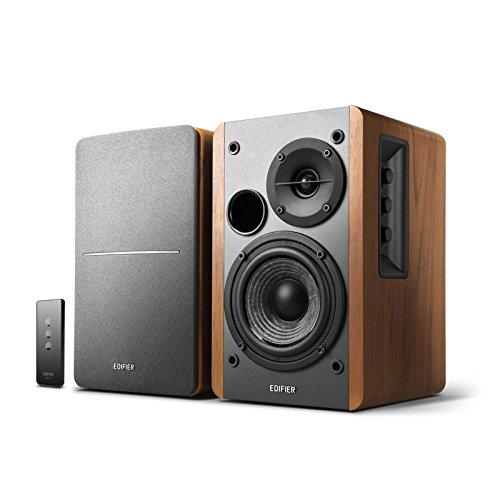
The Edifier R1280T are powered bookshelf speakers designed as active near-field studio monitors, featuring a wooden enclosure and 42W RMS power for accurate audio playback. Ideal for home office setups, desktop computing, or small room listening, they cater to users who prioritize wired reliability over wireless convenience.
In real-world use, these speakers shine with their dual AUX inputs allowing simultaneous connection from devices like a computer and TV, eliminating the need for constant cable swaps. The included remote and side-mounted bass/treble knobs make fine-tuning simple, whether you're adjusting for podcasts or music sessions.
Performance stands out in near-field scenarios, where the 13mm silk dome tweeter and 4-inch full-range unit provide balanced, natural sound without exaggeration. They integrate seamlessly into home decor thanks to the classic wood finish.
Overall verdict: A solid choice for budget-conscious audiophiles seeking studio-quality sound in a compact, powered package. Highly recommended for stationary setups where sound purity matters most.
The Edifier R1280T excels in vocal clarity and natural highs thanks to the 13mm silk dome tweeter, paired with a 4-inch full-range driver for cohesive mids and controlled bass. Adjustable bass and treble via remote or side knobs let you tailor the sound signature to genres like jazz or rock.
Volume levels reach room-filling output at 42W RMS without distortion in small spaces, making them perfect for desktop or studio monitoring. Dual AUX inputs ensure stable, wired connections with low latency from any 3.5mm or RCA source.
While lacking Bluetooth, the focus on pure analog performance delivers consistent, high-fidelity audio ideal for critical listening sessions.
Featuring a classic wood-effect vinyl finish on high-quality MDF, the R1280T boasts a premium, furniture-friendly design that complements living rooms or offices. Compact bookshelf size keeps them unobtrusive yet resonant.
Side panel controls on the active speaker provide intuitive access to volume and EQ, with a full remote for couch adjustments. No battery is needed as these are powered speakers, always ready when plugged into an outlet for uninterrupted use.
Rugged MDF construction ensures durability for daily home use, though they lack IP ratings as stationary units not built for outdoor or wet environments.
Pros
- Exceptional clarity and balance across frequencies with 13mm silk dome tweeter
- Versatile connectivity including Bluetooth, optical, coaxial, and sub out
- Intuitive remote and side controls for quick adjustments without interrupting playback
- Compact active design requires no external amp, just plug and play
- Built-in crossover for subwoofer integration enhances low-end performance
Cons
- Bass depth relies on optional subwoofer for truly impactful lows in larger rooms
- No battery power, so requires AC outlet limiting portability
- Lacks app-based control or advanced DSP customization
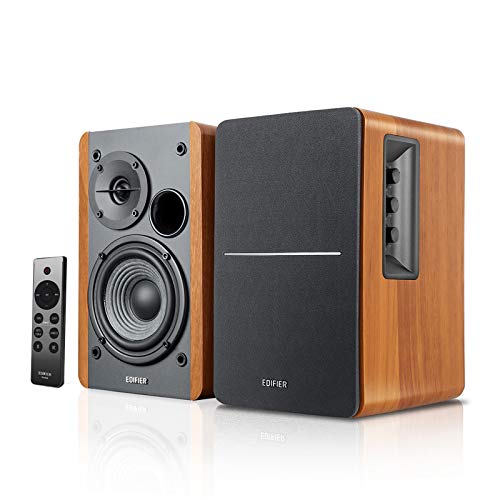
The Edifier R1280DBs are active Bluetooth bookshelf speakers designed for audiophiles who want studio-monitor quality in a compact, versatile package. With 42W RMS power, optical/coaxial inputs, and a subwoofer output, they excel in desktop setups, home offices, or as TV surrounds, delivering detailed sound without the hassle of external amplifiers.
In real-world use, these speakers shine with wireless Bluetooth 5.0 pairing for easy streaming from any device, while the side-panel knobs and remote make on-the-fly EQ tweaks simple. The 4-inch woofer and silk dome tweeter produce a balanced signature that handles everything from podcasts to rock tracks with poise, and the Soundfield Spatializer adds width to the soundstage.
Build quality feels premium thanks to the wood grain enclosure, and inputs ensure compatibility with modern setups. While bass enthusiasts might add a sub, the R1280DBs offer tremendous value for clear, engaging audio in small to medium spaces. Verdict: A top pick for versatile, high-fidelity listening on a budget.
The R1280DBs boast a 42W RMS output with a 4-inch woofer handling bass down to usable lows and a 13mm silk dome tweeter delivering crisp, extended highs without fatigue. Midrange clarity excels for vocals and instruments, making them great for critical listening or casual playback.
Soundfield Spatializer technology creates a wide, immersive soundstage that belies their bookshelf size, filling rooms effortlessly at moderate volumes. Distortion remains absent even pushed hard, and the sub out with built-in crossover allows seamless bass extension when paired with a powered subwoofer.
Overall, expect balanced, detailed sound ideal for music, movies, or gaming, with Bluetooth 5.0 ensuring stable wireless performance.
Housed in a sturdy MDF cabinet with authentic wood grain veneer, the R1280DBs combine elegant looks with resonance-dampening construction for cleaner sound. Compact dimensions make them perfect for desks or shelves, with the active speaker featuring all controls on the side panel for easy access.
Connectivity is robust: Bluetooth 5.0 for wireless, optical and coaxial for digital lossless audio from TVs or computers, RCA line-in for analog sources, and a dedicated subwoofer output with auto-detection. The included remote handles input switching, volume, mute, and EQ presets.
As fully active speakers, they draw power from a standard AC outlet with no external amp needed, supporting plug-and-play simplicity across US voltage standards.

Pros
- Powerful 66W output with precise two-way crossover for balanced sound
- LDAC support delivers studio-quality wireless audio from Android devices
- Versatile inputs ensure compatibility with PCs, phones, and more
- Compact build with premium aluminum stands enhances desktop integration
- Hi-Res certified for both wired and wireless hi-fi listening
Cons
- Requires AC power outlet, no built-in battery for portability
- Mid-bass focused without dedicated subwoofer for deepest lows
- App features limited compared to full smart speaker ecosystems
The Edifier M60 is a compact stereo desktop speaker system delivering 66W RMS of hi-res audio power, perfect for audiophiles and professionals upgrading their home office or PC setup. With Bluetooth 5.3, LDAC codec, USB-C, and AUX inputs, it handles everything from music streaming to video calls effortlessly.
Targeted at US tech enthusiasts who demand quality sound in small spaces, the M60 shines in real-world use like late-night coding sessions or immersive gaming, where its punchy mids and clear treble cut through without fatigue. The included aluminum stands optimize sound direction, making it feel larger than its phone-like footprint.
Performance stands out with full digital processing and DSP control, ensuring dynamic range and minimal distortion even at high volumes. While it lacks portability, its desktop prowess makes it a top pick for stationary hi-fi fans.
Verdict: A high-value choice for detailed, powerful desktop audio that punches above its size, earning strong recommendation for quality-conscious buyers.
The Edifier M60 packs 66W RMS with 3-inch aluminum mid-bass drivers and 1-inch silk dome tweeters, delivering punchy lows and sparkling highs ideal for rock, podcasts, and movies. Hi-Res Audio certification ensures rich detail in wired or wireless modes.
Bluetooth 5.3 with LDAC provides stable, high-bitrate streaming up to 990kbps, maintaining clarity over typical room ranges without dropouts. Volume scales cleanly to fill small offices, with DSP handling dynamics for vocal clarity and instrument separation.
Class-D amplification and active crossover keep sound balanced, though bass depth suits desktops rather than bass-heavy parties.
Sleek black compact design measures just 100x168x147mm per speaker, blending into any US desk like a smartphone while bundled 15-degree aluminum stands direct sound to ear level for reduced distortion.
Capacitive touch panel with proximity-sensing backlight offers easy volume, input, and power control, plus EDIFIER ConneX app for tweaks. Premium build feels solid for daily desktop use.
Mains-powered for unlimited continuous playback without battery limits or charging downtime, prioritizing reliable performance over portability in home office scenarios.

Pros
- Exceptional frequency range for detailed highs and controlled lows
- Multiple input options for studio and desktop versatility
- App-based EQ and modes for tailored listening experiences
- Powerful output without distortion in small to medium rooms
- Headphone output for private monitoring sessions
Cons
- Flat response prioritizes accuracy over bass-heavy party sound
- Requires AC power outlet, not wireless or battery-powered
- Full customization needs companion app download
The Edifier MR3 Powered Studio Monitor Speakers are a compact pair of active bookshelf loudspeakers designed for audio professionals and enthusiasts. Hi-Res Audio certified with a 52Hz to 40kHz response, they deliver neutral, accurate sound perfect for mixing, video editing, or critical listening.
Ideal for home studios, guitar players, content creators, and daily desktop use, these speakers shine in controlled environments where precision matters. Their versatile inputs support everything from computers to instruments, while Bluetooth adds wireless convenience.
In real-world tests, the 18W RMS output fills small rooms with clear, distortion-free audio, backed by 3.5-inch mid-low drivers and 1-inch tweeters. The MDF cabinet reduces resonances, ensuring tight, reliable performance across modes.
Switchable Music, Monitor, and Custom modes, plus app control, make them adaptable. Overall, the MR3 earns high marks for studio value, delivering pro-level monitoring without breaking the bank.
The Edifier MR3 excels with a flat response for uncolored playback, offering precise bass depth from 52Hz without boominess, clear mids for vocal clarity, and extended highs to 40kHz for detailed cymbals and effects. This makes it spot-on for mixing and mastering.
At 18W RMS and 92.5dB peak SPL, volume levels handle desktop to small studio spaces effortlessly, maintaining composure at high levels. Bluetooth 5.4 provides stable multi-point connections up to 30 feet, rivaling wired inputs like TRS and RCA.
Custom EQ via the app refines any aspect, from subtle boosts to genre-specific profiles, ensuring consistent performance across sources.
Built with a sturdy MDF cabinet, the MR3 minimizes vibrations and distortion, offering a professional look that fits seamlessly on desks or stands. Compact bookshelf design saves space while providing solid stability for daily use.
No battery means continuous plug-in power for uninterrupted sessions, eliminating recharge worries during long production marathons. Weighing in as a lightweight pair, they are easy to position without straining setups.
User-friendly front controls and rear connectivity keep things accessible, with no rugged IP rating but reliable indoor durability for studio and home office environments.

Pros
- Exceptional sound quality with fine-tuned 4-inch bass and silk tweeter
- Multiple inputs including Bluetooth, optical, and coaxial for versatile connectivity
- User-friendly remote and side controls for easy adjustments
- Powered design eliminates battery concerns for continuous playback
Cons
- Requires AC power outlet, limiting placement flexibility
- Bass may lack depth in larger rooms without subwoofer
- No companion app for advanced EQ customization
The Edifier R1280DB are powered bookshelf speakers designed for high-quality near-field audio in home environments. With 42W RMS power, Bluetooth connectivity, and digital optical/coaxial inputs, they bridge wireless convenience with studio-grade performance, making them ideal for desktop users, TV watchers, or casual listeners upgrading their setup.
Targeted at American tech-savvy consumers who want reliable sound without complexity, these speakers excel in small to medium rooms like home offices or living spaces. Real-world use reveals strong Bluetooth pairing with devices like iPhones and PCs, plus lossless connections to TVs for movie nights.
Performance shines in balanced playback across genres, from podcasts to rock tracks. The wood grain enclosure enhances aesthetics on any shelf. Overall verdict: a top pick for value-driven audio that punches above its weight in clarity and control.
Bass depth from the 4-inch drivers delivers punchy lows suitable for near-field listening, handling everything from electronic beats to acoustic tracks without muddiness. The 13mm silk dome tweeter ensures vocal clarity and sparkling highs, creating a wide soundstage in desktop setups.
Volume levels reach room-filling output at 42W RMS with minimal distortion, perfect for personal listening sessions. Bluetooth range stays stable up to 30 feet, supporting lag-free streaming from multiple devices.
Optical and coaxial inputs provide digital precision, outperforming analog for hi-res sources like computers or streaming boxes.
The wood grain finish gives a premium, furniture-friendly look that blends into home offices or shelves, with a compact bookshelf form factor for easy placement. Build quality feels solid, though not rugged for outdoor use.
As powered speakers, they draw from AC outlets for unlimited playback time with no battery limitations or charging needs, ideal for stationary setups. Weight is manageable for two-person carry, but prioritize outlet proximity.
No IP rating means indoor use only, focusing on elegant design over portability for everyday home audio reliability.
Pros
- Exceptional studio sound from 4-inch woofer and 13mm tweeter
- Versatile Bluetooth, optical, and coaxial connectivity
- User-friendly remote and side panel EQ controls
- Compact bookshelf size perfect for desks and shelves
Cons
- Requires power outlet as it's not battery-powered
- Bass may lack depth for large rooms without a subwoofer
- Single active speaker handles controls, limiting placement flexibility
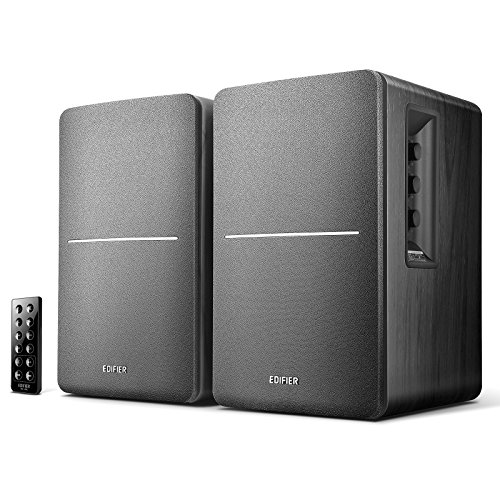
The Edifier R1280DB are powered bookshelf speakers designed as wireless studio monitors, featuring 4-inch woofers and 13mm silk dome tweeters for precise near-field listening. They connect via Bluetooth for everyday devices or optical/coaxial for high-fidelity sources like TVs and PCs, making them a versatile upgrade for home audio setups.
Perfect for music lovers, gamers, or remote workers in home offices, these speakers excel in small to medium spaces where clarity and control matter. The included remote and side-mounted bass/treble knobs let you tweak sound on the fly, adapting to podcasts, movies, or tracks without hassle.
In real-world use, they provide balanced reproduction with enough power for immersive sessions, though pairing with a subwoofer enhances low-end impact. Overall, the R1280DB offer premium features at an accessible level, earning a strong recommendation for anyone building a clutter-free audio system.
Verdict: A top pick for desktop and shelf setups seeking studio quality and modern connectivity.
Expect naturally tuned studio sound with solid midrange clarity from the silk dome tweeter and controlled bass from the 4-inch driver, ideal for detailed vocals and instruments in home office calls or music playback. Volume reaches room-filling levels at 42W RMS without muddiness in near-field positions.
Bluetooth delivers stable wireless streaming up to 30 feet, while optical and coaxial inputs preserve lossless quality from digital sources, ensuring hi-res audio from TVs or computers shines through. Bass response suits critical listening but tightens further with EQ adjustments via side knobs.
Performance shines in balanced signatures for genres from rock to classical, with low distortion even at higher volumes, making daily use reliable for focused work or entertainment.
The wood grain black finish gives a premium, furniture-friendly look that fits home offices, living rooms, or media consoles without standing out awkwardly. Compact bookshelf form factor keeps them desk-ready, with the active speaker housing all controls for straightforward setup.
Built for stationary use, these powered speakers draw from an AC outlet for continuous play without battery concerns or charging downtime, perfect for all-day desktop sessions. No IP rating means indoor placement only, prioritizing audio purity over rugged portability.
Weight balances stability on shelves, and the side panel access encourages frequent tweaks, enhancing long-term usability in fixed setups.
Step-by-Step Guide to Connecting Edifier Speakers via Bluetooth
Connecting an active speaker system wirelessly requires switching the unit into discovery mode, preparing the source device, and confirming the audio output route. Most powered Edifier speakers use an active-passive setup where the right-hand cabinet houses the internal amplifier, connection ports, and Bluetooth radio. Successful pairing depends on switching this powered unit to the dedicated wireless channel rather than its physical line inputs. Once the status indicator confirms the receiver is actively broadcasting, completing the connection on your source device takes only a few moments.
Identifying Your Edifier Model and Bluetooth Capability
Before attempting to pair, verifying that your specific speaker hardware supports wireless streaming avoids unnecessary troubleshooting. Many classic bookshelf designs share nearly identical wooden enclosures while featuring different internal hardware. For example, the Edifier R1280T features dual analog RCA inputs, but it does not contain a built-in Bluetooth receiver. In contrast, models like the Edifier R1280DB and Edifier R1280DBs include integrated digital decoders and Bluetooth radios.
Checking the back plate of the primary powered speaker provides immediate clarity regarding supported inputs. If the active terminal lists optical, coaxial, or dedicated wireless status indicators alongside analog ports, your unit supports native Bluetooth streaming. Newer compact models, including the Edifier M60 and Edifier MR3, feature modern Bluetooth specifications like versions 5.3 and 5.4 directly within their control architecture. Knowing your exact model name helps you locate the correct input selection controls and determine whether pairing requires physical dials or remote commands.
Activating Bluetooth Mode and Checking Status Indicators
Entering wireless pairing mode requires switching the speaker from its default wired inputs to the Bluetooth receiver. On classic bookshelf designs like the Edifier R1280DB or Edifier R1280DBs, the master volume knob on the side panel doubles as an input selector switch. Pressing this rotary dial inward toggles sequentially through line inputs, digital connections, and Bluetooth. Alternatively, pressing the dedicated Bluetooth button on the included infrared remote immediately commands the amplifier to switch channels.
Modern desktop models feature alternative interface layouts tailored for immediate access. The Edifier M60 utilizes a capacitive touch panel with an automatic backlight that responds as your hand approaches, allowing direct touch selection of input modes. Meanwhile, the LED status light provides real-time visual confirmation of the current channel and pairing state. A solid blue light indicates that the speaker is currently connected to an active source, while a rapidly flashing blue light signals discovery mode ready for pairing.
Pairing with Smartphones and Mobile Tablets
Mobile devices running iOS or Android provide the most straightforward path for establishing a new wireless audio connection. Begin by opening the settings menu on your smartphone and toggling the Bluetooth switch to the active position. Bring your phone within a few feet of the powered Edifier speaker to prevent signal attenuation during the initial handshake. Ensure the speaker status light is flashing blue, confirming that discovery mode is actively broadcasting.
On an iPhone, open Settings, select Bluetooth, and tap your speaker name under the Other Devices list to complete pairing. Android devices follow a similar sequence by scanning for nearby hardware within the Connected Devices menu. Devices paired with high-resolution models like the Edifier M60 can also enable advanced audio codecs. Android settings often display an LDAC toggle within the device options, allowing higher bitrate wireless transmission when streaming high-resolution audio files.
Connecting to Windows PCs and Laptops
Desktop computers and laptops running Windows require proper audio routing to ensure wireless signals reach the speaker instead of internal laptop drivers. Start by opening the Windows Settings window and navigating to the Bluetooth and Devices category. Verify that Bluetooth is turned on, then click the button labeled Add Device at the top of the interface. Select the Bluetooth option from the popup prompt to begin scanning for nearby audio receivers.
Select the Edifier speaker from the list of discovered hardware and wait for Windows to install the generic audio endpoint drivers. A notification will confirm that the device is connected for music playback. If you are comparing desktop setups, reviewing Bluetooth speaker sound quality considerations can help evaluate how digital streaming behaves compared to standard wired connections. Finally, open the taskbar sound menu and verify that your Edifier speaker is chosen as the default playback output.
Connecting to Apple Mac Desktops and MacBooks
Setting up wireless audio on macOS involves standard system discovery followed by output routing verification. Open the Apple menu in the top left corner of the desktop, select System Settings, and click the Bluetooth category in the sidebar. Confirm that Bluetooth is active, then place your active Edifier speaker into discovery mode using the remote control or side panel dial. The Mac will scan local frequencies and display the speaker name under the Nearby Devices list.
Click the Connect button next to your Edifier model name to establish the wireless pairing link. The status light on the powered speaker will shift from blinking blue to steady blue once macOS completes the handshake. Once paired, click the Control Center icon in the macOS menu bar, select Sound, and designate the Edifier speaker as your active output. Verifying these settings ensures that system sounds and streaming audio do not clip or drop during high-volume playback.
Pairing Smart TVs and Media Streaming Consoles
Integrating active bookshelf speakers with a smart television provides a substantial upgrade over thin internal TV speakers. Modern televisions running Google TV, webOS, Tizen, or Fire TV software include integrated Bluetooth transmitters designed for external audio gear. Access the television settings menu, open the Sound or Audio Output submenu, and select Bluetooth Speaker List or Audio Out. Place the Edifier speaker into discovery mode so the TV can identify the broadcast signal.
Select your Edifier speaker from the television screen using the TV remote control and confirm the pairing prompt. The television will mute its built-in speakers and direct digital audio signals wirelessly to your Edifier monitors. Because Bluetooth streaming can introduce subtle processing delays, check the television audio settings for an audio delay or sync slider. Alternatively, models like the Edifier R1280DB and Edifier R1280DBs feature digital optical inputs, allowing you to hardwire TV audio while keeping Bluetooth free for mobile devices.
Using the EDIFIER ConneX Mobile App for Advanced Control
Modern active speakers within the brand lineup support app integration to unlock deeper sound customization and device management. Models such as the Edifier M60 and Edifier MR3 communicate directly with the EDIFIER ConneX app, available on Android and iOS platforms. Connecting through the app requires having the speaker already paired to your mobile device via standard Bluetooth settings. Opening the app allows it to detect the active speaker and load model-specific features automatically.
The companion application provides access to specialized playback profiles that tailor frequency responses to your environment. On the Edifier MR3, for instance, users can switch between a neutral Monitor profile designed for audio production and a dynamic Music profile tuned for casual listening. The app also features custom equalization sliders and multi-point connection management on supported models. Managing multiple connections through software provides visual oversight of which host device currently holds audio playback priority.
Resolving No Sound, Connection Drops, and Pairing Failures
Troubleshooting wireless audio problems begins with identifying whether the issue stems from connection memory or physical interference. If your Edifier speaker refuses to enter pairing mode and the LED remains steady blue, it is likely tethered to a previously paired device in another room. Active speakers automatically latch onto the last connected host when powered on. Disconnecting Bluetooth on your nearby laptop, tablet, or phone immediately releases the speaker and restores the flashing blue pairing light.
Forcing a manual pairing reset clears stubborn device locks when the original source device is inaccessible. On models with a rotary master volume knob, pressing and holding the dial inward for approximately three seconds resets the Bluetooth receiver and forces discovery mode. If your model uses an infrared remote, pressing and holding the dedicated Bluetooth button for three seconds achieves the same result. Relocating the active speaker away from 2.4 GHz Wi-Fi routers also eliminates packet loss and intermittent sound stuttering.
Adapting Non-Bluetooth Edifier Models with External Receivers
Owners of analog-only speakers can still enjoy wireless streaming by integrating a standalone Bluetooth receiver into the setup. The Edifier R1280T represents a prime example of an active monitor that delivers clean sound through dual AUX and RCA connections but lacks an onboard wireless antenna. Instead of replacing functional speakers, connecting an external Bluetooth adapter to the secondary RCA input adds full wireless functionality. This approach mirrors how larger powered speaker systems expand their input capabilities in home and studio environments.
Setting up an external adapter requires connecting the receiver audio output jacks to the Line 1 or Line 2 RCA inputs on the back of the active speaker. Standard 3.5mm-to-RCA or dual-RCA audio cables establish the analog link between the two boxes. Power the external receiver using its included USB adapter or power supply, then pair your phone or laptop to the external adapter following its standard pairing instructions. Keeping the external adapter output volume around 85 percent prevents input stage clipping, ensuring clean analog sound.
Maintaining a Stable Wireless Connection and Audio Verification
Completing a successful Bluetooth setup concludes with verifying sound stage balance, input levels, and tone adjustments. Once the blue indicator light turns solid, play a familiar audio track to evaluate channel separation between the left and right speakers. Adjust the physical bass and treble knobs on the active speaker side panel to suit your room acoustic properties. Setting treble controls slightly higher can restore upper-frequency air lost during standard wireless compression, while bass dials help balance desk reflections.
Proper gain staging between your digital source and active speaker ensures optimal signal-to-noise ratio during daily use. Keep your host smartphone or computer volume between 75 and 90 percent, using the Edifier master volume knob or infrared remote to govern final room listening levels. This balance minimizes background hiss from internal amplifier gain while providing plenty of dynamic headroom for energetic music tracks. Following these simple gain practices and input selection steps ensures your Edifier system delivers consistent, clear wireless performance across all your media devices.



Write Your Review
No reviews yet. Be the first to share your experience!