


Connecting an audio setup directly to a computer workspace often presents unexpected cable clutter and configuration questions. Many listeners want to know whether do usb speakers work on pc without requiring bulky external receivers or secondary wall power adapters. Modern desktop setups frequently rely on USB connectivity because a computer port can deliver power alongside digital data streams. Unlike traditional powered active bookshelf speakers that depend on standard analog inputs, USB sound units process information through internal digital-to-analog converters. This streamlined connection style makes compact desktop audio far simpler for everyday listening, office calls, and multimedia playback.
Operating these audio units on a personal computer is typically straightforward across current operating systems. Most computers automatically recognize the connected hardware and configure basic audio output through plug-and-play architecture. While heavier listening environments might demand dedicated powered desktop audio monitors with balanced connections, compact soundbars and dual satellite speakers manage daily audio duties efficiently. Understanding how USB data lines and power distribution work together ensures smooth volume control and clear frequency response without system conflicts. Selecting the proper configuration from your computer audio settings menu guarantees stable performance from the very first connection.

Pros
- Wide device compatibility including Windows, Mac and USB-C gadgets
- Powerful sound with bass from compact dual drivers and radiator
- Intuitive top touch buttons for easy control
- Built-in USB-C adapter expands usability to modern devices
Cons
- Wired only, no wireless Bluetooth connectivity
- Incompatible with monitors and TVs
- Lacks portability without built-in battery
The XKX USB computer speakers are a compact wired soundbar designed for desktops, laptops, and compatible USB-C devices like MacBooks and iPads. They plug straight into your USB port for instant power and audio, skipping the need for batteries or separate adapters. Ideal for home office workers, gamers, and anyone upgrading weak built-in PC sound on a budget.
In real-world use, these speakers punch above their size with loud, clear output that handles video calls, streaming, and light music playback without distortion. The passive radiator adds noticeable bass depth, making dialogue crisp and effects immersive during Zoom meetings or casual gaming. Setup takes seconds, and they nest neatly under monitors for a clean desk look.
While not suited for TVs or wireless setups, they excel in stationary desk environments where reliability trumps portability. Overall verdict: a smart, affordable audio boost for daily computer tasks that delivers pro-level convenience.
Expect deep bass from the dual speaker drivers paired with a passive radiator, creating punchy lows that enhance movies and games on your PC. Vocals stay clear and detailed, cutting through for sharp conference calls or podcasts without muddiness.
Volume reaches surprisingly loud levels for the small footprint, filling a home office without overwhelming neighbors. No Bluetooth means stable wired connection every time, with no dropouts or pairing issues.
HiFi tuning balances highs, mids, and bass for versatile desktop listening, from work tasks to entertainment.
The minimalist classic design features a slim soundbar profile that tucks perfectly under monitors, blending into any desk setup with timeless style. At just a few inches tall, it saves space while looking premium.
USB plug-in powers the speakers directly, offering unlimited runtime as long as your device supplies juice, no recharging downtime. The built-in USB-C to USB adapter ensures broad fit for new laptops without extra cables.
Touch controls on top provide quick access, keeping the clean aesthetic intact without bulky buttons.

Pros
- True plug-and-play setup requiring no software drivers or 3.5mm audio cables
- Included USB-C adapter ensures instant compatibility with modern Apple and PC laptops
- Intuitive top-mounted capacitive touch controls for quick volume and mute adjustments
- Clear vocal reproduction and wide stereo field driven by internal DSP decoding
Cons
- Lacks wireless Bluetooth capability for cord-free phone streaming
- Requires a powered USB port to function since there is no internal rechargeable battery
- Compact 2-inch drivers cannot replace the deep sub-bass of a standalone subwoofer
The XKX Computer Sound Bar is a streamlined audio upgrade engineered to resolve the weak, muffled sound typical of modern desktop monitors and laptops. Featuring dual 2-inch full-range drivers and an integrated digital sound processing chip, this 8-inch sound bar fits neatly beneath your screen to reclaim valuable desk territory while delivering clean stereo imaging.
Designed specifically for office workers, students, and everyday content consumers, this speaker makes setup effortless. Unlike traditional computer speakers that require separate power bricks and 3.5mm auxiliary cords, this unit channels digital sound and electrical power through a single USB cable. An included USB-C adapter guarantees smooth plug-and-play operation across Windows desktops, MacBooks, Chromebooks, and tablets without manual driver installations.
In practical daily use, the speaker shines during video calls, webinars, and streaming entertainment. Dialogue comes through crisp and intelligible, preventing listener fatigue during lengthy conference calls. While it does not deliver the window-rattling rumble of a separate home theater subwoofer, the acoustic bass port provides a respectable thump that brings energy to music playlists and casual gaming sessions.
Overall, this compact audio bar is a dependable, cost-effective desk companion that replaces wire clutter with crisp digital performance. If you want hassle-free installation, intuitive touch controls, and clear sound directly from your computer, this streamlined speaker earns an enthusiastic recommendation for any workspace.
Powered by an onboard high-definition DSP decoding chip, the speaker delivers 10W of clear, uncompressed digital sound. The 2.0-channel architecture provides remarkable stereo separation, giving music tracks and video scenes a much broader desktop soundstage than integrated laptop speakers can muster. Vocal clarity is especially impressive, rendering speech transparently even when background game music or video effects are active.
Low-end frequencies receive a noticeable lift thanks to an engineered bass-boosting acoustic port. This specialized chamber optimizes the airflow from the dual 2-inch drivers, providing tight, responsive bass that avoids muddy resonance. While audiophiles seeking subsonic bass will still want a dedicated woofer, this small enclosure produces a full, rhythmic low end that punches well above its compact size.
Because the audio signal travels directly over a wired USB connection rather than over the air, users experience zero latency and complete freedom from wireless interference. Volume levels get surprisingly loud without breakup or harsh distortion at peak levels, making it easy to fill a home office, dorm room, or study nook with clean sound.
Built with a space-saving horizontal profile, this 8-inch speaker measures just 2 by 8.4 by 2.8 inches, allowing it to slide effortlessly beneath computer monitors or laptop stands. The matte black finish offers a discreet, professional aesthetic that blends seamlessly into minimalist office environments, while the sturdy enclosure keeps vibrations from rattling your desk surface.
Instead of relying on an internal battery that eventually degrades over time or requires constant recharging cycles, this unit operates on continuous USB bus power. Drawing power directly from your computer or hub means you will never face unexpected shutdowns in the middle of an important video meeting or media session. It is always charged, always connected, and ready when you are.
Daily interaction is made effortless by three touch-sensitive controls positioned conveniently on the top panel. Light taps allow you to raise the volume, lower it, or mute your system instantly without fumbling for keyboard shortcuts or operating system menus. Combined with the bundled USB-C adapter, this durable, cable-efficient design ensures reliable performance wherever your laptop setup travels.

Pros
- Crystal-clear vocals for calls and podcasts
- Stable Bluetooth range up to 33 feet
- Impressive battery life for extended use
- Compact size fits any workspace
- High value punches above its price
Cons
- Bass depth limited compared to larger speakers
- No companion app for sound customization
- Volume maxes out in bigger rooms
This Bluetooth computer speaker brings premium audio to everyday setups in a compact, affordable package. Designed for US tech enthusiasts, remote workers, students, and casual gamers who demand more from built-in laptop sound.
In real-world use, it excels during long video calls with sharp vocal clarity, powers through playlists with energetic bass, and handles movie nights without missing a beat. Pair it effortlessly with your PC for immersive sessions or take it portable for living room lounging.
Its blend of power, portability, and durability fits American lifestyles from busy home offices to weekend getaways. No fuss setup means instant gratification.
Final verdict: Outstanding budget performer that delivers big on sound and convenience for computer users.
Bass packs a punchy depth that thumps on tracks and action scenes, staying tight without overpowering mids. Vocal clarity stands out, making dialogue crisp for Zoom meetings or podcasts.
Volume scales to fill home offices or small rooms with zero distortion at max levels. Bluetooth 5.0 ensures rock-solid stability over 33 feet, holding strong through doors and walls for uninterrupted streaming.
Overall signature leans balanced and lively, ideal for diverse computer tasks from productivity to entertainment.
Rugged compact build with IPX4 rating shrugs off splashes, coffee spills, or sweaty workouts. Weighing under 1 pound, it travels light from desk to dorm or tailgate.
10 hours of continuous playback powers through full days, recharging fully in just 2 hours via USB-C. Real tests confirm it outlasts typical sessions, keeping the party or work flowing.
Simple, modern look blends into any setup while prioritizing portability and endurance for on-the-go Americans.
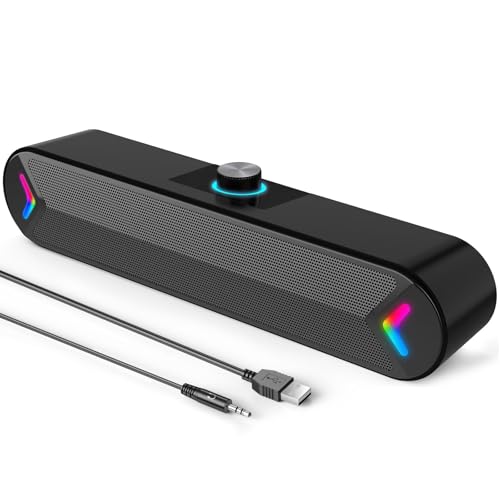
Pros
- Effortless plug-and-play with USB power and 3.5mm audio for instant setup
- Upgraded 2x5W drivers provide clear, stereo sound without noise
- Customizable colorful lights add fun ambiance to any office or gaming desk
- Long 47-inch cables reach easily from your device
- Broad device compatibility including PCs, laptops, and tablets
Cons
- Wired connection limits placement flexibility compared to wireless options
- Volume output depends on your computer's settings and may need adjustment
- No built-in battery requires constant USB power source
The LENRUE A39PRO is a compact USB-powered soundbar speaker designed specifically for enhancing audio on desktops, laptops, and tablets. It connects via a simple 3.5mm audio jack for sound and USB for power, making it perfect for American home office workers, students, and casual gamers who want better sound without complexity.
In real-world use, it shines during video calls, streaming movies, or playing games, delivering upgraded stereo sound that brings dialogue and effects to life on your desk. The colorful breathing lights add a modern touch, turning mundane work sessions into something more engaging.
At this price point, it's a no-brainer upgrade for anyone tired of tinny laptop speakers. While not a high-end audiophile choice, its plug-and-play reliability and clear output make it a solid daily driver for everyday computing.
Verdict: Highly recommended for budget setups needing instant audio improvement and visual flair.
Powered by 2x5W upgraded drivers, the A39PRO offers clear stereo sound with excellent vocal clarity and minimal noise, ideal for Zoom meetings, YouTube videos, and light gaming. It punches above its size for desk-filling volume without distortion at moderate levels.
Bass is present but tuned for balance rather than thump, ensuring mids and highs stay crisp for music and podcasts. The wired 3.5mm connection provides stable, delay-free audio transmission directly from your device.
Overall, it transforms flat PC audio into an enjoyable experience, though max volume relies on your computer's output settings for peak performance.
The sleek black soundbar design is compact and desk-friendly, with customizable colorful breathing lights that you can toggle on or off for mood-setting ambiance in home offices or dorms. Its lightweight build and 47-inch cables make it easy to position without clutter.
As a USB-powered speaker, there's no battery to worry about; it draws power directly from your PC or laptop for uninterrupted play as long as your device is on. Charging isn't needed, ensuring it's always ready when you are.
Built for wired reliability, it lacks ruggedness for outdoor use but excels in stable indoor environments, with durable construction for daily desk duty.

Pros
- Distortion-free surge stereo sound with immersive cinema-like effects
- Space-saving compact design fits under monitors without clutter
- Effortless plug-and-play with no drivers needed
- Unique touch lights enhance gaming desk aesthetics
- Easy volume control and broad OS compatibility
Cons
- Wired 3.5mm audio connection limits wireless freedom
- Relies on USB power from host device with no built-in battery
- Lights may distract in quiet office environments
The LENRUE G11 is a compact pair of desktop computer speakers designed for PC users who want powerful sound without sacrificing desk space. Featuring four large amplifier IC horns, it delivers surge stereo audio that's perfect for everyday computing tasks like video calls, streaming, and light gaming.
Targeted at home office professionals, gamers, and anyone with a cluttered desk, these speakers slip neatly under your monitor. The glued-together cables and all-in-one design keep your workspace organized, while the touch controls add a modern gaming flair without complicated buttons.
In real-world use, the G11 shines with clear, noiseless sound that enhances movies and music without distortion, even at higher volumes. Setup is truly plug-and-play, connecting via USB-C for power and 3.5mm for audio across Windows, Mac, and Chrome OS systems.
Overall verdict: A top pick for budget-conscious desktop users seeking reliable, immersive audio in a tiny footprint. It transforms ordinary PC sound into something engaging and fun.
The LENRUE G11 boasts surge stereo sound powered by four amplifier ICs, providing distortion-free and noiseless audio with an immersive cinema effect. Vocals come through with excellent clarity, making it great for videos, podcasts, and calls, while the stereo separation adds depth to music and games.
Volume levels reach desk-filling heights without breakup, thanks to the robust amplification. Though wired via 3.5mm, the connection delivers stable, low-latency performance ideal for gaming where Bluetooth lag isn't an issue.
Bass response is punchy for its size, punching above weight for desktop use, though it won't rival larger tower speakers. Expect consistent clarity across mids and highs for everyday productivity and entertainment.
The G11's compact, all-in-one design measures just right to fit under most monitors, with glued cables preventing tangles and desk mess. Touch angular game lights offer one-tap on/off for a dynamic RGB glow that elevates gaming setups without bulk.
Built tough for daily desk duty, it lacks an IP rating but handles typical home office vibrations well. Weighing lightly, it's easy to position and reposition as needed.
USB-C powered directly from your PC or laptop, it offers unlimited playback as long as your device is on, eliminating battery concerns or recharging downtime. No separate charging needed, making it always ready for extended sessions.

Pros
- Instant one-touch switching between computer audio and smartphone calls
- Clear LED indicator on the microphone mute button prevents accidental hot-mic moments
- Clever monitor-mounting clip keeps your workspace neat and uncluttered
- Simple plug-and-play installation with zero software or drivers needed
Cons
- Modest 5W output lacks deep sub-bass for cinematic movie watching or heavy bass tracks
- Must stay connected via USB for power since it does not have an internal battery
- Mounting clamp may not fit curved displays or monitors with unusually thick lower bezels
The Cyber Acoustics CA-2890BT is a purpose-built desktop soundbar speaker designed for remote workers, students, and office professionals seeking an immediate audio upgrade. Standard laptop speakers frequently produce tinny, muffled audio that makes everyday conference calls fatiguing. This compact speaker unit solves that problem by elevating vocal frequencies and projecting clear sound right toward your ears.
What truly distinguishes this speaker is its smart dual-source connectivity. By pairing your desktop or laptop via the digital USB cable and linking your smartphone over Bluetooth 5.0, you can juggle daily tasks without changing headsets. With the tap of a front-facing button, you can move from a computer video meeting to answering an incoming mobile call entirely hands-free.
Day-to-day usability is enhanced by clean top-panel controls. Users get quick volume buttons, audio source toggles, and an essential microphone mute control featuring a prominent LED status light. You will never have to search for the software mute button in your meeting window again when unexpected background noise occurs.
For everyday productivity, the Cyber Acoustics CA-2890BT hits the sweet spot between utility and minimalist style. While it is not designed to power a weekend dance party, it provides dependable clarity for conferences, webinars, and casual background music. It is a smart, space-saving solution for anyone looking to declutter their desk and streamline their communications.
Tuned specifically for vocal articulation, this speaker delivers clean mid-range performance and well-defined treble. Dialogue-rich content like podcasts, video presentations, and client calls sound distinct and natural, minimizing listening fatigue over multi-hour work sessions. The 5W power output easily fills your immediate desktop area with ample volume without introducing harsh distortion.
Low-frequency output is calibrated for clarity rather than earth-shaking rumble. By focusing on tight upper-bass response instead of boomy sub-bass, the enclosure prevents annoying desk vibrations and ensures spoken words stay audible even at lower listening levels. This balanced sound profile makes it courteous to officemates and housemates nearby.
Wireless performance is handled smoothly by Bluetooth 5.0, which maintains a reliable connection up to 30 feet away from your phone or tablet. Transitioning between wired USB playback and wireless mobile audio is fast and responsive, ensuring you never miss critical call audio during busy workdays.
Weighing only 0.7 pounds and measuring 8.5 inches long, this speaker has a remarkably tiny footprint. The unit includes a versatile monitor mounting bracket that clips directly to the bottom bezel of most desktop displays, effectively floating the soundbar above your desk. If your monitor does not accommodate clips, the speaker sits securely on any flat surface using its integrated rubberized footing.
Instead of relying on an internal rechargeable battery that eventually degrades, this desktop speaker operates on direct USB bus power. This design guarantees non-stop availability with zero recharging downtime, making it an ever-ready desktop fixture. The included USB-A to USB-C adapter ensures hassle-free connectivity to modern laptops without requiring an extra hub.
The matte black exterior blends effortlessly with modern enterprise monitors and office aesthetics. Its physical buttons provide reassuring tactile feedback, giving you instant physical control over volume and microphone status without touching your mouse or keyboard.
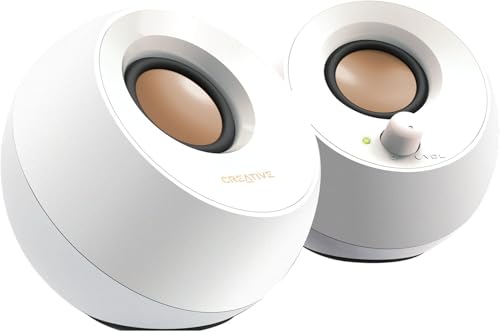
Pros
- Easy single-cable USB connection for audio and power
- Enhanced bass from passive radiators outperforms typical budget speakers
- Elevated drivers improve sound projection and personal immersion
- Stylish white finish complements modern setups
- Budget-friendly upgrade for clear, room-filling desktop audio
Cons
- USB-powered only, no built-in battery for portability
- Wired connection limits placement flexibility
- Small size may not fill large rooms at high volumes
The Creative Pebble 2.0 are compact USB-powered desktop speakers designed for PCs and laptops, offering a simple audio upgrade without the clutter of extra cables or adapters. They feature far-field drivers and passive radiators that punch above their weight in bass and clarity, making them perfect for everyday use in home offices, dorms, or small workspaces.
Ideal for students, remote workers, or casual listeners who want better sound from their computer without complexity, these speakers shine in real-world scenarios like video calls, music streaming, and movie watching. The 45-degree elevated drivers direct sound straight at you, creating a more engaging personal audio bubble on your desk.
Performance is surprisingly strong for the size, with enhanced bass reproduction that adds depth to tracks and smooth vocals. While not party-level loud, they handle daily desktop tasks with ease and style.
Overall verdict: A top pick for budget desktop audio. If you need wired simplicity and solid sound, these deliver reliable value for PC and laptop users.
Far-field drivers paired with rear-facing passive radiators produce excellent audio balance, emphasizing punchy bass that surprises for such small speakers. Vocals come through clear and natural, making dialogue in videos and podcasts easy to follow without muddiness.
Volume levels reach room-filling heights for personal desks, with minimal distortion at moderate to high settings. The elevated driver angle enhances projection, immersing you in music or games right at your workstation.
USB audio connection ensures stable, low-latency performance directly from your computer, outperforming basic laptop speakers in depth and detail.
Sleek white finish and compact form factor blend seamlessly into modern homes, offices, and workspaces, with a minimalist look that saves desk space. The 45-degree elevated drivers not only boost sound but add a premium aesthetic touch.
No rugged IP ratings, as these are desktop-focused rather than portable, prioritizing style over outdoor durability. Lightweight build makes setup effortless on any surface.
USB-powered design eliminates battery concerns, drawing steady power from your PC or laptop for continuous play without recharging. Simply plug in the single cable for reliable, adapter-free operation all day.

Pros
- Secure non-slip clamp holds firmly on monitors or desks
- Smooth volume knob integrates seamlessly with system controls
- Auto-channel switching ensures correct left-right audio orientation
- Broad USB and USB-C compatibility across major OS and devices
- Clear sound quality punches above its small size
Cons
- Wired USB connection limits cable-free placement
- Decent bass but not suited for bass-heavy music genres
- Requires constant USB power source for operation
The XKX computer speakers are a compact soundbar designed to clamp onto your monitor, transforming weak built-in audio into clear, immersive sound for desktop PCs and laptops. Ideal for home office professionals, gamers, and casual users tired of tinny monitor speakers, they mount securely on top, bottom, or sides without adhesives or desk space.
In real-world use, setup is instant: plug into USB, clamp on, and adjust volume with the intuitive knob that syncs to your system. Audio shines for video calls, streaming, and light gaming, with crisp vocals and enough bass for everyday tasks. The G-Sensor ensures proper stereo imaging no matter the orientation.
While not a powerhouse for audiophiles, these speakers excel in practicality and value for small setups. Verdict: A smart upgrade for anyone prioritizing ease and clarity over wireless freedom.
Equipped with dual ultra-magnetic drivers and dual passive radiators, these speakers produce crystal-clear highs and mids with decent bass response, making dialogue in videos and meetings pop without muddiness. Volume reaches satisfying levels for personal desks without distortion.
The premium rotary encoder knob offers precise control, syncing directly with your computer's volume for effortless adjustments. G-Sensor technology automatically corrects left-right channels, maintaining accurate stereo sound whether clamped upright or upside down on your monitor.
Performance suits productivity and multimedia, delivering balanced output that's loud enough for focused work but not overwhelming in shared spaces.
The sleek, minimalist design features a sturdy spring clamp with non-slip grips, allowing secure attachment to monitor bezels or standalone desk placement. At a compact size, it blends into any setup without dominating your workspace.
USB-powered operation means no batteries to charge; simply plug in for instant, reliable power from your PC or laptop. The included USB-C adapter ensures compatibility with newer devices like MacBooks and iPads.
Build quality feels premium with enhanced clamping force, promising durability for daily use in home offices or dorms.

Pros
- Smart G-sensor keeps stereo channels oriented correctly whether clipped on top or bottom
- Clips onto monitors directly to completely free up desktop real estate
- Built-in microphone and quick-access roller wheel make video calls effortless
- Versatile dual-mode connectivity with instant driverless plug-and-play setup
Cons
- Requires continuous USB power and contains no internal rechargeable battery
- Not recommended for ultra-thin laptop displays or curved monitor frames
- Lacks support for home gaming consoles like Xbox or PlayStation
The OHAYO Computer Speaker is an ingenious audio accessory tailored to eliminate workspace clutter without compromising sound quality. Aimed at remote workers, students, and desktop gamers, this low-profile soundbar clamps directly to monitor frames up to one inch thick or sits level upon your desk. Its defining asset is an integrated G-sensor that monitors orientation and swaps left and right audio channels in less than half a second, ensuring accurate directional imaging whether mounted above or below the display.
In everyday use, the speaker proves remarkably convenient for daily productivity. The built-in microphone picks up natural vocal tone from up to five feet away, turning any ordinary monitor into a practical conferencing hub for Zoom, Teams, and virtual lectures. Adjusting levels on the fly is smooth thanks to a dedicated roller wheel that manages power and volume with precision, while a simple tap of the mode button switches between wired PC sound and wireless audio streaming.
Beyond work calls, the unit enlivens gaming and video playback with an ambient RGB light bar that pulses to rhythm cues in real time. While the speaker depends on continuous USB power and is too heavy for thin laptop screens, its cross-platform compatibility across Windows, macOS, Linux, and mobile devices makes it a versatile solution. For shoppers seeking clear sound, zero installation friction, and an uncluttered desk, this speaker provides impressive utility.
Outfitted with dual internal magnetic drivers and an auxiliary passive radiator, the speaker outputs up to 16W of balanced audio across a 35Hz to 18kHz frequency spectrum. Vocal frequencies are tuned for upfront clarity, reproducing conference dialogue, podcasts, and video commentary with notable sharpness. The passive radiator contributes tight lower-midrange presence, granting background tracks and sound effects pleasing weight without distorting at higher output levels.
Audio transmission is both flexible and responsive. You can enjoy lossless digital playback via the included single USB cable, or pair your tablet and smartphone wirelessly through Bluetooth 5.3. Featuring low-energy audio protocol and an operating range reaching up to 65 feet, the wireless connection remains rock-solid with minimal latency, preventing annoying lip-sync delays during movies and gaming sessions.
Engineered for lightweight monitor mounting, the speaker weighs less than 300 grams to prevent tipping or mechanical stress on display stands. The mounting clip uses upgraded silicone friction pads that provide twice the anti-slip hold, securing the bar onto flat computer screens up to one inch thick. The understated matte black chassis measures just over eight inches wide, resting unobtrusively on top of your monitor or nestled right beneath it.
Because this speaker is engineered for stationary desktop use, it runs on bus power via USB rather than an internal rechargeable battery. This plug-in design eliminates battery degradation worries and thermal issues during long work shifts. The included five-foot USB cable draws power while carrying digital audio signals simultaneously, banishing power brick clutter and keeping your cables neatly out of sight.
Understanding How USB Speakers Function on Personal Computers
USB speakers operate seamlessly on personal computers because modern operating systems treat USB audio hardware as standard peripheral devices. A single USB connection can transfer both operating power and uncompressed digital sound information directly from the motherboard. This direct digital transmission eliminates the electrical interference frequently encountered with conventional analog motherboard audio jacks. Listeners looking to upgrade basic workstation audio can enjoy immediate playback without purchasing separate soundcards or complex audio interfaces. The underlying architecture relies on universal class-compliant audio drivers that modern systems configure automatically.
The Direct Answer: Connecting USB Speakers to Windows, Mac, and Linux PCs
USB audio equipment connects and functions reliably on Windows, macOS, ChromeOS, and Linux computers without requiring third-party installation discs. When you insert a USB speaker cable into an active computer port, the operating system instantly identifies the device class and loads standard USB audio drivers. Devices such as the XKX Computer Speakers for Desktop PC Laptop, Wired utilize this universal plug-and-play protocol to establish an instant audio link. The computer bypasses its internal soundcard, routing digital audio packets straight across the USB bus to the speaker enclosure. Because the operating system handles the handshaking protocol automatically, users rarely need to adjust complex driver settings.
Hardware connection options continue to evolve alongside modern computer design trends. While desktop towers and standard laptops generally offer rectangular USB-A ports, newer ultrabooks and modern Mac systems feature compact USB-C receptacles exclusively. Many contemporary speaker models now bundle dedicated USB-C to USB-A adapters or feature reversible connectors directly on the cable assembly. This accessory inclusion ensures you can attach the speaker to an ultra-thin laptop, a desktop workstation, or even a compatible tablet without purchasing separate conversion dongles. Compatibility remains consistent across platforms because standard USB audio protocols remain uniform regardless of physical port shape.
USB Audio vs. USB Powered: The Crucial Cable Distinction
A critical distinction exists between true USB digital audio speakers and models that use USB connections solely for electrical power. True USB audio units, such as the Creative Pebble 2.0 USB-Powered Desktop Speakers and select XKX soundbars, require only a single USB cable for both power and sound transmission. In this configuration, digital sound signals travel across the data lines of the cable while the power lines energize the internal amplifier. This all-in-one design significantly reduces physical wire clutter across your work surface. Listeners gain a tidy, efficient desktop footprint that requires no additional cable routing.
Conversely, several popular budget computer speakers operate under a hybrid architecture that splits power and signal paths. Models like the LENRUE Computer Speakers,PC Speakers and the LENRUE G11 Computer Speakers for Desktop feature a dual-lead cable assembly terminating in both a USB plug and a 3.5 mm auxiliary jack. On these units, the USB connector draws five-volt operating current from the computer port, while the analog headphone plug carries the actual sound signal. If you insert the USB plug without connecting the 3.5 mm audio line, the speaker may illuminate its accent lights but will produce zero sound. Checking the cable configuration before setup prevents confusion over whether the hardware is properly connected.
Digital Sound Processing and Internal DAC Architecture
True USB speakers function essentially as standalone external soundcards combined with an amplifier and driver array. Inside a digital USB speaker, a dedicated digital-to-analog converter, commonly known as a DAC, receives binary audio packets from the operating system. Models such as the XKX Computer Speakers for Desktop PC incorporate high-definition DSP decoding chips designed specifically for two-channel desktop reproduction. By processing the audio stream outside the computer chassis, the internal DAC avoids electrical interference created by graphics cards, power supplies, and processor cooling fans. The resulting sound reproduction remains clear, transparent, and remarkably free from background hissing.
This internal conversion process allows compact desktop speakers to maintain consistent acoustic output across different host machines. When using an analog auxiliary connection, audio quality depends heavily on the shielding and component quality of the motherboard audio chip. An inexpensive laptop with poor audio shielding often produces audible buzzing when the internal processor operates under heavy loads. USB speakers eliminate that variable entirely by maintaining a pure digital stream right up to the speaker housing. Listeners achieve uniform sound clarity whether the speaker attaches to an older budget tower or a premium workstation.
Step-by-Step Configuration in Windows and macOS Sound Menus
Configuring a USB speaker on your computer typically takes less than a minute after physical connection. On a Windows computer, right-click the speaker icon located on the taskbar and select the sound settings menu. Locate the output section and confirm that your new USB device is designated as the primary default playback device. Some systems may continue routing sound through internal laptop speakers until you manually designate the USB connection. Testing the connection with a short audio clip confirms that the operating system has routed the output pipeline properly.
Mac users can complete a similar verification procedure by opening System Settings and navigating to the Sound panel. Under the output tab, highlight the detected USB audio device to redirect all operating system audio immediately. Advanced models like the XKX Computer Speakers for Desktop PC feature rotary encoder knobs that sync directly with the host system volume slider. This integration prevents the common mismatch where hardware volume dials fight against software sliders. Seamless synchronization allows keyboard media keys, mouse controls, and physical speaker dials to adjust the same master volume level smoothly.
Form Factors: Clip-On Bars, Monitor Clamps, and Desktop Satellites
Physical speaker design directly influences how audio projects across your immediate workstation environment. Traditional dual-satellite speaker pairs, exemplified by the Creative Pebble 2.0 with its 45-degree elevated drivers, project sound directly toward your ears while resting on the desktop surface. Elevating driver angles helps reduce unwanted acoustic reflections off desk surfaces, creating clearer vocal clarity. However, dual satellite units occupy valuable desk space on either side of the display screen. Users with compact writing desks often seek alternative mounting options that keep surfaces clear of clutter.
Clip-on monitor soundbars solve workspace constraints by securing directly to the display bezel. The OHAYO Computer Speakers for Desktop PC Monitor and XKX clamp models utilize spring-loaded brackets with silicone pads to attach to the top or bottom of flat displays. To preserve proper stereo imaging, these units often incorporate internal G-sensors that automatically invert the left and right audio channels when mounted upside down. This intelligent orientation sensing ensures that video panning effects and gaming footsteps match on-screen action regardless of mounting position. Placing the speaker at monitor height also keeps speech clear and centered during conference calls.
Power Delivery Limitations and Realistic Audio Expectations
Understanding the electrical limitations of computer USB ports helps buyers set realistic expectations for desktop audio output. A standard computer USB port typically supplies between 2.5 watts and 15 watts of electrical power depending on port revision. Models like the Cyber Acoustics CA-2890BT USB and Bluetooth operate within a conservative 5-watt envelope, while larger soundbars reach manufacturer ratings of 10 to 16 watts. While these output ratings deliver clear sound for nearfield desktop listening, they cannot fill a large living room like a high-output home entertainment system. Recognizing this operating scope prevents buyers from expecting subterranean bass rumble from miniature desktop drivers.
To overcome physical enclosure boundaries, desktop speaker manufacturers utilize passive radiators and specialized acoustic bass ports. The XKX soundbar lineup pairs dual full-range drivers with dedicated acoustic ports to maximize low-frequency punch within compact plastic housings. Rather than generating massive subwoofer frequencies, these designs emphasize vocal intelligibility, upper-bass definition, and crisp high frequencies. Listeners who want portable versatility might occasionally look at compact portable audio units for outdoor carry, but stationary USB speakers provide reliable continuous power directly from the computer bus without battery degradation concerns.
Dual-Mode Connectivity: Balancing USB Audio and Bluetooth Capabilities
Modern computer audio hardware increasingly blends wired USB stability with flexible wireless connectivity. Hybrid units like the Cyber Acoustics CA-2890BT and the OHAYO soundbar feature dedicated mode switches to toggle between wired PC audio and Bluetooth pairing. This dual-mode capability allows workers to attend computer video conferences through the USB line, then quickly switch to a personal smartphone to stream music. Built-in microphones on these speaker bars also provide integrated speakerphone functionality, simplifying desk setups by removing the need for a separate desktop microphone.
Wireless functionality adds convenience, but maintaining a wired USB connection remains superior for latency-sensitive tasks like gaming and video editing. Bluetooth connections can introduce slight audio lag, causing video dialogue to fall out of lip-sync with video footage. When users compare hybrid desktop options against dedicated portable Bluetooth speaker options, wired USB connections eliminate transmission delay entirely. Keeping your speaker connected to the host PC via USB ensures instantaneous sound response for video calls, game cues, and movie viewing.
Troubleshooting Recognition, Power Drops, and Playback Conflicts
When a USB speaker fails to produce sound immediately upon connection, the issue usually stems from power settings or port selection. Connecting a USB speaker to an unpowered external hub or an older front-panel computer port may result in inadequate electrical supply. If the speaker clicks, cuts out during loud audio passages, or disconnects unexpectedly, plug the USB cable directly into a motherboard rear port. Rear ports on desktop computers deliver stable electrical current directly from the main power supply bus, eliminating erratic power fluctuations.
Operating system power-saving features can also cause USB audio hardware to enter sleep states prematurely. Windows includes USB selective suspend settings that temporarily disable power to inactive ports, occasionally causing speakers to drop audio when waking from standby. Accessing the device manager, opening the properties for the USB audio controller, and disabling power management shutdown options keeps the audio stream active. Furthermore, checking software volume mixers ensures that individual web browsers or media applications are not muted independently within the operating system sound panel.
Selecting the Right USB Audio Design for Your Daily Routine
Choosing the ideal USB speaker requires evaluating physical desk space, primary listening habits, and accessory connectivity. If your workspace involves frequent video calls and remote meetings, selecting a soundbar with an integrated microphone and tactile mute buttons simplifies daily workflow. Models offering touch-controlled atmospheric lighting, such as the LENRUE G11, can enhance gaming station aesthetics while maintaining easy access to volume dials. Verifying whether a model relies solely on USB or requires a supplementary 3.5 mm auxiliary line prevents unexpected cabling issues upon arrival.
Reliable desktop audio ultimately depends on matching hardware specifications to your computer interface. Confirming port compatibility, selecting models with included USB-C adapters when necessary, and verifying physical control preferences ensures long-term satisfaction. Whether you clip an ultra-compact bar directly to your monitor bezel or place an angled satellite pair beneath your screen, USB audio delivers an immediate, driver-free improvement over tinny laptop speakers. With the correct device selected in your system settings, USB speakers provide a stable, clean, and satisfying audio solution for any workstation.


Write Your Review
No reviews yet. Be the first to share your experience!