


Setting up a desktop workstation often leaves users wondering whether their display can handle daily audio tasks on its own. If you find yourself asking does asus vg248qe have speakers, the short answer is yes. The classic monitor includes integrated stereo drivers designed to deliver sound directly from your video connection without extra hardware cluttering your desk. While integrated monitor audio handles basic operating system alerts and voice playback, pairing your rig with a multimedia desktop speaker system can provide the dynamic range needed for immersive gaming.
Understanding monitor audio capabilities helps eliminate cable clutter while planning out clean desk routing. Display audio passthrough through HDMI or DisplayPort routes both video and audio streams over a single cord, simplifying your entire workspace setup. Many players still transition between integrated monitor sound and dedicated audio gear depending on whether they are listening to casual voice clips or playing competitive multiplayer titles. Reviewing the audio hardware specifications, connection paths, and potential sound upgrades ensures that your desk produces the acoustic output you expect.
Pros
- Integrated speakers eliminate the need for bulky external desktop audio gear
- Direct wired input delivers latency-free audio perfectly synced with competitive gameplay
- Unlimited continuous playback thanks to reliable wall outlet power
- Highly adjustable stand easily directs audio and video toward your preferred seated position
Cons
- Compact internal speaker drivers lack deep bass response and low-end impact
- Lacks battery portability and water resistance because it is built strictly for indoor desk use
- Output volume is suited for personal desktop listening rather than filling large rooms
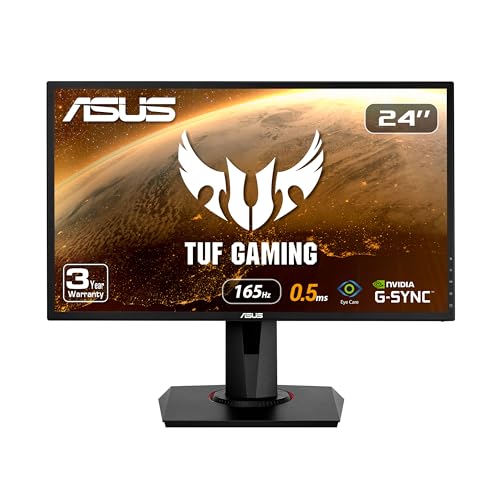
The renewed ASUS VG248QG is an all-in-one desktop gaming display featuring built-in stereo sound designed to streamline your personal setup. By housing audio drivers directly inside the display frame, it eliminates the need for separate desktop speakers while delivering the essential acoustic feedback needed for gaming, media consumption, and daily work tasks.
This integrated speaker solution is engineered for budget-conscious gamers, college students in compact dorm rooms, and home office professionals looking to maximize desk space. If you want a tidy workstation without dealing with tangled speaker wires or bulky external soundbars, this unit provides immediate plug-and-play audio right out of the box.
In everyday use, the built-in speaker delivers clear vocal articulation, making podcasts, video calls, and multiplayer voice communications easy to follow. While it is not designed to produce room-rattling audio, it handles system sounds and in-game cues with clean precision. The audio performance pairs naturally with the ultra-fast 165Hz refresh rate and 0.5ms response time, ensuring every visual cue and sound trigger feels tight and responsive.
Overall, the renewed ASUS VG248QG represents a dependable, dual-purpose solution for everyday desktop entertainment. Serious audiophiles may still prefer external headphones for deep music listening, but for everyday convenience, clear speech, and space efficiency, this integrated speaker setup delivers dependable performance.
The sound profile of the ASUS VG248QG is tailored primarily for clean midrange and high-frequency output. Spoken dialogue, podcast voices, and competitive voice chat come across with crisp definition and zero muffled tones. However, due to the slim chassis profile, low-end bass depth is minimal. Explosions, heavy bass drops, and deep cinematic rumbles lack the sub-bass punch found in standalone subwoofers or larger external desktop speakers.
Volume levels are well-tuned for nearfield desktop use. The built-in speaker drivers produce sufficient output to easily fill a personal bedroom, study nook, or home office without severe distortion at moderate volume. Because audio travels directly over high-speed DisplayPort and HDMI cables, the connection remains rock-solid with zero signal drops or the audio-video latency often found in wireless connections.
The ASUS VG248QG features a durable matte black construction built to endure daily desktop use. Its sturdy base and fully adjustable stand provide remarkable stability, supporting tilt, swivel, pivot, and height adjustments so you can angle sound directly toward your ears. Unlike portable outdoor speakers, this device is engineered strictly for indoor desktop environments and does not carry an IP waterproof or dustproof rating, meaning it must be kept safe from liquids, moisture, and outdoor elements.
When it comes to power and playback time, this speaker operates on standard AC wall power, providing unlimited continuous playback without battery anxiety. Because there is no internal rechargeable battery, you will never experience reduced battery capacity, runtime degradation over the years, or hours spent waiting for a recharge. It remains permanently ready to power up and project audio whenever your computer system is active.

Pros
- Integrated stereo sound eliminates the cost and clutter of dedicated external desktop speakers.
- HDMI input routes high-quality digital audio and Full HD visuals through one tidy cable.
- Direct wall power guarantees endless audio playback with zero battery degradation or recharge pauses.
- Low 2ms latency prevents lip-sync errors and lag during video conferences and gaming sessions.
Cons
- Integrated speaker drivers produce modest low-end bass, making them less suited for bass-heavy club music.
- Designed strictly for indoor desk use, lacking outdoor weatherproofing and portable battery operation.
- Relies on physical HDMI and aux connections rather than wireless Bluetooth pairing.
The ASUS VE248H is a complete multimedia workstation solution that integrates stereo speakers into a versatile 24-inch Full HD display. Designed for everyday users who want to simplify their desktop layout, this unit consolidates visual output and sound reproduction into a single sleek package. Instead of hunting for extra outlets and managing tangled cables for separate computer speakers, users can enjoy straightforward audio output directly from their main screen.
In everyday practical use, this speaker unit shines during productivity tasks, remote work calls, and relaxed streaming sessions. The integrated speakers are engineered to elevate mids and upper frequencies, allowing speech in webinars, YouTube videos, and conference calls to cut through cleanly. The 2ms response time and Full HD visual feed ensure that fast-moving media stays perfectly in sync with the audio track, preventing annoying sound lag during movies or gaming breaks.
Targeted primarily at students, home office workers, and minimalists, this speaker setup provides great daily utility for anyone working in tight spaces like dorms or small bedrooms. While it will not replace an audiophile-grade soundbar for high-volume entertaining, it succeeds at providing dependable personal listening without claiming an inch of valuable desk space. For shoppers seeking an efficient audio-visual hub that handles work and recreation with equal ease, the ASUS VE248H remains a practical and functional choice.
The sound profile of the ASUS VE248H focuses heavily on mid-range clarity and articulate high notes. Voices during podcasts, Zoom meetings, and video playback come through with crisp definition, making dialogue easy to follow even at modest volume settings. While the compact internal drivers naturally exhibit rolled-off sub-bass compared to large standalone subwoofers, the lower-mid frequencies remain steady enough to provide satisfying punch for general videos and casual background listening.
Volume levels are well-balanced for typical desktop distances, comfortably filling a standard home office or study room without significant audio distortion. Because audio signals feed directly through high-bandwidth HDMI or the 3.5mm analog aux input, listeners enjoy a stable, low-latency connection that avoids the dropped signals and pairing headaches commonly found in budget wireless links. The headphone pass-through port also offers a quick way to switch to personal listening whenever privacy is needed.
Built with durability and workspace ergonomics in mind, the ASUS VE248H features a sturdy black chassis weighing in at 9.7 pounds. The stable circular stand provides smooth tilt adjustment, letting you optimize both your viewing angle and the directional projection of the internal speakers toward ear level. As an indoor desktop unit, it foregoes outdoor water-resistance ratings and rugged rubber bumpers in favor of a clean, professional matte finish that fits seamlessly into professional office environments.
Unlike portable units that depend on internal batteries that lose capacity over time, this speaker system runs on reliable AC power with an efficient 34-watt standard consumption rating. This direct power connection ensures that your sound never cuts out during critical presentations or long movie marathons, eliminating charging times and battery anxiety entirely. For users who prioritize continuous uptime and a permanent desktop audio solution, this dependable power architecture delivers complete peace of mind.
Pros
- Built-in stereo sound eliminates the need for bulky external desktop speakers
- Rich connectivity with HDMI, DisplayPort, and D-Sub audio-video passthrough
- Highly adjustable ergonomic stand allows ideal height, tilt, and swivel positioning
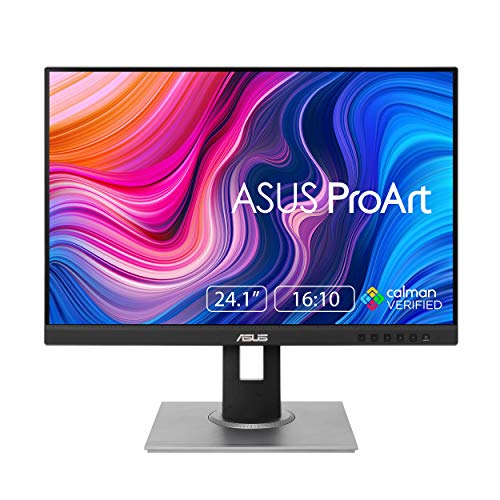
- Calman Verified color precision and 16:10 aspect ratio boost creative productivity
Cons
- Lacks deep sub-bass response and high volume output for room-filling party music
- No wireless Bluetooth pairing or battery operation, requiring stationary AC power
- No outdoor IP waterproof rating, making it strictly confined to dry indoor office environments
The ASUS ProArt PA248QV serves as an integrated desktop multimedia speaker and professional display designed to streamline creative workstations. Combining built-in stereo audio drivers with a 24-inch WUXGA 16:10 panel, this unit gives content creators and office professionals an all-in-one audiovisual hub that eliminates bulky external desktop speakers. Its factory-calibrated color accuracy and sleek black styling make it an attractive centerpiece for digital audio workstations, video editing suites, and executive offices alike.
This speaker solution is built specifically for creators, remote workers, and multitasking professionals who need clean, dependable desktop sound without sacrificing desk real estate. Video editors reviewing timeline dialogue, podcast producers checking vocal clarity, and remote team members attending daily conference calls will appreciate the direct, near-field audio delivery. It caters to users who prioritize organized cable management and integrated desktop hardware over complex multi-speaker setups.
In everyday real-world use, the speaker performs admirably for spoken word, video playback, and background acoustic listening. Voice reproduction is distinct and articulate, which makes conference calls on Zoom and Google Meet effortless to understand. While it will not replace high-power studio reference monitors for low-frequency mastering, the direct integration through DisplayPort and HDMI ensures instant, lag-free audio sync that keeps voice tracks aligned perfectly with on-screen action.
Ultimately, the ASUS ProArt PA248QV delivers dependable day-to-day desktop utility for professionals seeking convenience and clarity. While audiophiles seeking deep sub-bass will still require dedicated studio gear, this speaker system shines in simplicity, ergonomic flexibility, and space efficiency. It stands out as an exceptional value for productive desk setups where vocal precision and tidy workspaces are essential.
Acoustically, the integrated speaker focuses on the middle and upper frequency ranges, producing exceptional vocal clarity that highlights spoken dialogue and acoustic instruments. Voices come through crisp and natural without muffled resonances, ensuring you catch every detail during podcasts, video edits, and webinars. Due to the slim enclosure, bass depth is lean, meaning heavy sub-bass beats and cinematic rumbles are kept modest rather than room-shaking, keeping the emphasis on communicative clarity.
The speaker reaches comfortable listening levels tailored for personal desktop environments, maintaining low distortion even when pushed toward maximum volume. While it does not feature wireless Bluetooth pairing or mobile wireless range, its hardwired DisplayPort and HDMI signal transmission provides zero latency and rock-solid connection stability. This wired passthrough eliminates the audio drops, interference, and pairing glitches common with wireless alternatives, delivering rock-solid sync for fast-paced video editing and presentations.
Engineered for stationary workstation stability, the speaker system weighs in at a sturdy 13.45 pounds, supported by a heavy-duty ergonomic stand that resists wobbles during intense typing sessions. It lacks an outdoor IP waterproof or dustproof rating, meaning it is strictly designed for protected indoor office and studio spaces rather than poolside use. The matte black enclosure features an anti-glare finish and versatile stand mechanics that allow full height, tilt, swivel, and 90-degree pivot adjustments to direct the sound precisely toward your ears.
Because this speaker is powered continuously via a standard AC wall connection, users never have to worry about battery degradation, charging times, or unexpected shutdowns mid-project. Unlike portable battery-powered units that require frequent recharging after several hours of play, this stationary desktop system delivers indefinite, uninterrupted playback from morning to night. It provides an uninterrupted audio stream that stays ready whenever your workstation powers on.

Pros
- Direct drop-in replacement with zero soldering needed
- Restores full stereo separation and clear dialogue
- Pre-wired motherboard connector ensures quick plug-and-play installation
- OEM-matching 4 Ohm 2W specifications preserve console power efficiency
Cons
- Requires careful console teardown and basic technical confidence
- Not compatible with the original 2023 ROG Ally RC71L model
- Does not include pry tools, screwdrivers, or replacement adhesives
The Deal4GO Internal Speaker Assembly is an authentic-fit replacement kit crafted specifically for the 2024 Asus ROG Ally X (RC72LA ALLYX.Z1X) handheld gaming console. Consisting of both the left and right speaker units, this set is built to directly replace damaged, buzzing, or blown factory drivers, restoring the immersive soundstage that modern portable PC gaming demands.
This speaker kit is tailor-made for gamers and DIY enthusiasts who want to revive their handheld without dealing with lengthy warranty turnarounds or costly repair depot fees. If your console has suffered from distorted highs, muffled sound effects, or complete channel loss after heavy daily use or an accidental drop, this modular repair kit brings your hardware back to factory performance.
In real-world gaming scenarios, the replacement drivers seamlessly re-establish punchy stereo separation, crisp dialogue in narrative cutscenes, and accurate directional audio cues in competitive titles. The pre-attached 4-wire 6-pin wire-to-board connector ensures a secure connection directly to the motherboard, giving you dependable acoustic output straight out of the box.
Ultimately, the Deal4GO internal speaker assembly provides an accessible, budget-friendly fix that breathes new life into your Asus ROG Ally X. It maintains the integrity of your handheld setup, ensuring you can dive back into your favorite games with vibrant, balanced sound.
Engineered to duplicate factory acoustics, these replacement speakers provide a balanced sound profile tuned for gaming. The 4 Ohm and 2W power rating ensures clean midrange presence, allowing character dialogue and quiet environmental cues to cut through clearly without sounding tinny or hollow.
Unlike external audio gear that introduces wireless lag, this internal speaker system connects straight to the mainboard, guaranteeing absolute zero latency between on-screen action and audio delivery. You get instant acoustic feedback during fast-paced gameplay alongside dependable volume output that stays clear without distorting at higher levels.
Constructed from lightweight, heat-resistant composite materials, this speaker pair weighs just 0.044 pounds to keep your console agile and comfortable during extended play sessions. Designed to sit securely within the internal chassis, the sealed enclosure protects internal voice coils from ambient dust and vibrations.
Because the speaker assembly adheres strictly to OEM power specifications, it draws power efficiently from the console main battery pack without introducing unexpected battery drain. Your overall gaming runtime, sleep-mode efficiency, and USB-C fast-charging speeds remain completely unaffected, letting you game on the go with confidence.
Pros
- Direct plug-and-play fix for distorted, crackling, or dead laptop audio
- Clear vocal projection for gaming voice chats, streaming, and conference calls
- Wired 4-pin interface provides instantaneous sound response with zero audio lag
- Precision molded casing fits securely into the original factory mounting slots
Cons
- Installation screws are not included and must be reused from your original setup
- Requires opening the laptop casing for internal installation
- Only compatible with 4-pin configurations and will not fit 6-pin motherboard connectors
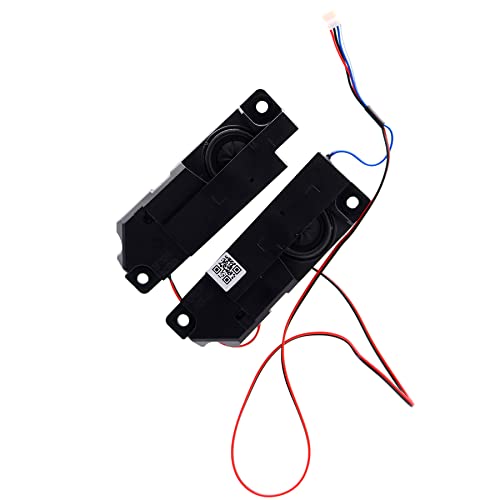
The Deal4GO 4-pin internal speaker replacement is an essential audio restoration component engineered specifically for ASUS ROG Strix and Scar gaming laptops. Designed to replace worn, blown, or distorted stock units, this left and right speaker assembly brings original sound output back to your machine. It fits a wide array of popular gaming models including the G531, G731, GL531, and G512 series.
This speaker set is tailor-made for PC gamers, DIY repair hobbyists, and remote professionals who depend on crisp laptop sound but want to avoid the high cost of third-party repair shops. If your current speakers suffer from harsh buzzing at higher volumes, muffled voice lines, or complete silence on one side, this assembly targets the problem directly at the hardware level.
In real-world use, installing this replacement speaker assembly requires basic technical comfort with opening a laptop lower panel. The speaker connects via a dedicated 4-wire 4-pin wire-to-board connector, matching the factory pinout seamlessly. Once plugged in and seated in the original mounting points, it immediately restores clear stereo output across games, movies, and system notifications without any software driver adjustments.
Ultimately, this replacement speaker offers a practical and budget-friendly way to extend the lifespan of your high-performance laptop. By delivering clean sound fidelity and a hassle-free physical fit, it ensures your machine sounds just as impressive as it plays.
Operating at an impedance of 4 Ohms with a 2-Watt power rating, this speaker assembly matches factory acoustic specifications for balanced multimedia playback. While ultra-compact laptop drivers cannot produce deep sub-bass frequencies, this set delivers articulate mid-bass punch and clean high frequencies. Directional audio cues like footsteps, gunfire, and atmospheric soundtrack layers remain clearly distinguishable in fast-paced gaming environments.
Vocal clarity is exceptionally strong, ensuring dialogue during video conferences, streaming media, and multiplayer team chats sounds crisp and natural. Unlike damaged drivers that buzz and rattle when volume levels are pushed, these replacement speakers maintain composure at elevated volumes, providing clean sound without jarring distortion.
Because this speaker system relies on a direct wire-to-board connection, it completely bypasses the latency, signal drops, and pairing delays common with wireless audio alternatives. Audio synchronization stays spot-on with on-screen action, giving competitive gamers the immediate acoustic feedback they need to react in real time.
The Deal4GO speaker assembly is built with a resilient, heat-resistant black composite housing designed to withstand the thermal environments inside modern gaming laptops. Its ultra-slim profile and feathery weight of under an ounce ensure it fits flush inside the chassis without adding bulk. Because it resides safely within the computer enclosure, the speaker remains shielded from exterior spills, dirt, and direct impact.
Power management is seamless since the speaker draws low-voltage power directly from the laptop motherboard. There are no separate batteries to monitor, charge, or replace over time. The energy-efficient 2W design minimizes power draw, allowing you to enjoy extended unplugged gaming and streaming sessions without noticeably reducing your laptop battery performance.
Pros
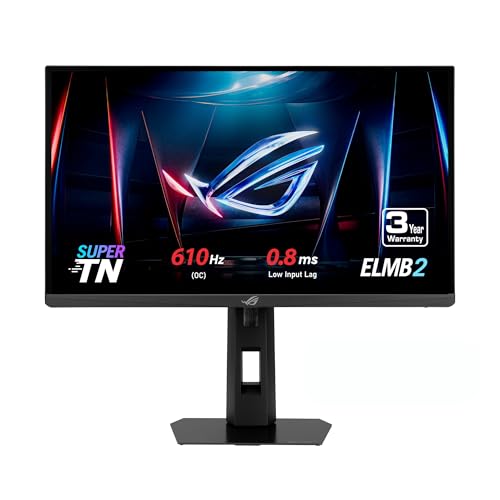
- World-class 0.8ms input lag and 610Hz refresh rate provide virtually zero latency between audio cues and on-screen motion.
- Streamlined desktop footprint creates generous room for low-DPI mouse maneuvering.
- Robust HDMI 2.1 connectivity allows effortless plug-and-play operation with top-tier graphics cards and consoles.
- Intuitive DisplayWidget Center software lets you dial in custom settings without fumbling through physical buttons.
Cons
- Super TN panel prioritizes pure competitive speed over the wide viewing angles and deep color fidelity of IPS screens.
- Stationary wired design weighs 12.4 pounds and requires dedicated AC power, ruling out outdoor or portable use.
- Built-in audio presentation lacks subterranean sub-bass depth, making external headphones or subwoofers ideal for cinematic listening.
The ASUS ROG XG248QSG is an uncompromising esports command center engineered specifically for gamers who measure competitive advantages in fractions of a millisecond. Pairing a blistering 610Hz refresh rate with an ultra-fast Super TN panel, this unit is built to deliver seamless audio-visual coordination directly to your desktop. Instead of catering to casual media consumption, ASUS focused on hyper-responsive feedback, ensuring every critical sound cue and frame transition reaches your senses instantly.
This setup is tailor-made for tournament competitors, aspiring esports professionals, and dedicated first-person shooter enthusiasts who cannot afford input delay. In real-world competitive play, the 0.8ms input lag and 0.1ms response time create an exceptionally fluid gameplay experience. Subtle environmental sounds like footsteps, reloads, and distant abilities sync impeccably with on-screen action, allowing players to track targets with pinpoint spatial awareness.
Day-to-day usability is enhanced by the ASUS DisplayWidget Center, which replaces clunky hardware buttons with intuitive mouse-driven software controls. Connectivity is thoroughly future-proofed with an HDMI 2.1 interface, ensuring high-bandwidth throughput for cutting-edge graphics cards and next-gen gaming consoles. Furthermore, the inclusion of Extreme Low Motion Blur 2 (ELMB 2) keeps high-motion sequences three times brighter than previous iterations, preserving clarity during chaotic firefights.
Ultimately, the ASUS ROG XG248QSG stands out as a specialized competitive powerhouse. While general users seeking casual movie playback might prefer broader viewing angles, competitive gamers will find its unmatched speed, compact desktop footprint, and reliable performance well worth the investment. It earns a strong recommendation for anyone serious about climbing the competitive ranks.
When evaluating the sound performance of the ASUS ROG XG248QSG setup, tuning is heavily optimized for tactical competitive awareness. Vocal clarity in voice chat and critical mid-range sound effects come through with crisp definition, making teammate callouts and enemy footsteps easily discernible. In terms of bass depth, the tuning leans toward a controlled, punchy profile rather than an overwhelming low-end rumble, preventing heavy explosions from masking subtle tactical acoustic cues.
Volume levels remain steady and clean even when dialed up for high-intensity gaming sessions, exhibiting minimal harmonic distortion across typical listening distances. The ultra-fast 0.8ms input response guarantees that audio cues arrive without the perceptible desynchronization that plagues conventional multimedia displays. Whether tracking an opponent through a smoke grenade or timing an ability cast, sound and motion feel unified.
Signal stability is rock-solid thanks to high-bandwidth HDMI 2.1 and DisplayPort connectivity, bypassing the latency penalties and dropped packets commonly found in consumer Bluetooth connections. While it skips traditional wireless Bluetooth range in favor of zero-latency wired transmission, this ensures continuous signal integrity without stutter or jitter throughout marathon competitive sessions.
The physical construction of the ASUS ROG XG248QSG emphasizes tournament-grade ruggedness and structural stability. Built to endure the rigors of competitive travel and intense desk setups, the chassis is crafted with durable matte plastics and reinforced hinge mechanisms. Because it is engineered as a dedicated indoor desktop station, it omits outdoor IP waterproof and dustproof ratings in favor of ample thermal ventilation grills that maintain cool internal temperatures under heavy loads.
Weighing in at a substantial 12.4 pounds, the unit provides a reassuringly anchored base that resists accidental nudges during aggressive gameplay. The redesigned stand features an impressively compact footprint, freeing up valuable mousepad real estate so low-sensitivity gamers can execute sweeping arm movements without striking the monitor base.
Unlike portable units constrained by finite playback time and lengthy charging time, this setup relies on continuous AC mains power. This dedicated wired architecture eliminates battery degradation entirely and guarantees that your gaming rig never shuts down in the final round of a championship match, providing dependable, 24/7 competitive readiness.
Understanding ASUS Monitor Audio Hardware and Configuration
Confirming whether a display handles sound without external hardware saves time when assembling or reorganizing a computer setup. The ASUS VG248QE does include integrated stereo speakers, giving users immediate out-of-the-box sound capability without requiring an immediate secondary purchase. However, knowing how those drivers receive their audio signal and how they perform during daily computing tasks is essential for setting realistic expectations. Exploring the acoustic specifications, signal routing, and physical connections provides a clear picture of what this popular panel offers.
Built-In Audio Specifications of the VG248QE
The ASUS VG248QE features two internal speakers rated at two watts RMS per channel, creating a basic 2.0 stereo soundstage. These miniature drivers are situated internally within the monitor casing, firing outward through small ventilation grilles on the chassis. Because physical space inside a slim desktop chassis is constrained, the speaker diaphragms are necessarily compact. This driver scale restricts lower-frequency extension while focusing energy primarily into the vocal midrange frequencies.
For everyday notifications, simple web browsing, and spoken-word media, these internal drivers provide clear output. Users who listen to podcasts or participate in quick voice calls will find the speech clarity sufficient for routine desktop tasks. At higher volume settings, however, compact chassis-mounted drivers can introduce audible distortion or panel resonance. Recognizing the mechanical limits of these built-in units helps users decide when to rely on monitor audio and when external hardware makes sense.
How Audio Routing Operates Across DisplayPort, HDMI, and DVI
Delivering digital sound to the ASUS VG248QE depends directly on the video cable connected to your graphics card or console. Both DisplayPort and HDMI cables carry uncompressed digital stereo audio alongside high-refresh-rate video packets. When using these two connections, the graphics driver detects the monitor as an active audio endpoint in your operating system. This unified connection eliminates the need for separate analog cords between the PC chassis and the display.
In contrast, standard Dual-link DVI cables carry only digital video signals and do not transmit audio data to the display. If your gaming rig connects via DVI to maintain high refresh rates, you must run a separate 3.5 mm male-to-male auxiliary cable from your motherboard audio output to the monitor audio input jack. Without that dedicated analog line, the internal speakers remain completely silent when video runs through DVI. Understanding this physical connection difference prevents immediate confusion during initial workstation assembly.
Audio Input and Output Ports: Using the 3.5 mm Connections
The rear connection panel of the ASUS VG248QE houses two distinct 3.5 mm stereo audio jacks next to the digital video inputs. The first port is an audio line-in jack, typically color-coded in green or marked with a PC audio symbol, which receives analog audio from your computer. The second port functions as a headphone line-out jack, allowing you to route incoming digital HDMI or DisplayPort audio out to personal listening gear. This audio breakout feature essentially lets the monitor act as a convenient desktop pass-through hub.
Plugging headphones or powered desktop speakers into the headphone output automatically mutes the internal monitor drivers. This mechanical muting behavior ensures you do not have to fiddle with display menus every time you switch between personal listening and ambient room sound. The onboard digital-to-analog converter handles the conversion from the incoming digital video stream to the 3.5 mm output. While convenient, the output power of this internal circuit is modest, meaning it works best with standard-impedance headphones and powered desktop systems.
Enabling and Configuring Monitor Sound in Windows and Display Menus
Getting sound out of the display requires verifying both operating system settings and internal monitor menus. Within the Windows sound control panel, users must select the ASUS display as the default playback device. If a graphics driver update occurs, operating systems occasionally reassign audio priority back to motherboard analog jacks. Checking the sound playback tab confirms whether digital audio streams are genuinely routed toward the monitor endpoint.
Physical controls located along the bottom bezel of the monitor also dictate sound output through the on-screen display menu. Users can access the audio submenu using the tactile buttons to adjust overall output volume or verify that the mute toggle is inactive. The on-screen menu also permits selecting whether audio originates from the digital video stream or the 3.5 mm analog input jack. Ensuring that both software playback settings and hardware menu selections point to the same active source resolves most silent-driver issues.
Why Built-In Monitor Speakers Sound Thin: Acoustic Realities of Slim Panels
Compact flat-panel computer displays present challenging acoustic environments for full-range sound reproduction. Generating deep, punchy low frequencies requires significant air displacement, which in turn demands physical cabinet volume and larger driver surface area. The slim enclosure of a 24-inch gaming display leaves virtually no room for tuned acoustic enclosures, bass-reflex ports, or substantial voice coils. Consequently, frequencies below roughly two hundred hertz roll off sharply, leaving music and action sound effects sounding somewhat hollow.
The internal mounting location also means the acoustic output reflects off the desk surface or nearby wall surfaces before reaching your ears. This indirect path can cause comb filtering and phase interactions that slightly reduce overall clarity. For background YouTube browsing, voice notifications, and casual strategy gaming, this sound signature remains entirely usable. However, users seeking deep bass impact or pinpoint directional cues in competitive shooters will inevitably notice these mechanical limitations.
Audio Capabilities Across Modern ASUS Monitor Series
The broader ASUS monitor lineup features varying audio implementations depending on the target use case. For instance, the ASUS VG248QG 24 inches G-Sync Gaming Monitor serves as a refreshed gaming counterpart, providing a rapid 165Hz overclocked refresh rate and 0.5ms response time alongside integrated stereo speakers. Similarly, general productivity options like the Asus Ve248h 24 Led LCD Monitor – 16:9-2 Ms incorporate internal speakers alongside HDMI, DVI, and VGA inputs for flexible office workstations. Both models emphasize everyday practicality by keeping sound available directly from the desktop frame.
In creative fields, displays such as the ASUS ProArt PA248QV 24 Inch WUXGA 16:10 balance factory-calibrated color accuracy with integrated stereo audio for convenient video editing reference. Meanwhile, pure competitive esports hardware like the ASUS ROG XG248QSG 24 Inch 1080p 610Hz Esports focuses strictly on motion clarity and ultra-high frame rates. In high-level tournament environments, players rely almost universally on external gaming headsets or dedicated amplifiers rather than built-in display sound. Reviewing the product tier reveals that while general-purpose and creative panels often include internal drivers, specialized tournament hardware treats audio as an external discipline.
Troubleshooting No Audio Issues on ASUS Gaming Monitors
When an ASUS monitor remains silent despite being connected to an active PC, methodical troubleshooting quickly pinpoints the cause. First, inspect the physical connection to confirm whether the cable supports direct audio transmission. If you use HDMI or DisplayPort, check the graphics card control panel to verify that digital audio output is enabled for that specific display port. If you use a DVI connection, make sure the 3.5 mm auxiliary line connects firmly between the motherboard green line-out and the monitor audio input.
Next, verify that the display has not been inadvertently muted within the on-screen display menu or at the operating system level. Occasionally, peripheral devices such as USB webcams or wireless headset dongles hijack the default audio output upon system boot. Opening the device manager to update or reinstall the graphics card audio drivers can also clear corrupted audio profiles. Checking each link in the signal chain systematically ensures you do not waste time replacing cables that are fully functional.
Replacement Parts and Internal Speaker Maintenance Considerations
Hardware enthusiasts and DIY technicians sometimes encounter damaged or distorted internal drivers across the wider family of ASUS hardware. For mobile gaming gear, specialized assemblies like the Deal4GO Internal Speaker Assembly 04072-05530000 offer direct replacement parts for handheld units such as the ROG Ally X. Similarly, laptop platforms benefit from components like the Deal4GO 4-pin Internal Speaker 04072-03250300, designed to restore sound output in ROG Strix gaming machines. These replacement modules illustrate how manufacturers utilize compact 4 Ohm, 2-watt transducer modules across various computing form factors.
Replacing internal speaker modules inside a standalone desktop monitor, however, is rarely cost-effective or practical compared to mobile gear. Desktop monitor enclosures are sealed with tight plastic retaining clips, making disassembly risky for the delicate LCD panel inside. Sourcing exact OEM replacement speakers for older desktop displays can also prove difficult once product lifecycles end. When an internal desktop monitor driver fails, routing your audio through the 3.5 mm headphone output or switching to dedicated speakers is almost always the smarter path.
External Audio Upgrades: Active Speakers, Monitors, and Accessories
Transitioning from integrated monitor sound to an external sound system produces an immediate leap in fidelity, bass depth, and stereo imaging. Equipping your workspace with powered active studio monitor speakers introduces dedicated tweeters and woofers that handle demanding audio mixes cleanly. These active systems contain built-in amplification, eliminating the need for bulky separate receivers while connecting easily to your PC soundcard or monitor line-out. You gain balanced frequency response and substantially higher volume headroom without introducing cabinet buzz.
Desk placement also plays a major role in achieving clean, accurate acoustic reproduction in any room. Placing your speakers on dedicated desktop speaker stands decouples the speaker enclosures from the desk surface, preventing unwanted bass muddiness and structural resonance. Elevating speakers also positions the high-frequency tweeters closer to ear height, resulting in sharper sound staging and clearer spatial positioning in games. These focused acoustic adjustments transform an ordinary computer desk into an expansive listening station that far surpasses built-in monitor drivers.
Practical Verification Checklist for Desktop Audio
Setting up your desktop sound successfully boils down to a few logical steps that ensure reliable operation every day. Start by identifying your primary audio needs, distinguishing between simple notification listening and immersive media consumption. If your goal is basic desktop functionality, verify that your display cable carries audio and that the monitor volume is set around fifty percent to avoid distortion. If your priorities include competitive gaming or critical listening, reserve monitor speakers as a secondary backup while routing primary audio to external gear.
Always confirm that audio cables are securely seated and routed away from high-current power bricks to minimize electrical interference. Double-check that your operating system retains your preferred default playback device after routine software updates or system restarts. By matching your audio gear to your actual listening habits, you can enjoy dependable sound without unnecessary desk clutter. Knowing what the hardware can and cannot deliver guarantees a smooth, enjoyable desktop audio experience.




Write Your Review
No reviews yet. Be the first to share your experience!